Salesforce Org Documentation is the written record of how your org is built and why. Without it, every new admin starts from zero and every bug takes longer to fix. With it, anyone can answer “what does this field mean?” or “what happens when a case is saved?” in minutes.
This post builds on Business Analysis for Admins and technical debt clean-up. We will document the Bright Path Tutors org step by step.
What is Salesforce Org Documentation?
Salesforce Org Documentation is a set of living documents and in-org descriptions that explain your setup. The core pieces are a data dictionary, an automation inventory, an integration list, a security summary and a change log. Many details also live inside Salesforce, in description and help text fields.
Think of it as the manual for a family car. You can drive without it. However, when a warning light comes on, the manual tells you what it means and what to do.
Why Salesforce Org Documentation Matters
Orgs grow fast. After a few years, there may be hundreds of fields and flows. If nobody knows why a flow exists, admins fear changing it, so technical debt grows.
So Salesforce Org Documentation speeds up debugging, onboarding and audits. Also, it helps business users trust reports, because they know what each field means.
How Salesforce Org Documentation Works
Good documentation starts inside Salesforce. Fill the Description field on objects, fields and flows. Then export lists into a shared sheet or wiki, add owners and keep them current at each release.
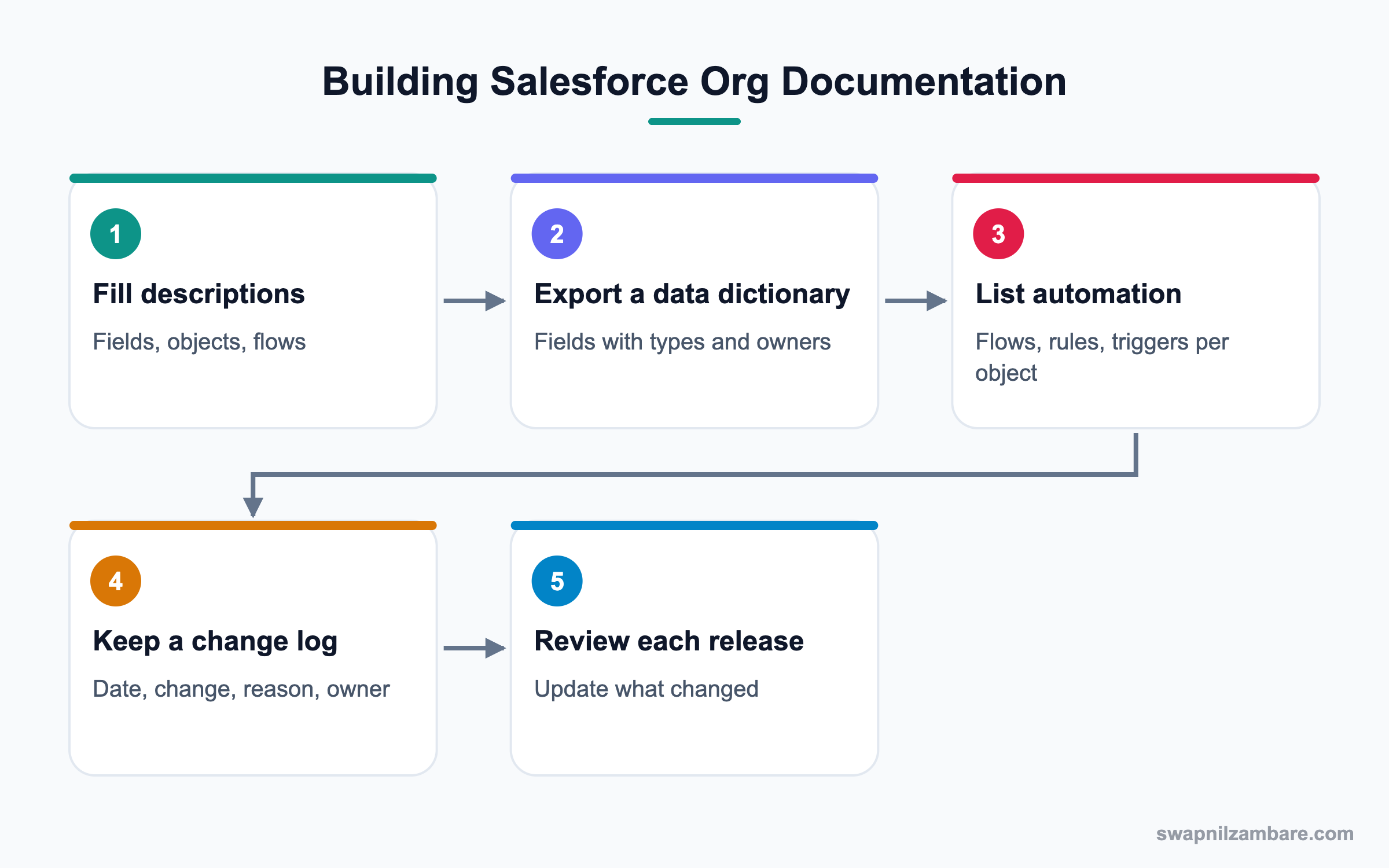
Descriptions and Help Text
Description explains a field to admins, while help text explains it to users. Fill both when you create a field.
Data Dictionary
A data dictionary lists objects and fields with label, API name, type, description, owner and where used.
Automation Inventory
An automation inventory lists every flow, validation rule, trigger, approval and scheduled job by object.
Integration List
This lists each connected system, its integration user, direction of data and owner.
Change Log
A change log records date, change, reason, ticket and who made it. The Setup Audit Trail helps fill it.
Release Notes for Users
Short notes tell users what changed in each release, in plain words.
Salesforce Org Documentation Checklist
This table shows each document and its main purpose.
| Document | Purpose | Source |
|---|---|---|
| Data dictionary | Explain fields | Object Manager, Schema Builder, exports |
| Automation inventory | Explain what fires | Flows list, Apex triggers, rules |
| Integration list | Explain connections | Connected apps, named credentials |
| Security summary | Explain access | Profiles, permission sets, sharing |
| Change log | Explain history | Setup Audit Trail, tickets |
| User release notes | Explain changes to users | Release plan |
Data Dictionary vs Automation Inventory
These two documents answer different questions. This table compares them.
| Feature | Data dictionary | Automation inventory |
|---|---|---|
| Answers | What does this field mean? | What runs on save? |
| Main users | Analysts, admins, report builders | Admins, developers |
| Key columns | Label, API name, type | Name, object, trigger, purpose |
| Main benefit | Correct reports | Faster debugging |
| Update trigger | Field changes | Automation changes |
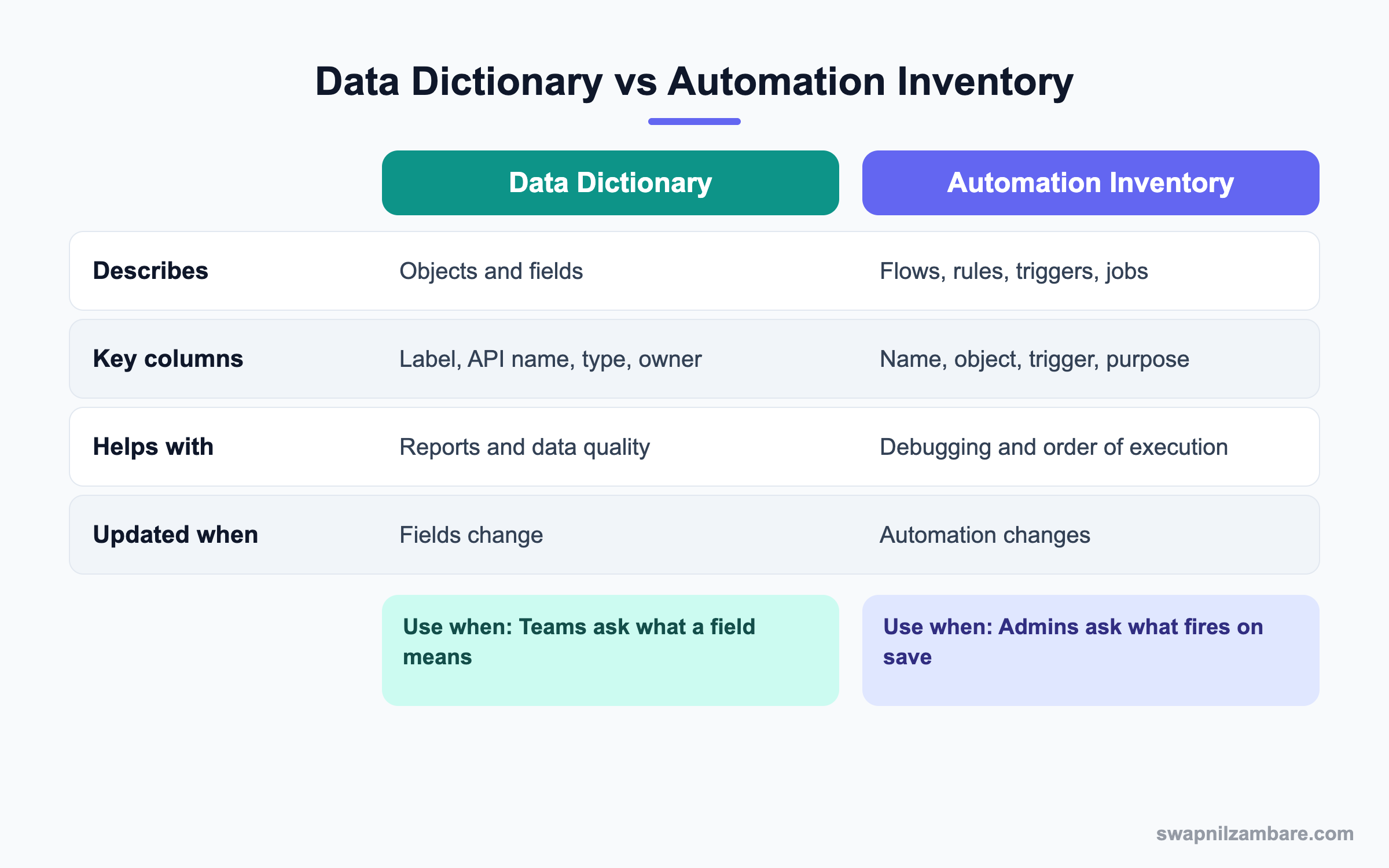
In short, you need both. The dictionary explains data, and the inventory explains behaviour.
A Real Salesforce Org Documentation Example
Ravi at Bright Path Tutors is going on leave, and a new admin, Kiran, joins. Ravi builds documentation so Kiran can work safely.
Step 1: Fill Descriptions
- Open Object Manager, then Enrolment, then Fields & Relationships.
- Open each custom field without a description.
- Write one sentence on purpose and owner, then save.
- Do the same for each active flow’s description.
Step 2: Export the Data Dictionary
Ravi queries field metadata with the Tooling API in a query tool, then pastes it into a sheet. This query lists custom fields on Enrolment.
SELECT QualifiedApiName, Label, DataType, Description
FROM FieldDefinition
WHERE EntityDefinition.QualifiedApiName = 'Enrolment__c'
Step 3: Build the Automation Inventory
These are the first rows of his inventory.
| Name | Object | Type | Fires when | Purpose |
|---|---|---|---|---|
| Enrolment Welcome Email | Enrolment | Record-triggered flow | After create | Send welcome email |
| Fee Reminder | Enrolment | Scheduled flow | Daily 8 AM | Remind due fees |
| No_Fee_Drop | Course | Validation rule | On save | Stop fee decrease |
| OverdueFeeBatch | Enrolment | Scheduled Apex | Daily 1 AM | Mark overdue |
Step 4: Start the Change Log
- Create a shared sheet with columns Date, Change, Reason, Ticket and By.
- Add the last month of changes from the Setup Audit Trail.
- Agree that every deployment adds a row.
Common Mistakes with Salesforce Org Documentation
- Writing a huge document once and never updating it.
- Leaving description fields empty inside Salesforce.
- Documenting what but not why.
- Storing documents where nobody can find them.
- Forgetting integrations and their users.
Best Practices for Salesforce Org Documentation
- Make descriptions mandatory in your build checklist.
- Keep documentation close to the work, in Salesforce and one shared space.
- Name an owner for every object and integration.
- Update documents as part of each deployment.
- Review the whole set every quarter.
Practice Task
Pick one object in your practice org and write a data dictionary for its custom fields. Include label, API name, type, purpose and owner. Hint: use the query above with your object’s API name.
Most Asked Salesforce Org Documentation Interview Questions
These Salesforce Org Documentation questions show interviewers that you can keep an org healthy over time.
Basic Salesforce Org Documentation Interview Questions
Q1: What is Salesforce Org Documentation?
It is the written record of how the org is built and why. It includes a data dictionary, automation inventory, integration list and change log.
Q2: What is a data dictionary?
A list of objects and fields with label, API name, type, description and owner. It explains what data means.
Q3: What is the difference between description and help text?
Description is for admins and shows in Setup. Help text is for users and shows as a tip on the page.
Q4: What is an automation inventory?
A list of flows, rules, triggers and jobs by object, with when they fire and why.
Q5: Where can you see recent setup changes?
In the Setup Audit Trail, which shows the last six months of changes.
Q6: Why document integrations?
Because integration failures are hard to debug without knowing users, systems and data flow. So the integration list is a key part of Salesforce Org Documentation, and it saves hours during an outage.
Q7: What is a change log?
A record of each change with date, reason and owner. It helps audits and rollbacks.
Intermediate Salesforce Org Documentation Interview Questions
Q8: How do you export field details?
Use Tooling API queries on FieldDefinition, Schema Builder screenshots or tools that export metadata to a sheet. Then add owners and notes by hand, because exports cannot know the business meaning.
Q9: How do you keep documentation current?
Add a documentation step to every deployment checklist and review quarterly.
Q10: What should an automation inventory include?
Name, object, type, trigger event, purpose, owner and status. Also note order where it matters.
Q11: How does documentation help debugging?
You quickly see what automation runs on an object, so you find the cause of an error faster.
Q12: Where should documentation live?
Keep it in Salesforce descriptions plus one shared space, like a wiki or shared drive, that everyone can find.
Q13: How do you document security?
Summarise profiles, permission set groups, sharing rules and role hierarchy, with the reason for each.
Q14: What is Where is this used?
A Setup button on fields that shows layouts, flows, reports and code using the field.
Advanced Salesforce Org Documentation Interview Questions
Q15: Scenario: you join an org with no documentation. Where do you start?
Start with the most changed objects and key automation. Then fill descriptions as you learn, and build the inventory object by object.
Q16: How does documentation reduce technical debt?
It shows unused or duplicate items clearly. So you can safely remove them, because you know who owns each item and why it was built.
Q17: How would you document order of execution risks?
List all automation per object and note which fire before or after save. Then flag overlaps.
Q18: How do you document Agentforce agents?
Record each agent’s topics, actions, instructions, data access and owner. Also log test results.
Q19: What tools help automate documentation?
Metadata exports, Salesforce CLI retrieves, Tooling API queries and AppExchange documentation apps.
Q20: How do you prove documentation value to managers?
Show faster onboarding and shorter fix times. For example, a bug fixed in one hour instead of a day.
Q21: Scenario: two admins changed the same flow without notes. What process fixes this?
Use a change log, sandboxes and source control. Then require a ticket for each change.
Q22: Should every field have help text?
Not every one, but every field users fill should. Then users enter correct data without asking.
Q23: How do you document reports and dashboards?
Note the purpose, owner, source report type and audience. Also remove reports nobody uses.
Q24: What is the risk of outdated documentation?
People trust wrong information and make bad changes. So an old document can be worse than none.
Q25: How much Salesforce Org Documentation is enough?
Enough that a new admin can make a safe change in their first week. So focus on key objects, automation and integrations first, then grow it.
Q26: Who should read Salesforce Org Documentation?
Admins, developers, analysts and auditors all use it. Also, business owners read the data dictionary to check field meanings.
Q27: How do you document a flow well?
Write the purpose in the description, name each element clearly and add notes on complex decisions. Then list the flow in the inventory with its trigger.
Q28: Can you store documentation inside Salesforce?
Yes. Descriptions, help text and a custom object or Knowledge articles can hold notes. However, many teams also keep a shared wiki.
Q29: How do you get busy admins to write documentation?
Make it part of the definition of done, so a change is not finished without notes. Also, use short templates, because people write more when the format is simple.
Q30: What is the first page a new admin should read?
A one-page org overview with main objects, key automation, integrations and contacts. Then they can open deeper documents as needed.
Official Resources
- Trailhead: Org Documentation for Admins
- Salesforce Developers: FieldDefinition
- Salesforce Help: Monitor Setup Changes
Quick Recap
- Salesforce Org Documentation explains how and why the org is built.
- Fill descriptions and help text as you build.
- Keep a data dictionary and an automation inventory.
- Track integrations, security and changes.
- Update documents with every release.
What’s Next?
Next, we start the AI section with the Agentforce Service Agent.

