Salesforce User Adoption decides whether your work pays off. You can build perfect flows and dashboards, but if people keep using spreadsheets, the org fails. So admins need simple change management habits that help people move to the new way.
This post builds on Business Analysis for Admins and In-App Guidance. We will roll out a new enrolment process at Bright Path Tutors.
What is Salesforce User Adoption?
Salesforce User Adoption is how fully and correctly people use Salesforce in their daily work. High adoption means users log in often, update records on time and trust the reports. Low adoption means side spreadsheets and empty fields.
Change management is the method you use to raise adoption. It covers communication, training, support and measuring results.
Think of a new road in a town. Even a better road stays empty if people do not know it exists or fear getting lost. Signs, maps and a few early drivers fill it up.
Why Salesforce User Adoption Matters
Salesforce costs money every month. If half the users ignore it, the company pays for nothing. Also, managers make poor decisions from incomplete data.
So Salesforce User Adoption is a business goal, not just an admin wish. Good adoption brings clean data, better reports and happier users.
How Salesforce User Adoption Works
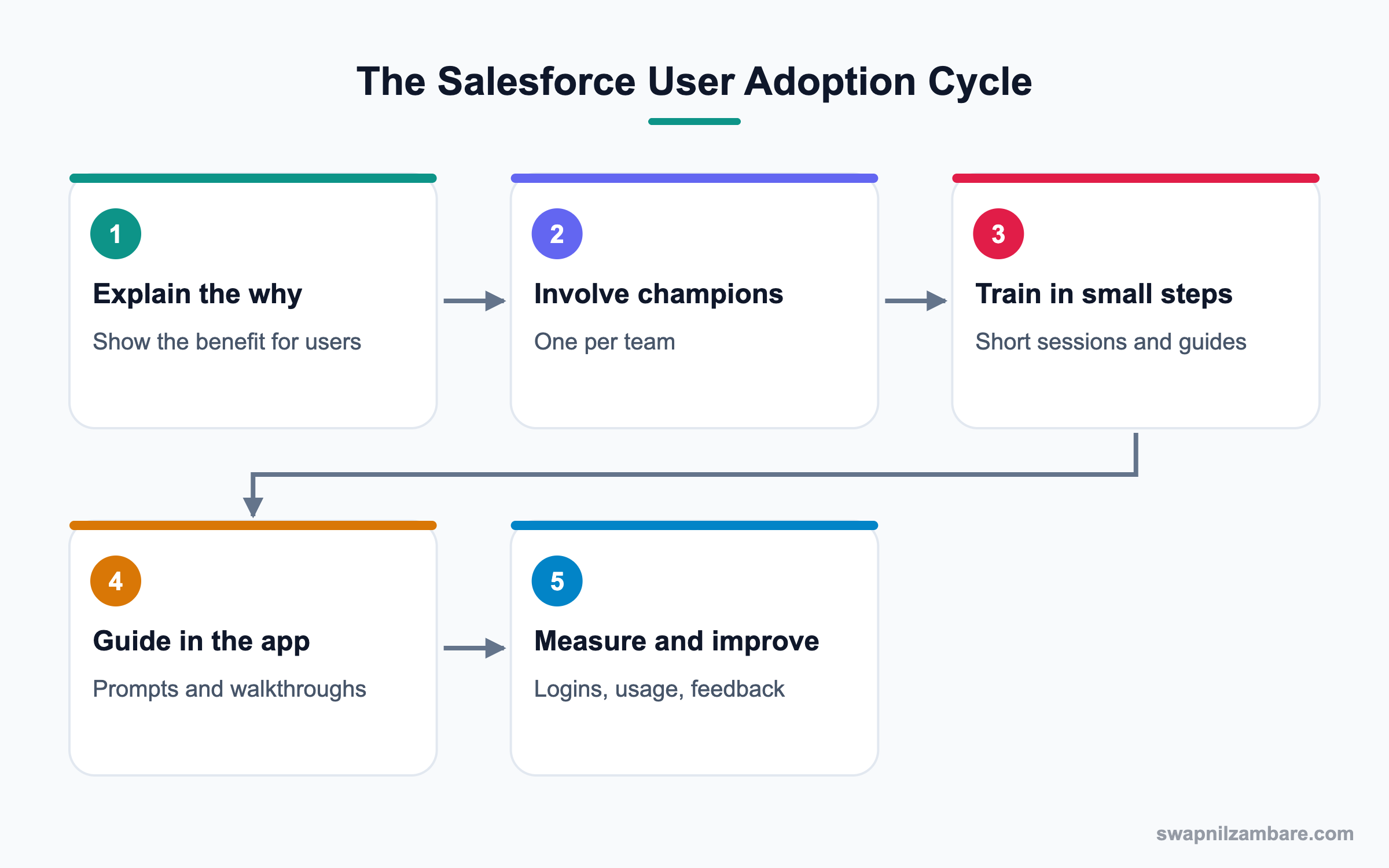
Adoption grows in a cycle. First, explain why the change helps users. Then involve champions, train in small steps, guide users inside the app and measure results.
Explain the Why
People accept change when they see what is in it for them. For example, “You will stop typing the same fee email every day.”
Champions
A champion is a respected user in each team who tests early and helps others. Champions answer small questions faster than the admin can.
Training
Short, role-based sessions work better than one long session. Also, record them so new joiners can watch later.
In-App Guidance
Prompts and walkthroughs appear inside Salesforce at the right moment. So users learn while they work.
Measuring Adoption
Track logins, records created, fields filled and report usage. Then talk to users about the gaps.
Salesforce User Adoption Metrics
This table shows useful metrics and where to find them.
| Metric | What it shows | Where to find it |
|---|---|---|
| Login rate | Who uses Salesforce | Login History, user reports |
| Records created | Real work done | Object reports |
| Field completion | Data quality | Quality score formula |
| Page usage | Which pages are used | Lightning Usage app |
| Report views | Trust in data | Report and dashboard usage |
| Support tickets | Pain points | Case or ticket reports |
Classroom Training vs In-App Guidance
Both help, but they work at different times. This table compares them.
| Feature | Classroom training | In-App Guidance |
|---|---|---|
| Timing | Before launch | During work |
| Reach | Attendees | Every user |
| Effort | Sessions to run | Set up once |
| Best for | Big changes | Small tips and reminders |
| Memory | Fades | Repeats when needed |
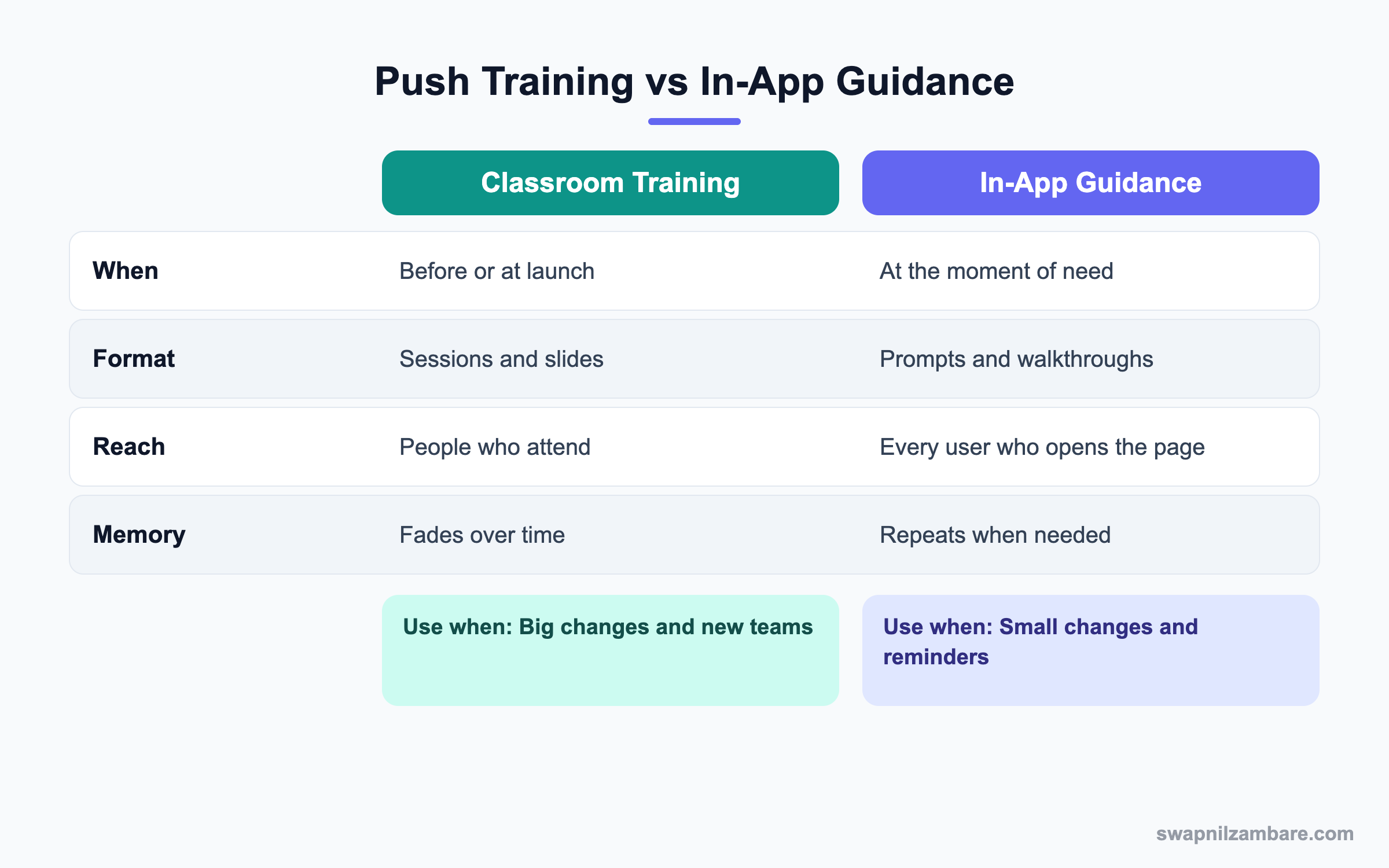
In short, use both. Train for big changes, then use in-app guidance to support people day to day.
A Real Salesforce User Adoption Example
Bright Path Tutors is moving enrolments from a spreadsheet to Salesforce. Counsellors are worried it will slow them down.
Step 1: Plan the Change
These are the plan items agreed with the sales head.
| Item | Plan |
|---|---|
| Why message | One place for enrolments, no double typing |
| Champions | One counsellor per centre |
| Training | Two 30-minute sessions per team |
| Guidance | Walkthrough on the Enrolment page |
| Go-live | 1 October |
| Spreadsheet | Read-only from go-live |
Step 2: Build In-App Guidance
- Open Setup and type “In-App Guidance” in Quick Find.
- Click Add and choose Walkthrough.
- Add three steps on the Enrolment page, pointing to Course, Fee and Status.
- Show it to the Counsellor profile for the first two weeks.
Step 3: Launch and Support
- Send the why message from the sales head, not the admin.
- Run training sessions with real examples.
- Open a Chatter group or Slack channel for questions.
- Make the old spreadsheet read-only on go-live day.
Step 4: Measure
After two weeks, check who created enrolments. A quick query helps.
SELECT CreatedBy.Name, COUNT(Id)
FROM Enrolment__c
WHERE CreatedDate = LAST_N_DAYS:14
GROUP BY CreatedBy.Name
Users with zero records get a friendly call from their champion.
Common Mistakes in Salesforce User Adoption
- Launching without explaining why the change helps users.
- Training everyone in one long session.
- Keeping the old spreadsheet open, so people never switch.
- Measuring only logins, not real work.
- Ignoring feedback after go-live.
Best Practices for Salesforce User Adoption
- Have a business leader announce the change.
- Use champions in every team.
- Keep pages simple and remove unused fields.
- Use in-app guidance for tips and changes.
- Share quick wins and thank active users.
Practice Task
Write a three-line why message for a change in your org. Then create a simple In-App Guidance prompt that repeats the key benefit. Hint: speak about time saved, not about features.
Most Asked Salesforce User Adoption Interview Questions
These Salesforce User Adoption questions test whether you can make a project succeed after go-live.
Basic Salesforce User Adoption Interview Questions
Q1: What is Salesforce User Adoption?
It is how fully and correctly people use Salesforce in daily work. High adoption means active users and complete data.
Q2: What is change management?
It is the method of helping people move from the old way to the new way, through communication, training and support.
Q3: What is a Salesforce champion?
A user in a team who learns early, tests changes and helps colleagues.
Q4: What is In-App Guidance?
Prompts and walkthroughs shown inside Salesforce to teach or remind users at the right time.
Q5: How do you measure adoption?
To measure Salesforce User Adoption, use login rates, records created, field completion, page usage and report views.
Q6: What is the Lightning Usage app?
A Setup app that shows usage data, like active users and most viewed pages.
Q7: Why do users resist Salesforce?
They fear extra work, do not see the benefit or find pages confusing.
Intermediate Salesforce User Adoption Interview Questions
Q8: How do you plan training for different roles?
Group users by role and train only on what they use. Then add short guides for each role.
Q9: How do you handle a team that still uses spreadsheets?
Understand why first. Then fix missing features, involve their champion and set a date to retire the sheet.
Q10: How can page design affect adoption?
Cluttered pages slow users down. Simple pages with only needed fields raise adoption.
Q11: How do you collect feedback?
Use a Chatter group, a short survey or office hours. Then act on the top themes.
Q12: What role do managers play?
Managers should use Salesforce reports in meetings. When they do, teams keep data updated.
Q13: How long should you show a walkthrough?
Usually for the first weeks of a change. Then switch it off or limit it to new users.
Q14: What is a good go-live communication plan?
Announce the why, share dates, explain training and say where to get help. Repeat key points close to launch.
Advanced Salesforce User Adoption Interview Questions
Q15: Scenario: adoption dropped three months after launch. What do you do?
Check usage data by team, talk to users and find the cause. Then fix issues and relaunch with champions.
Q16: How would you build an adoption dashboard?
Combine login counts, records created by user and field completion. Group by team and show trends.
Q17: How do you drive adoption of Agentforce or AI features?
Start with one clear use case, show time saved and collect feedback. Also explain how data stays safe.
Q18: Scenario: senior sales reps refuse to update opportunities. How do you respond?
Show them what they gain, like faster forecasts. Then ask their manager to run reviews from Salesforce only.
Q19: How do you reduce training needs?
Keep processes simple, use automation for repeat work and add help text to fields.
Q20: What is the link between data quality and adoption?
Good adoption creates good data, and good data builds trust. So each one supports the other.
Q21: How do you onboard new joiners after launch?
Give recorded training, a role guide and a buddy. Also show walkthroughs to new users only.
Q22: Why should a business leader announce changes?
Because people follow leaders. So the message carries more weight than an admin email.
Q23: How do you celebrate adoption wins?
Share success stories in team meetings and thank active users. So others see the benefit too.
Q24: What should you remove after go-live?
Old spreadsheets, unused fields and outdated reports. Then users have one clear place to work.
Q25: How does Salesforce User Adoption affect licence decisions?
Inactive users waste licences. So adoption data helps you reassign or remove them.
Q26: What is the first metric you check after a launch?
Records created by each user in the new process. It shows real work, not just logins.
Q27: What is the biggest single driver of Salesforce User Adoption?
Usually it is managers running meetings from Salesforce data. Because when the boss asks for the dashboard, teams keep records current. So involve managers early.
Q28: How do you make Salesforce feel faster for users?
Remove unused fields, use Dynamic Forms and add quick actions for common tasks. Then measure page load time with Lightning Page Performance. As a result, users stop avoiding the system.
Q29: Scenario: users say Salesforce has too many clicks. How do you respond?
Watch a user do the task and count the clicks. Then cut steps with quick actions, defaults or a screen flow. Finally, show the team the new, shorter path.
Q30: How do you use champions without overloading them?
Give them early access, a short monthly meeting and recognition. However, keep the admin as the owner of fixes, so champions only guide and collect feedback.
Q31: How do you report Salesforce User Adoption to leadership?
Share a one-page dashboard with active users, records created and data quality by team. Then add two or three actions you are taking next month.
Q32: When should you stop a training walkthrough?
Stop it once most users complete the task without help, or after a few weeks. Otherwise, the prompt becomes noise that users dismiss.
Official Resources
- Trailhead: User Adoption Strategies
- Salesforce Help: In-App Guidance
- Trailhead: Change Management Strategies
Quick Recap
- Salesforce User Adoption decides whether your build delivers value.
- Explain the why and involve champions early.
- Train in short, role-based sessions.
- Use In-App Guidance for help at the moment of need.
- Measure real work and act on feedback.
What’s Next?
Next, we write things down with Salesforce Org Documentation.


