Service Cloud Voice brings phone calls into the Salesforce Service Console. Agents answer calls, see a live transcript and update the case on the same screen. As a result, they stop switching between a phone tool and Salesforce.
This post builds on Omni-Channel routing and cases and support process. We will plan Service Cloud Voice for the Bright Path Tutors parent helpline.
What is Service Cloud Voice?
Service Cloud Voice is a Salesforce product that joins telephony with Service Cloud. It uses a telephony provider, such as Amazon Connect or a supported partner, to handle the phone network. Salesforce then shows calls, transcripts and call data inside the console.
Think of it like a hospital reception with the patient file on screen. When a patient calls, the nurse sees their file, writes notes while talking and saves everything to that file. Service Cloud Voice gives agents the same setup.
Why Service Cloud Voice Matters
Phone support is still common for urgent issues. However, when calls live in a separate system, managers cannot connect calls to cases. Agents also retype notes.
So Service Cloud Voice keeps call data in Salesforce. Also, transcripts make wrap-up faster, and supervisors can watch live calls to coach agents.
How Service Cloud Voice Works
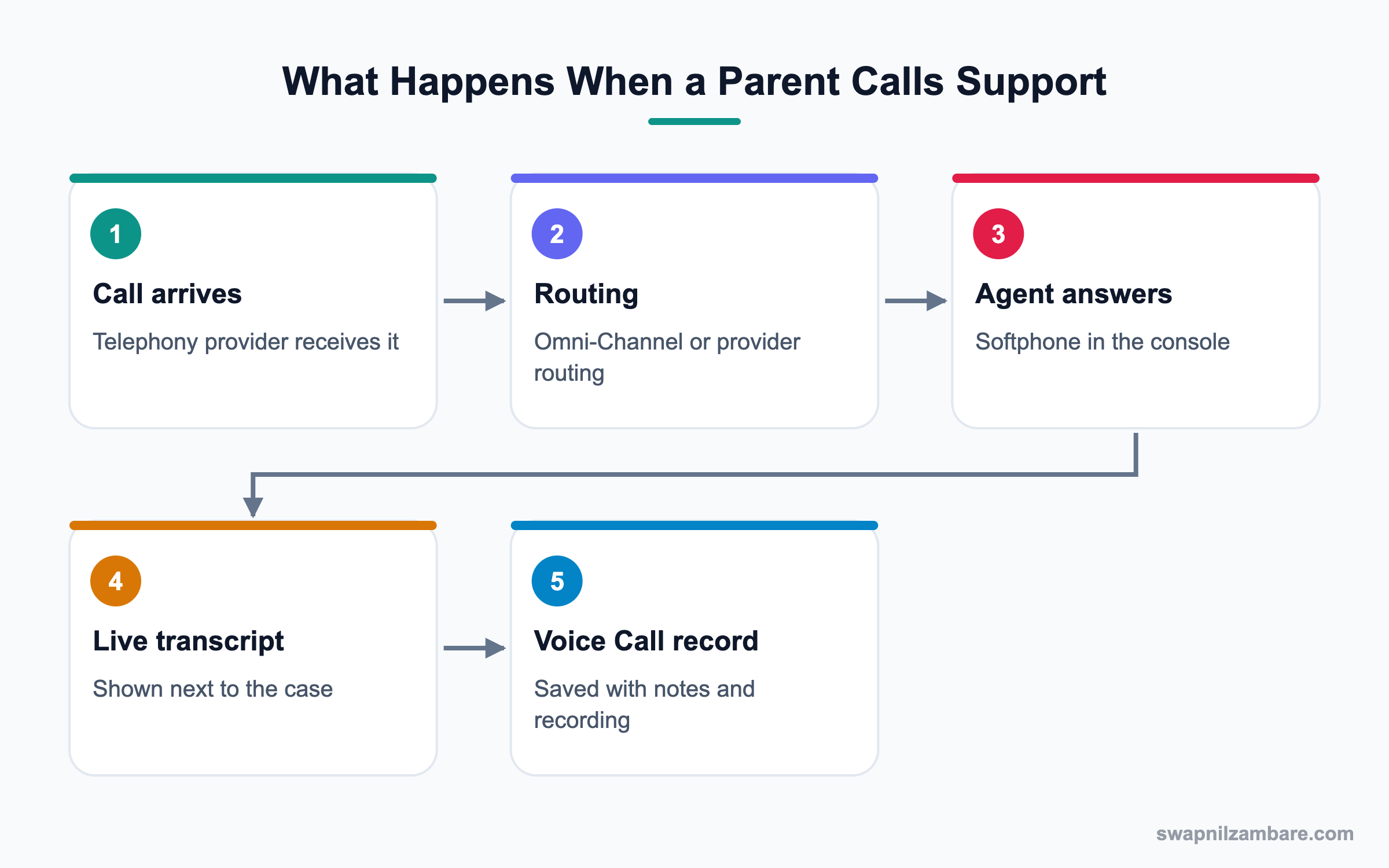
An admin sets up a contact center in Setup and links it to a telephony provider. Then agents get a softphone in the console utility bar. Calls create Voice Call records, which link to contacts and cases.
Telephony Models
You can use Amazon Connect, either provided through Salesforce or your own account. You can also use a partner telephony system that supports Service Cloud Voice.
Contact Center
The contact center is the Setup record that ties Salesforce to the telephony system. It holds settings like phone numbers and users.
Softphone
The softphone sits in the console’s utility bar. Agents accept, hold, transfer and end calls there.
Voice Call Records
Each call creates a VoiceCall record with details like duration, direction and recording link. It relates to the caller’s contact and case.
Transcripts and AI
With transcription on, the conversation appears live in the console. Einstein can suggest articles or next steps based on what the customer says.
Routing and Supervision
Calls can be routed with Omni-Channel, so voice joins chat and email in one queue model. Supervisors use Omni Supervisor to monitor agents.
Key Service Cloud Voice Components
This table summarises the main components.
| Component | What it does | Example |
|---|---|---|
| Contact Center | Links Salesforce and telephony | Bright Path Helpline |
| Softphone | Lets agents handle calls | Answer and transfer |
| VoiceCall record | Stores call details | 6-minute inbound call |
| Transcript | Live text of the call | Parent asks about fee |
| Omni-Channel | Routes calls to agents | Fees queue |
| Omni Supervisor | Live monitoring | Listen to a call |
Service Cloud Voice vs Basic CTI
Some orgs use an older CTI softphone. This table shows the difference.
| Feature | Service Cloud Voice | Basic CTI |
|---|---|---|
| Call data | VoiceCall records | Tasks or logs |
| Transcripts | Yes | Usually no |
| Routing | Omni-Channel option | Phone system only |
| AI suggestions | Yes | Usually no |
| Supervisor tools | In console | Separate tool |
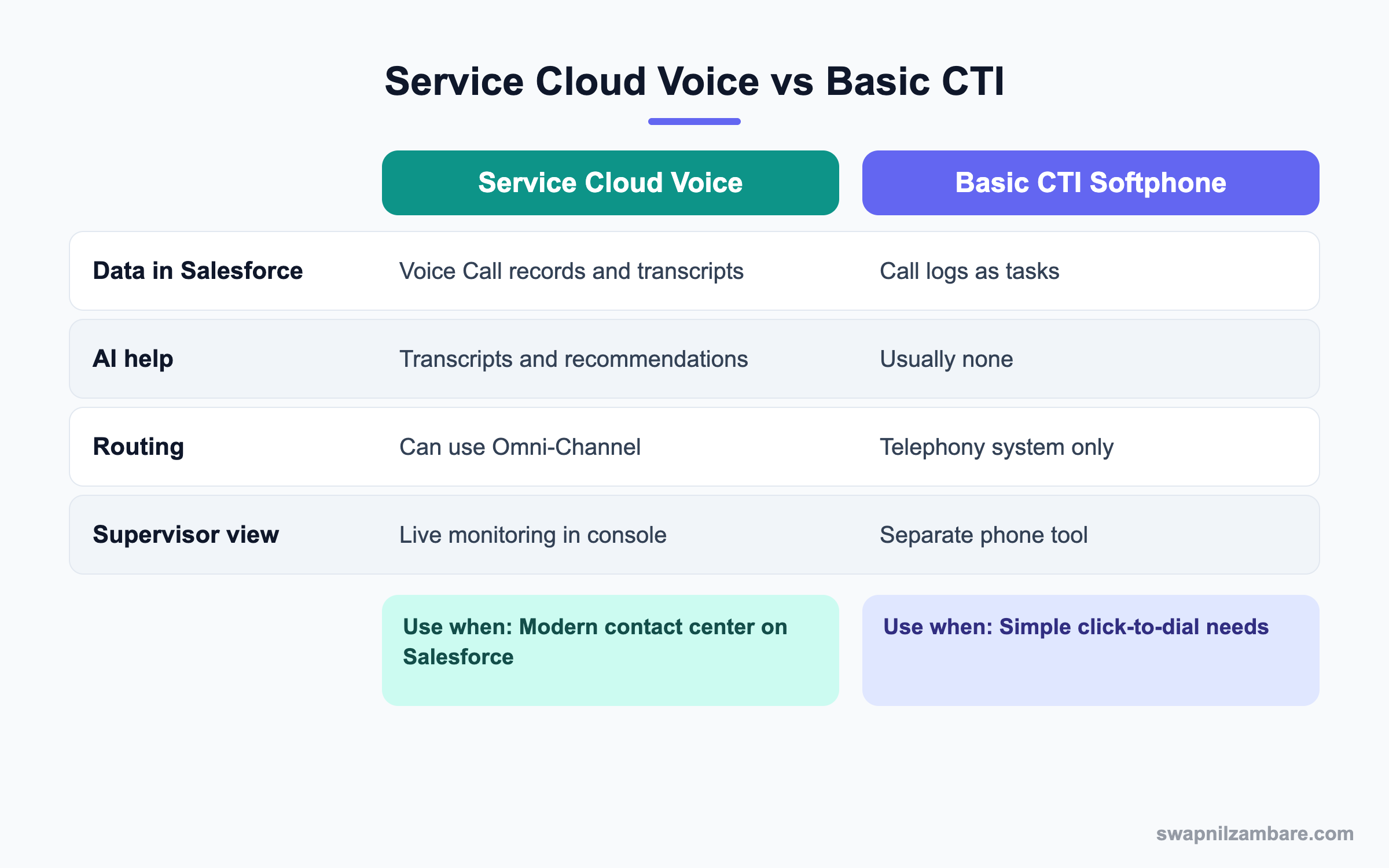
In short, Service Cloud Voice suits teams that want calls, AI and cases in one place. A basic CTI may be enough for simple click-to-dial.
A Real Service Cloud Voice Example
Bright Path Tutors runs a parent helpline with eight agents. Parents call about fees, timetables and refunds. The goal is to see each caller’s details instantly and keep a transcript on the case.
Step 1: Plan the Setup
These are the decisions made before setup.
| Decision | Choice |
|---|---|
| Telephony | Amazon Connect provided through Salesforce |
| Phone number | One local helpline number |
| Queues | Fees, Timetable, Refunds |
| Routing | Omni-Channel |
| Transcription | On |
| Recording | On, with consent message |
Step 2: Create the Contact Center
- Open Setup and type “Contact Centers” in Quick Find.
- Click New and follow the guided steps for Amazon Connect.
- Add the eight agents and the supervisor as contact center users.
- Claim the helpline number and link it to the contact center.
Step 3: Prepare the Console
- Open the Service Console app in App Manager.
- Add the Omni-Channel utility item and confirm the softphone shows.
- Add the Voice Call related list to the Contact page.
- Add the transcript component to the VoiceCall record page.
Step 4: Test a Call
Call the helpline from a test phone. Accept it in the console, talk and end the call. Then open the VoiceCall record and check the transcript and links.
You can review recent calls with a query.
SELECT CallType, CallDurationInSeconds, FromPhoneNumber, CreatedDate
FROM VoiceCall
WHERE CreatedDate = TODAY
ORDER BY CreatedDate DESC
Common Mistakes with Service Cloud Voice
- Turning on recording without a consent message where the law needs one.
- Forgetting to add agents as contact center users.
- Using a desktop page without the transcript component.
- Running voice routing separately from Omni-Channel without a plan.
- Skipping a pilot with a small agent group.
Best Practices for Service Cloud Voice
- Start with one queue and a few agents, then grow.
- Link VoiceCall records to cases for full history.
- Use transcripts to speed up wrap-up notes.
- Give supervisors Omni Supervisor access from day one.
- Review call metrics weekly with team leads.
Practice Task
Write a short call flow for your helpline: greeting, menu options and queues. Then map each option to a Salesforce queue. Hint: keep the menu to three or four choices.
Most Asked Service Cloud Voice Interview Questions
These Service Cloud Voice questions are asked in Service Cloud admin and consultant interviews.
Basic Service Cloud Voice Interview Questions
Q1: What is Service Cloud Voice?
It joins telephony with Service Cloud, so agents handle calls inside the console. Calls create VoiceCall records linked to cases and contacts.
Q2: Which telephony options are supported?
Amazon Connect, either through Salesforce or your own account, and supported partner telephony systems.
Q3: What is a contact center in Setup?
It is the record that connects Salesforce to the telephony system. It holds users and phone settings.
Q4: Where does the softphone appear?
In the utility bar of the console app, where agents accept and manage calls.
Q5: What is a VoiceCall record?
It stores details of a call, such as duration, direction and recording link.
Q6: Can agents see a live transcript?
Yes, when transcription is turned on. The text appears in the console during the call.
Q7: Does Service Cloud Voice need a separate license?
Yes. It is an add-on to Service Cloud, and telephony usage may cost extra.
Intermediate Service Cloud Voice Interview Questions
Q8: How are calls routed?
Calls can route through Omni-Channel or through the telephony provider’s routing. Omni-Channel lets voice share queues and skills with other channels.
Q9: How do supervisors monitor calls?
They use Omni Supervisor to see agent status and live calls, and in some setups listen in or join.
Q10: How does a call link to a case?
The agent links the VoiceCall to the case, or automation creates and links a case. Then the case shows call history.
Q11: What does Einstein add to Service Cloud Voice?
It can suggest Knowledge articles and next steps from the live transcript. Conversation insights can also highlight keywords.
Q12: What is the difference with Open CTI?
Open CTI connects a softphone to Salesforce with basic call logging. Service Cloud Voice adds native call records, transcripts and AI.
Q13: How do you add users to Service Cloud Voice?
Assign the license and permission sets, then add them to the contact center users.
Q14: Why might a call not show a transcript?
Transcription may be off, the component may be missing from the page or the user may lack permission.
Advanced Service Cloud Voice Interview Questions
Q15: Scenario: agents miss calls while working chats. What do you check?
Check Omni-Channel capacity and presence statuses. Then set capacity so voice gets priority.
Q16: How do you handle recording consent?
Play a consent message at the start of the call where required. Also store recordings according to your data rules.
Q17: How would you measure success after launch?
Track average handle time, first call resolution, wrap-up time and customer satisfaction before and after.
Q18: Scenario: the business already has a telephony vendor. What options exist?
Check if the vendor supports Service Cloud Voice partner telephony. If not, Open CTI may be the fallback.
Q19: How does Service Cloud Voice relate to Agentforce?
Agentforce can help with summaries and suggestions, and some setups use AI agents for calls. Human agents still handle complex calls in the console.
Q20: What data privacy points should you review?
Review recording storage, transcript access, field-level security on VoiceCall and who can play recordings.
Q21: Why should voice and digital channels share Omni-Channel?
Because agents then have one workload view. So capacity, skills and reporting stay consistent across channels.
Q22: How do you train agents for the new console?
Run short practice calls in a sandbox, give a one-page guide and pair new users with a champion agent.
Q23: Scenario: wrap-up time is still high after launch. What next?
Check if agents use transcripts and quick text. Then add a wrap-up flow with required fields only.
Q24: What reports would a supervisor want?
Calls by queue, average handle time, missed calls and calls linked to cases. Then add a weekly trend chart.
Q25: Why run a pilot first?
Because phone setups have many moving parts. So a pilot finds issues before all agents depend on the system.
Q26: Can Service Cloud Voice work with Field Service teams?
Yes. Calls can create cases that lead to work orders. So dispatchers see the call history on the job.
Official Resources
- Salesforce Help: Service Cloud Voice
- Trailhead: Service Cloud Voice Basics
- Salesforce Help: Contact Centers
Quick Recap
- Service Cloud Voice puts phone calls inside the Service Console.
- A contact center links Salesforce to Amazon Connect or partner telephony.
- Calls create VoiceCall records with transcripts and recordings.
- Omni-Channel can route calls with chats and emails.
- Supervisors monitor live work with Omni Supervisor.
What’s Next?
Next, we handle big outages with Incident Management and Slack Swarming.


