Salesforce Incident Management helps service teams handle one big issue that causes many cases. Instead of 200 agents working 200 separate cases, the team works one incident and updates every linked case together. Also, Slack swarming brings experts into one channel to fix hard problems fast.
This post builds on cases and support process and Salesforce and Slack. We will handle an outage of the Bright Path Tutors student portal.
What is Salesforce Incident Management?
Salesforce Incident Management is a Service Cloud feature set for tracking service disruptions. It adds objects like Incident, Problem and Change Request. Cases from customers can be linked to an incident, so the team sees the full impact in one place.
Think of a power cut in a building. Fifty residents call the guard about the same thing. The guard opens one complaint with the power company and tells everyone when it is fixed. An incident is that single complaint.
Why Salesforce Incident Management Matters
When a system fails, cases flood in. Without incidents, agents give different answers and duplicate work. Managers cannot see how many customers are affected.
So Salesforce Incident Management brings order. Agents link cases, give one approved update and close them together. Also, problem records help the team stop repeat failures.
How Salesforce Incident Management Works
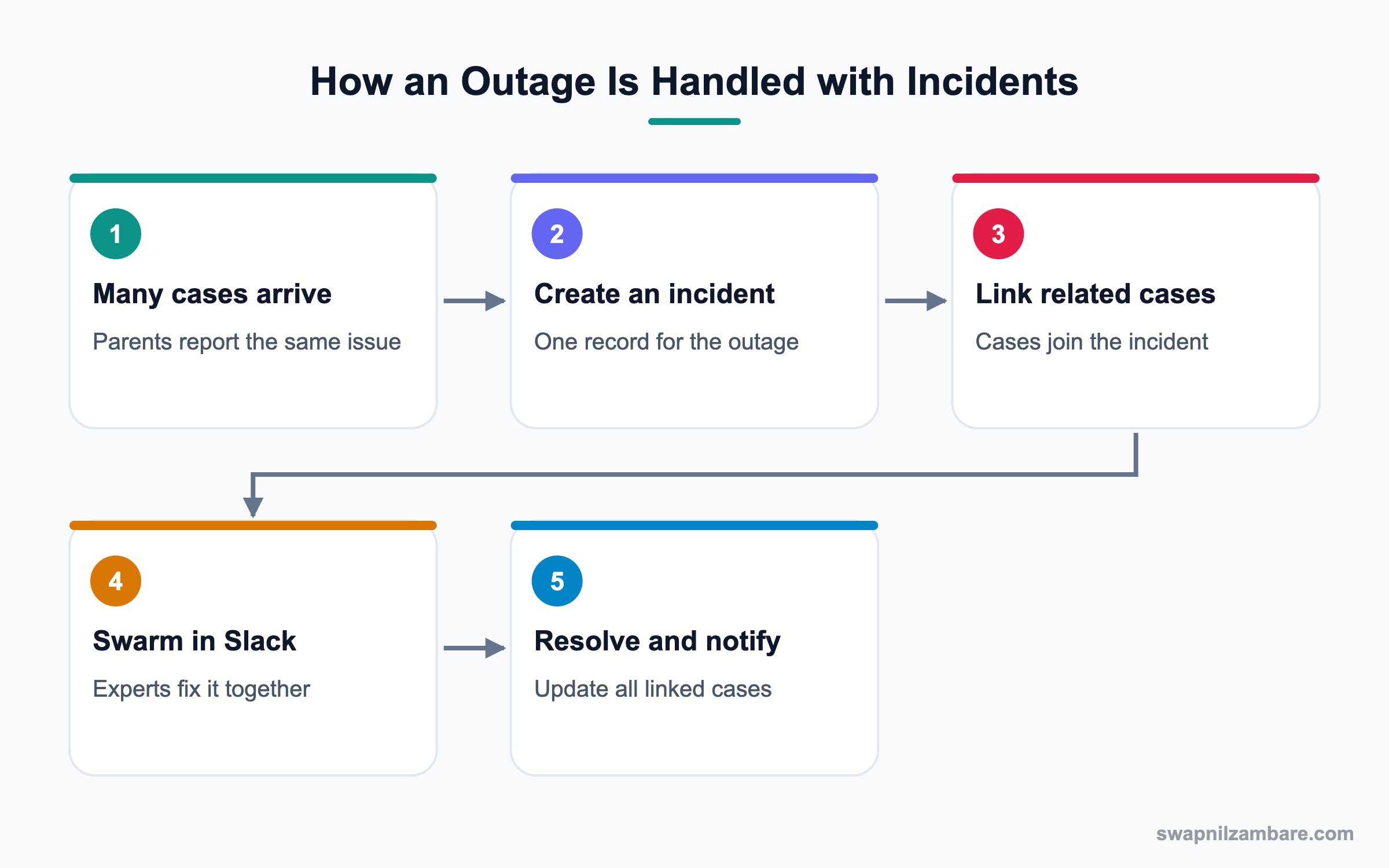
In Salesforce Incident Management, an agent or lead creates an Incident record when they notice many similar cases. Then agents link those cases to the incident. When engineers fix the issue, the team updates the incident and notifies every linked case.
Incidents
An incident records a current disruption, with fields like priority, status, impact and start time.
Problems
A problem records the root cause behind one or more incidents. For example, an expired certificate that caused three outages.
Change Requests
A change request tracks a planned fix, such as renewing the certificate process. It can need approval before work starts.
Related Cases
Cases link to an incident through related issue records. So the incident page shows every affected customer.
Slack Swarming
Swarming means pulling experts together to solve one case or incident. With Service Cloud for Slack, an agent clicks Swarm, and a Slack channel opens with case details. Experts discuss there, and the outcome flows back to Salesforce.
Key Salesforce Incident Management Records
This table shows each record type and when it is used.
| Record | Used for | Example |
|---|---|---|
| Incident | Current disruption | Portal login failing |
| Problem | Root cause | Certificate not renewed |
| Change Request | Planned fix | Auto-renew process |
| Case | One customer’s report | Parent cannot log in |
| Swarm | Expert team for a hard issue | Slack channel for INC-104 |
Incident vs Problem
These two terms are often confused. This table compares them.
| Feature | Incident | Problem |
|---|---|---|
| Focus | Restore service | Remove root cause |
| Timing | Now | Later |
| Owner | Service lead | Engineering or IT |
| Records linked | Cases | Incidents |
| Success measure | Time to restore | No repeat incidents |
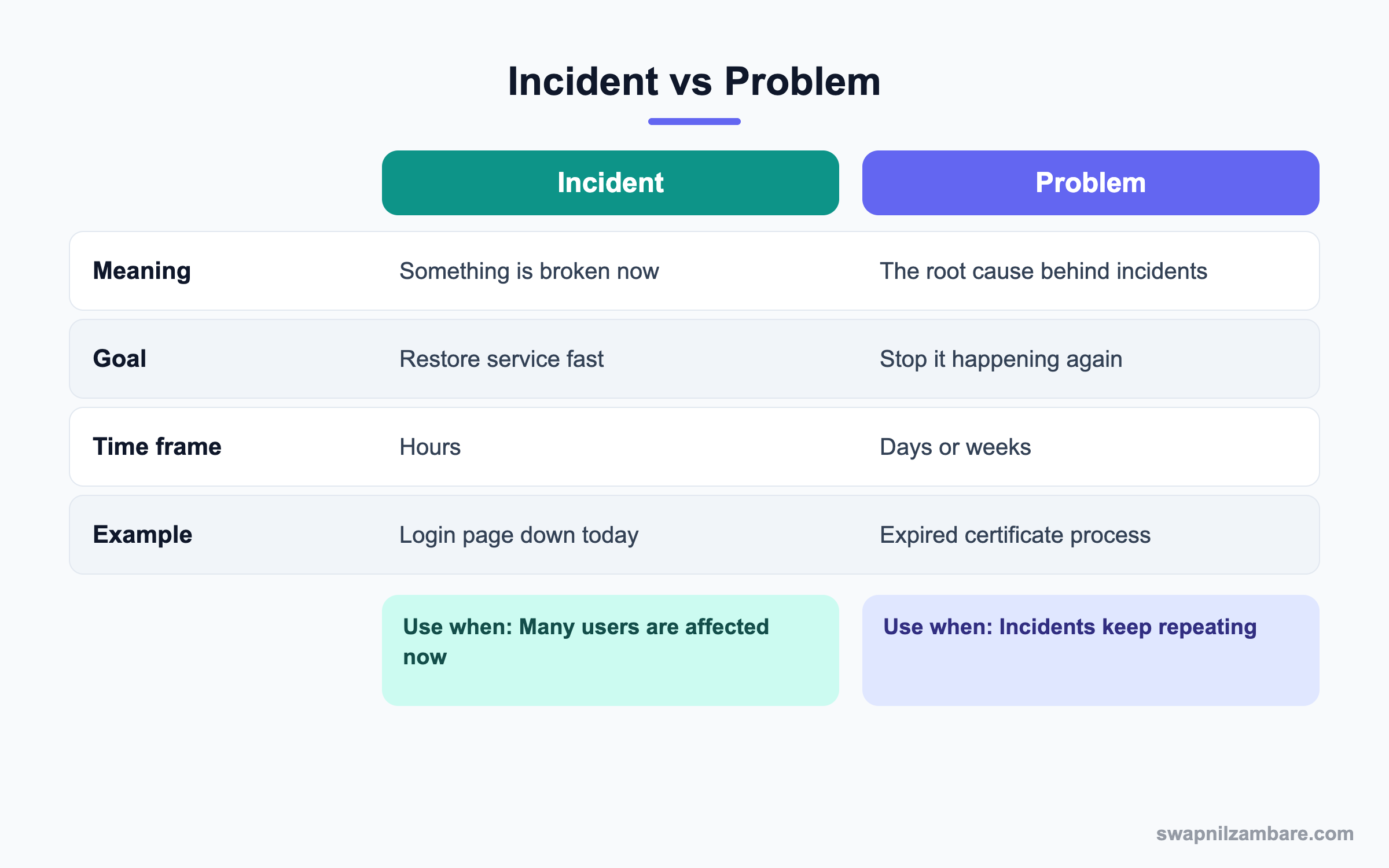
In short, incidents fix today’s pain. Problems prevent tomorrow’s pain.
A Real Salesforce Incident Management Example
At 9 AM on exam day, the Bright Path student portal stops accepting logins. Within an hour, 180 parents raise cases. Let’s handle it.
Step 1: Create the Incident
- Open the Incidents tab and click New.
- Fill in the values from the table below and save.
| Field | Value |
|---|---|
| Subject | Student portal login failing |
| Priority | Critical |
| Impact | High |
| Status | In Progress |
| Detected Date | Today, 9:05 AM |
Step 2: Link the Cases
- Open a related case and use the action to relate it to the incident.
- For many cases, use a list view action or a screen flow to link them in bulk.
- Check the Related Cases list on the incident.
Step 3: Swarm in Slack
- On the incident or a key case, click Swarm.
- Invite the portal developer, the IT admin and the support lead.
- Share findings in the channel until the cause is found.
- Post the fix summary, which is saved back to Salesforce.
Step 4: Resolve and Notify
- Set the incident Status to Resolved and add the resolution.
- Run a flow that emails all linked case contacts with the update.
- Close the linked cases with the same resolution note.
- Create a Problem record for the expired certificate cause.
You can count linked cases with a query. CaseRelatedIssue connects cases to incidents.
SELECT RelatedIssueId, COUNT(Id)
FROM CaseRelatedIssue
GROUP BY RelatedIssueId
Common Mistakes with Salesforce Incident Management
- Letting agents answer outage cases one by one with different messages.
- Creating several incidents for the same outage.
- Closing the incident without linking or closing the cases.
- Skipping the problem record, so the outage repeats.
- Swarming everyone instead of the few experts needed.
Best Practices for Salesforce Incident Management
- Agree on when a group of cases becomes an incident.
- Use one approved message for all linked cases.
- Use bulk linking through flows or list actions.
- Invite only the right experts to a swarm.
- Review every critical incident and create a problem record.
Practice Task
Write an incident template for your team: subject format, priority rules and a customer update message. Hint: keep the customer message short and give the next update time.
Most Asked Salesforce Incident Management Interview Questions
These Salesforce Incident Management and swarming questions come up in Service Cloud interviews.
Basic Salesforce Incident Management Interview Questions
Q1: What is Salesforce Incident Management?
It is a Service Cloud feature set for tracking disruptions with incidents, problems and change requests. Cases link to incidents.
Q2: What is an incident?
In Salesforce Incident Management, it is a record of a current disruption that affects customers, like a portal outage.
Q3: What is a problem record?
It records the root cause behind incidents, so the team can prevent repeats.
Q4: What is a change request?
It tracks a planned change, such as a fix or update, often with approval.
Q5: Why link cases to an incident?
So the team sees the impact and can update and close all cases together.
Q6: What is swarming?
Swarming brings experts together to solve one hard case or incident quickly, often in Slack.
Q7: What do you need for Slack swarming?
Service Cloud for Slack connected to your org and Slack workspace, with users mapped.
Intermediate Salesforce Incident Management Interview Questions
Q8: How do you link many cases to one incident?
Use a list view action, a screen flow or automation. Then each link appears as a related issue.
Q9: How do customers get updates during an incident?
Post updates on the incident, then use a flow to email or message linked case contacts.
Q10: What is the difference between an incident and a case?
A case is one customer’s request. An incident is the shared disruption behind many cases.
Q11: How does swarming update Salesforce?
The Slack channel links to the record, and summaries or resolutions are posted back to the case or incident.
Q12: Who should be in a swarm?
Only the experts who can help, like an engineer, a product owner and the case owner.
Q13: How do you report on incidents?
Build reports on incidents with related cases, time to restore and impact. Then share them with leaders.
Q14: Can you use approval processes on change requests?
Yes. Approvals ensure a lead reviews risky changes before work starts.
Advanced Salesforce Incident Management Interview Questions
Q15: Scenario: 300 cases come in about the same issue in an hour. What do you do?
Create one incident, link cases in bulk and share a holding message. Then swarm the experts and update customers on a schedule.
Q16: How do you prevent repeat incidents?
Create a problem record, find the root cause and raise a change request for a permanent fix.
Q17: How would you automate incident detection?
Use a flow or report alert when many cases with similar subjects arrive quickly. Then notify the service lead.
Q18: What metrics matter for incidents?
Time to detect, time to restore, number of affected customers and repeat incidents.
Q19: How does Agentforce help during incidents?
An AI service agent can answer common questions with the approved incident message. So human agents focus on complex cases.
Q20: Scenario: agents keep sending different outage messages. How do you fix it?
Create a quick text or template from the incident update and require agents to use it.
Q21: When should a swarm be closed?
When the issue is solved and the summary is saved to Salesforce. Then archive the Slack channel.
Q22: How do incidents relate to entitlements?
Linked cases may still have SLAs. So track milestones and pause or adjust them by policy during major outages.
Q23: Why keep problems separate from incidents?
Because restoring service and fixing root causes need different teams and timelines. So separate records keep both clear.
Q24: How do you review a critical incident afterwards?
Hold a short review of what happened, the cause, the fix and lessons. Then record actions on the problem.
Q25: What permissions do agents need?
Read and edit on cases, read on incidents and the ability to create related issue links. Leads need incident edit access.
Q26: Can partners or customers see incidents?
Usually not directly. Instead, share status through site announcements or case updates.
Q27: Is Salesforce Incident Management only for IT teams?
No. Any service team can use it when one issue affects many customers. For example, a delayed exam result batch affects many parents.
Q28: How does Salesforce Incident Management help reporting?
Leaders see one incident with its impact instead of hundreds of loose cases. So root causes and costs become clear.
Q29: What should the first customer message say?
Say what is affected, that the team is working on it and when the next update will come. Keep it short and honest.
Q30: Can a case belong to more than one incident?
It can be related to more than one issue if needed. However, most teams link it to the main incident only.
Official Resources
- Salesforce Help: Incident Management
- Trailhead: Customer Service Incident Management
- Salesforce Help: Swarming in Slack
Quick Recap
- Salesforce Incident Management tracks disruptions that cause many cases.
- Incidents restore service, while problems remove root causes.
- Link cases to incidents and update them together.
- Slack swarming brings experts into one channel.
- Review critical incidents and prevent repeats.
What’s Next?
Next, we sharpen people skills with Business Analysis for Admins.


