Einstein Case Classification uses AI to predict field values on new cases, such as Type, Reason and Priority. It learns from your closed cases, so it speaks your company’s language. As a result, agents spend less time filling fields and more time helping customers.
In the same post we cover Einstein Search, which helps agents find records faster. This builds on cases and support process and Omni-Channel routing. We will use the Bright Path Tutors support team.
What is Einstein Case Classification?
Einstein Case Classification is a Service Cloud AI feature that recommends or fills picklist and checkbox fields on cases. It reads the subject, description and other fields of new cases. Then it compares them with patterns from your closed cases.
Think of a new support agent who studies a year of old tickets. After that, they can guess the right category for a new ticket at a glance. Einstein Case Classification does the same, only faster.
Why Einstein Case Classification Matters
Wrong or empty case fields break routing and reporting. For example, a billing case tagged as Technical reaches the wrong team. Also, agents dislike filling many fields on every case.
So Einstein Case Classification improves data quality and speed together. Also, when fields are right from the start, Omni-Channel can route cases to the right queue at once.
How Einstein Case Classification Works
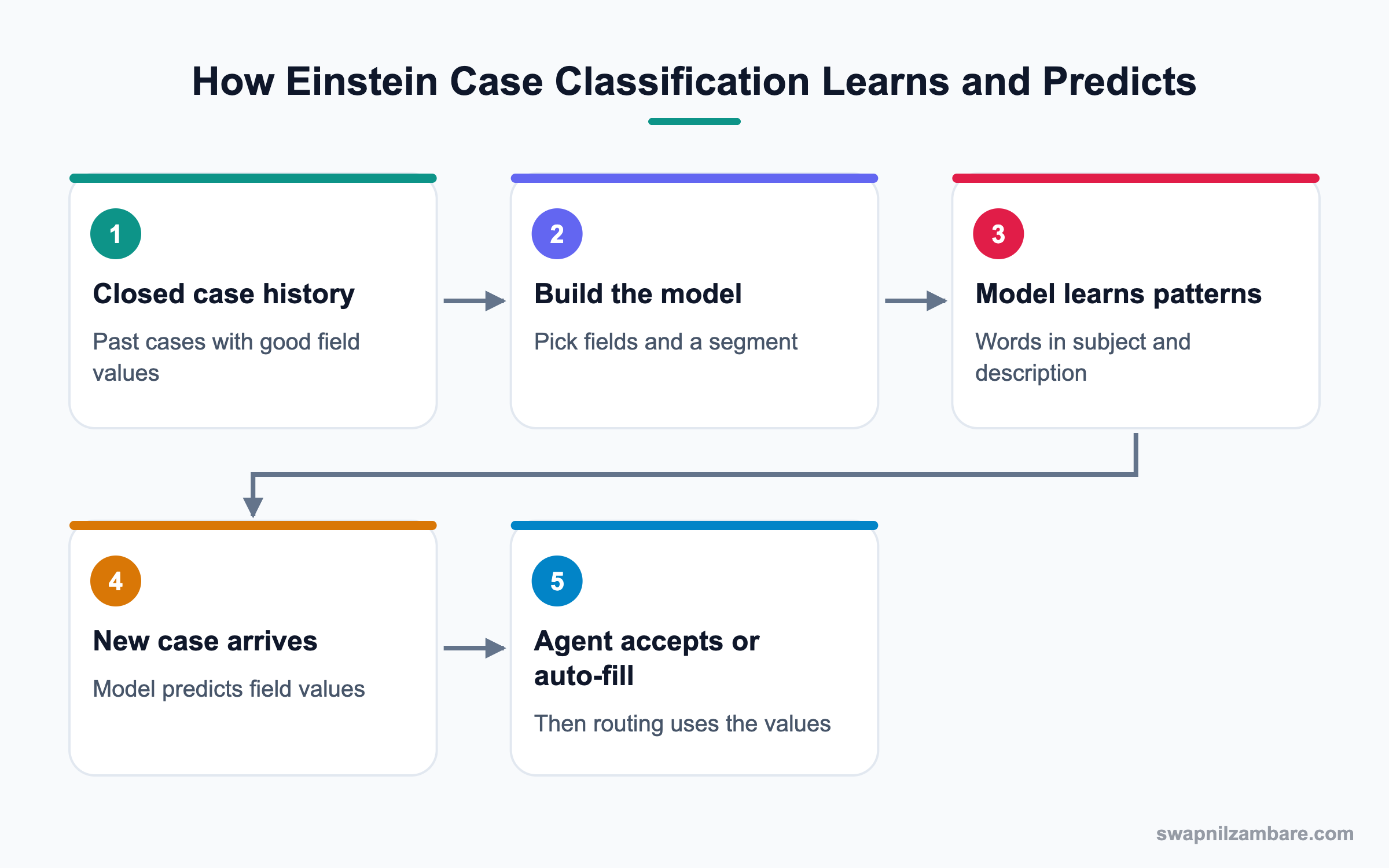
An admin creates a model in Setup and chooses which fields to predict. The model trains on closed cases from recent months. After activation, it scores each new case and shows recommendations or fills fields.
Fields You Can Predict
Standard and custom picklist and checkbox fields can be predicted. Common choices are Type, Case Reason, Priority and Product.
Segments
A segment limits which cases the model learns from, such as only email cases. This keeps predictions focused.
Recommendation Modes
You can show recommendations for agents to accept, auto-populate the field, or auto-populate and save. Each field can use its own mode.
Data Requirements
The model needs enough closed cases with good values. If history is small or messy, predictions will be weak.
Einstein Case Routing
Einstein Case Routing uses the predicted values to route cases with Omni-Channel. It works best after the model proves accurate.
What is Einstein Search?
Einstein Search makes Salesforce search smarter. It personalises results based on a user’s activity, shows instant results as you type and supports natural language searches, such as “my open cases in Pune”. So agents reach the right record in fewer clicks.
Key Einstein Case Classification Settings
This table shows the main settings and good starting choices.
| Setting | What it does | Starting choice |
|---|---|---|
| Fields to predict | Which fields the model fills | Type, Case Reason |
| Segment | Which cases to learn from | Cases from Email and Web |
| Mode per field | Recommend or auto-fill | Recommend only |
| Activation | Turns predictions on | After review |
| Agent component | Shows suggestions | Einstein Field Recommendations |
Recommend Only vs Auto-Populate
The mode decides how much control agents keep. This table compares them.
| Feature | Recommend only | Auto-populate |
|---|---|---|
| Who sets value | Agent | Model |
| Speed | Slower | Faster |
| Risk | Low | Higher |
| Best stage | Launch | After proven accuracy |
| Feedback | Agent choices teach the team | Needs monitoring |
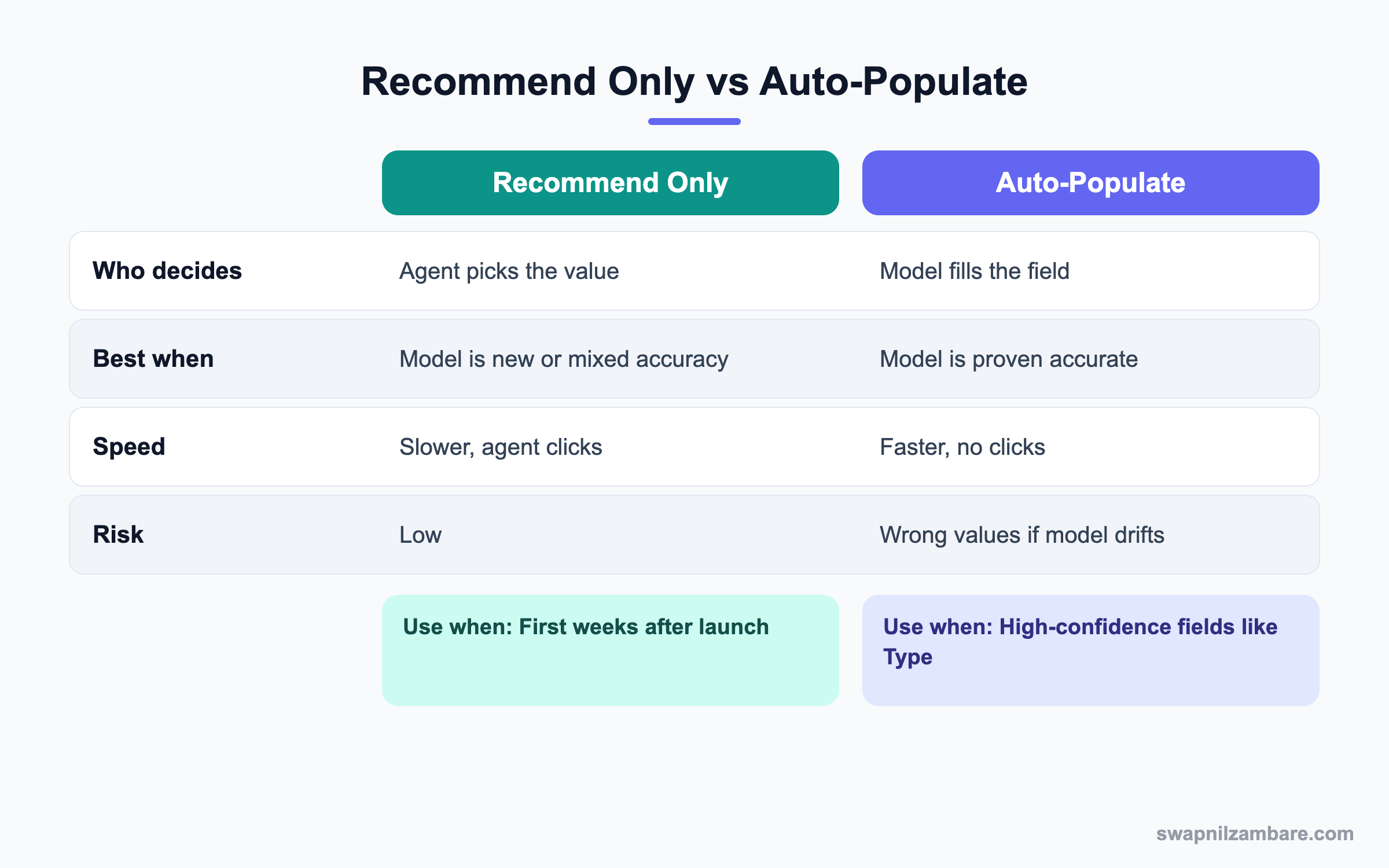
In short, start with recommendations. Then switch strong fields to auto-populate once accuracy is proven.
A Real Einstein Case Classification Example
Bright Path Tutors receives 2,000 email cases a month. Agents often leave Case Reason empty, so reports cannot show why parents contact support.
Step 1: Check the Data
First, run a report of closed cases from the last six months grouped by Case Reason. If most cases have a reason and the values are clean, the model can learn well.
Step 2: Build the Model
- Open Setup and type “Einstein Classification” in Quick Find.
- Click New and name the model Support Case Model.
- Add the fields Type and Case Reason.
- Set a segment for Case Origin equals Email or Web.
- Click Build and wait for the model to finish.
Step 3: Review and Activate
- Open the model summary and check predicted accuracy for each field.
- Set Type to Recommend only and Case Reason to Recommend only.
- Click Activate.
- Add the Einstein Field Recommendations component to the Case page.
These are the settings we used.
| Field | Mode at launch | Mode after 30 days |
|---|---|---|
| Type | Recommend only | Auto-populate |
| Case Reason | Recommend only | Recommend only |
| Priority | Not predicted | Review later |
Step 4: Measure Results
After a month, compare how often agents accepted recommendations. You can also check how many cases still have no reason.
SELECT Reason, COUNT(Id)
FROM Case
WHERE CreatedDate = LAST_N_DAYS:30
GROUP BY Reason
Common Mistakes with Einstein Case Classification
- Building a model on messy, inconsistent history.
- Turning on auto-save for every field on day one.
- Predicting too many fields at once.
- Forgetting to add the recommendation component to the page.
- Never reviewing accuracy after launch.
Best Practices for Einstein Case Classification
- Clean case history before building the model.
- Start with two fields that matter for routing and reports.
- Launch in recommend mode and watch acceptance rates.
- Rebuild the model when products or reasons change.
- Combine with Einstein Search and Knowledge for faster resolution.
Practice Task
List the five case fields your team fills most often. Then mark which ones are picklists with clean history. Hint: those are the best first candidates for Einstein Case Classification.
Most Asked Einstein Case Classification Interview Questions
These Einstein Case Classification and Einstein Search questions often appear in Service Cloud interviews.
Basic Einstein Case Classification Interview Questions
Q1: What is Einstein Case Classification?
It is a Service Cloud AI feature that predicts field values on new cases. It learns from closed cases in your org.
Q2: Which field types can it predict?
Picklist and checkbox fields, both standard and custom. Common ones are Type, Reason and Priority.
Q3: Where do you set it up?
In Setup, under Einstein Classification apps or a similar Einstein setup page, depending on release.
Q4: What data does the model learn from?
It learns from closed cases, especially the subject, description and the field values agents chose.
Q5: What are the recommendation modes?
Recommend only, auto-populate, and auto-populate and save. Each field can have its own mode.
Q6: What is a segment?
A segment filters which cases the model learns from and predicts for, such as only email cases.
Q7: What is Einstein Search?
It is smarter search with personalised results, instant results and natural language queries.
Intermediate Einstein Case Classification Interview Questions
Q8: How does the agent see predictions?
Through the Einstein Field Recommendations component on the case page. The agent can accept a suggestion with one click.
Q9: Why might a field show low accuracy?
History may be messy, too small or too evenly spread across values. So clean data and give the model time.
Q10: What is Einstein Case Routing?
It uses predicted values to route cases through Omni-Channel. So cases reach the right queue faster.
Q11: When should you switch to auto-populate?
When accuracy is high and agents accept most suggestions. Then auto-populate saves even more time.
Q12: How often should you rebuild the model?
Rebuild when processes, products or picklist values change. Many teams also rebuild every few months.
Q13: What is natural language search in Einstein Search?
Users type a phrase like “open cases for Pune school” and Salesforce turns it into filters.
Q14: Do these features need a special license?
Yes, most Einstein service features need an Einstein or AI-enabled Service Cloud edition or add-on. Check your contract.
Advanced Einstein Case Classification Interview Questions
Q15: Scenario: agents ignore recommendations. What do you do?
Check accuracy and whether the component is visible. Then train agents and collect feedback on wrong suggestions.
Q16: Scenario: a new product launches and predictions get worse. Why?
The model has no history for the new product. So rebuild after enough cases close with correct values.
Q17: How would you measure the value of Einstein Case Classification?
Track field completion, acceptance rate, handle time and routing accuracy before and after launch.
Q18: How does Einstein Case Classification relate to Agentforce?
Both use your case data. Agentforce service agents can resolve cases, while classification keeps fields clean for routing and reports.
Q19: What risks come with auto-save?
Wrong values may route cases badly or distort reports. Therefore monitor results and keep a way to correct values.
Q20: How do you prepare data before building the model?
Merge duplicate picklist values, fill missing reasons on recent closed cases and remove test cases.
Q21: How does the Einstein Trust Layer apply here?
Generative AI features use the Trust Layer for data protection. Predictive models like classification run on your org’s data within Salesforce.
Q22: Can you predict fields on objects other than Case?
Einstein Case Classification is built for cases. Other objects need different Einstein features, such as Einstein Prediction Builder.
Q23: Scenario: managers want reports on prediction quality. How?
Use the model’s built-in metrics and compare predicted values with final values in reports.
Q24: How does Einstein Search help agents during calls?
Agents find the caller’s records and articles quickly with personalised and instant results. So the customer waits less.
Q25: Why start with only one or two fields?
Because it is easier to measure accuracy and train agents. Then you add more fields once trust grows.
Q26: What is a good acceptance rate to aim for?
There is no fixed number, but a rising rate shows trust. So compare the rate month by month and investigate drops.
Q27: Can Einstein Case Classification work on web-to-case and email-to-case?
Yes. It predicts values for new cases from any channel included in the segment. So email and web cases get fields filled before an agent opens them.
Q28: What happens if the agent changes a predicted value?
The agent’s value is saved. Later, when the case closes, that value becomes part of the history the model learns from.
Q29: Should you predict Priority with AI?
Only if past priority values were set consistently. Otherwise, a rule based on entitlements or customer tier may be safer.
Q30: How do you explain Einstein Case Classification to a support manager?
Say it reads each new case and suggests fields like an experienced agent would. Then agents confirm with one click, and reports get cleaner.
Q31: What should you do before switching a field to auto-save?
First check accuracy over a few weeks and talk to team leads. Then switch one field at a time and watch reports closely.
Official Resources
- Salesforce Help: Einstein Case Classification
- Trailhead: Einstein Case Classification
- Salesforce Help: Einstein Search
Quick Recap
- Einstein Case Classification predicts case field values from history.
- It supports recommend only, auto-populate and auto-save modes.
- Clean closed case data is the key to good predictions.
- Einstein Case Routing can use the predictions with Omni-Channel.
- Einstein Search helps agents find records faster.
What’s Next?
Next, we add phone support with Service Cloud Voice.


