Sales Engagement Cadences turn a follow-up plan into steps that Salesforce serves to reps one by one. Instead of remembering to call on day one and email on day three, the rep opens the work queue and sees the next step. So every lead gets the same good follow-up, even on busy days.
This post builds on lead management and Lightning Email Templates. We will build a cadence for new course enquiries at Bright Path Tutors.
What are Sales Engagement Cadences?
Sales Engagement Cadences are planned sequences of sales steps, like calls, emails and waits. They are part of Sales Engagement, a Sales Cloud add-on. Reps work the steps from a list called the work queue.
Think of a cadence like a fitness plan from a coach. Monday is cardio, Wednesday is weights and Friday is rest. You simply follow the plan, and the coach adjusts it based on how you did.
Why Sales Engagement Cadences Matter
New leads cool down fast. If the first call happens after three days, the student may join another institute. However, reps juggle many leads and forget follow-ups.
Sales Engagement Cadences fix this by putting the next step in front of the rep at the right time. Also, managers can see which steps work best, because every step is tracked.
How Sales Engagement Cadences Work
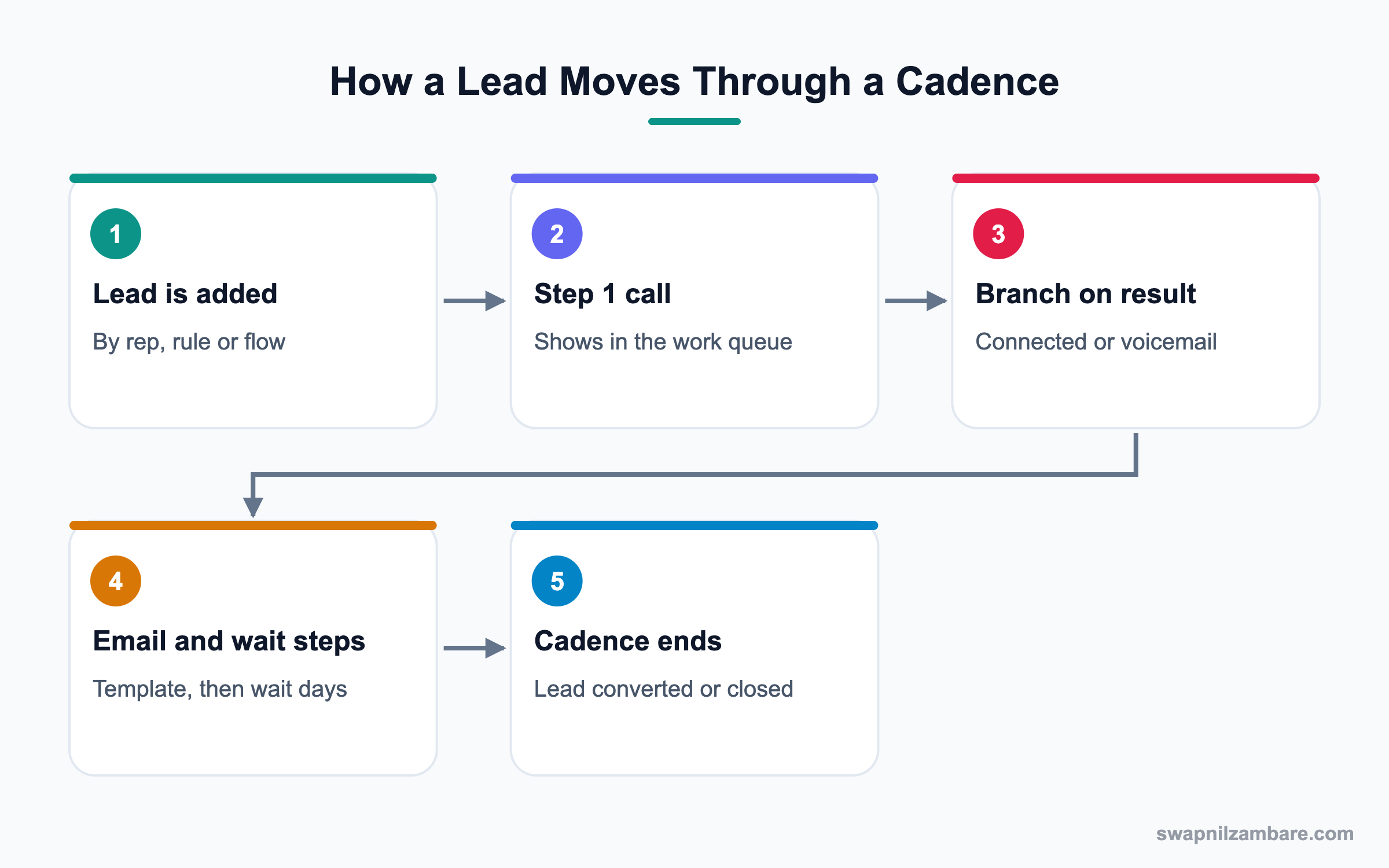
An admin or sales manager builds a cadence in Cadence Builder. Then leads or contacts are added as targets. Each target moves through the steps, and the current step appears in the assigned rep’s work queue.
Step Types
Common steps are Call, Send an Email, Custom Step and Wait. Email steps can use templates, and they can be sent automatically or after the rep reviews them.
Branching
After a call, the rep logs a result like Meaningful Connect or Left Voicemail. The cadence then takes a different branch for each result. Email steps can also branch on opens or replies.
The Work Queue
The work queue lists every step due today for the rep, sorted by priority. Reps click a step, do it and move on.
Adding Targets
Reps can add leads by hand. Admins can also add them automatically with assignment rules or a flow, such as all new web enquiries.
Permissions
Users need the Sales Engagement license and the right permission sets, such as Sales Engagement User or Cadence Creator.
Key Parts of Sales Engagement Cadences
This table explains each part in plain words.
| Part | What it does | Example |
|---|---|---|
| Cadence | The full follow-up plan | New Enquiry Follow-Up |
| Step | One action in the plan | Day 1 call |
| Wait step | Pause before the next step | Wait 2 days |
| Branch | Path based on an outcome | Voicemail path |
| Target | The lead or contact in the cadence | Asha Mehta lead |
| Work queue | Today’s steps for a rep | 12 calls, 8 emails |
Cadence vs Manual Follow-Up Tasks
Many teams start with manual tasks. This table shows why cadences scale better.
| Feature | Cadence | Manual tasks |
|---|---|---|
| Planning | Built once | Rep creates each time |
| Consistency | High | Varies by rep |
| Reminder | Work queue | Rep must check tasks |
| Branching | Built in | Not available |
| Reporting | Step outcomes | Task counts |
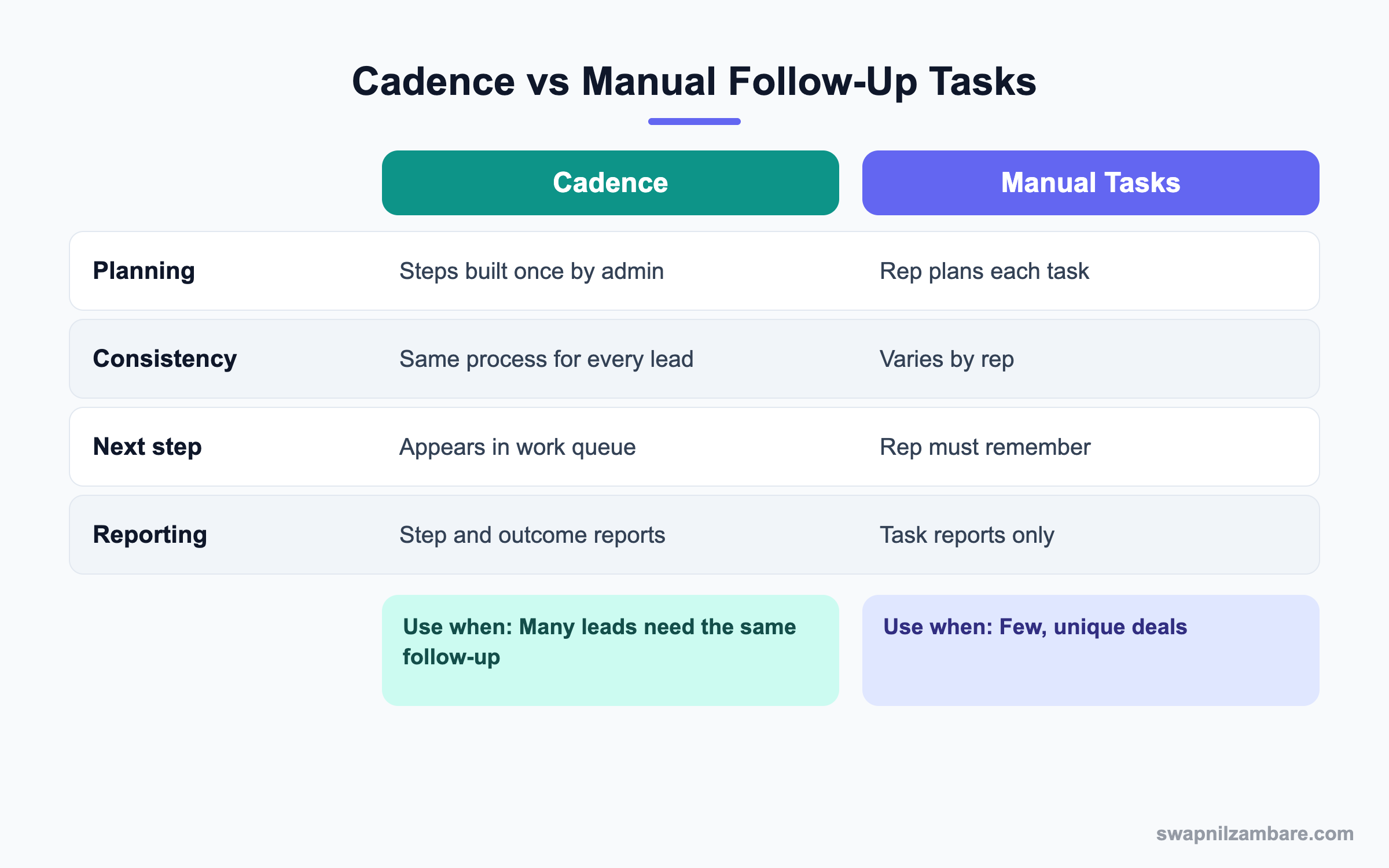
In short, use cadences when many leads need the same follow-up. Use manual tasks for a few unique, high-touch deals.
A Real Sales Engagement Cadences Example
Bright Path Tutors gets 300 web enquiries a month. The sales head wants a call on day one, an email the same day if there is no answer, and a second call on day three.
Step 1: Give Access
- Open Setup and confirm the Sales Engagement licenses are assigned.
- Assign the Cadence Creator permission set to the sales head.
- Assign the Sales Engagement User permission set to the counsellors.
- Add the Work Queue component to the counsellors’ Lightning app utility bar or console.
Step 2: Build the Cadence
- From the App Launcher, open Sales Cadences and click New.
- Name it New Enquiry Follow-Up and choose Lead as the target type.
- Add the steps from the table below in Cadence Builder.
- Save and activate.
| Step | Type | Detail |
|---|---|---|
| 1 | Call | Call within 1 hour |
| 2 | Branch on call result | Meaningful Connect ends; Voicemail continues |
| 3 | Send an Email | Template Course Info, auto send |
| 4 | Wait | 2 days |
| 5 | Call | Second call with fee details |
| 6 | Send an Email | Template Last Reminder |
Step 3: Add Leads Automatically
- Create a record-triggered flow on Lead, when a record is created.
- Add the condition Lead Source equals Web.
- Add the Assign Target to Sales Cadence action.
- Pick the cadence and set the target assignee to the lead owner.
Step 4: Work the Queue
Counsellors open the work queue each morning. They click a call step, call the student and log the result. Then the next step appears on the right day.
You can report on cadence progress with a query too. ActionCadenceTracker stores each target’s progress through a cadence.
SELECT ActionCadence.Name, State, CompletionReason
FROM ActionCadenceTracker
WHERE CreatedDate = THIS_MONTH
Common Mistakes with Sales Engagement Cadences
- Building a cadence with too many steps, so reps rush through them.
- Forgetting branches, so connected leads still get reminder emails.
- Auto-sending emails without testing the templates.
- Not removing converted leads from the cadence.
- Assigning permission sets without the Sales Engagement license.
Best Practices for Sales Engagement Cadences
- Keep cadences short, usually five to eight steps.
- Add branches for every call result that changes the plan.
- Review cadence reports monthly and drop steps that do not help.
- Use automatic assignment for high-volume lead sources.
- Ask reps for feedback, because they see what works.
Practice Task
Design a three-step cadence on paper for a webinar sign-up: call, email and a final call. Then decide which call result should end the cadence early. Hint: think about what a meaningful connect means for your team.
Most Asked Sales Engagement Cadences Interview Questions
These Sales Engagement Cadences questions appear in Sales Cloud admin and consultant interviews.
Basic Sales Engagement Cadences Interview Questions
Q1: What is a sales cadence?
It is a planned sequence of sales steps, such as calls, emails and waits. Reps follow it from their work queue.
Q2: What is the work queue?
It is a list of the steps due today for a rep. It shows calls, emails and custom steps in priority order.
Q3: Which step types can a cadence have?
Call, Send an Email, Custom Step, Wait and branching steps. Some orgs also add LinkedIn or other custom steps.
Q4: Which records can be cadence targets?
Leads, contacts and person accounts are common targets.
Q5: What license is needed?
Users need a Sales Engagement license, which is an add-on or included in some editions. Then permission sets give access.
Q6: What is branching in a cadence?
Branching sends the target down a different path based on a result, such as a call outcome or an email reply.
Q7: Can emails in a cadence be automatic?
Yes. Email steps can be sent automatically or after the rep reviews them.
Intermediate Sales Engagement Cadences Interview Questions
Q8: How do you add leads to a cadence automatically?
Use a flow with the Assign Target to Sales Cadence action, or assignment rules where supported.
Q9: What happens when a lead is converted during a cadence?
The tracker can end, or the contact may continue, depending on settings. Check the cadence completion reasons.
Q10: How do you report on cadence results?
Use cadence reports and objects like ActionCadenceTracker and ActionCadenceStepTracker. They show progress and outcomes.
Q11: What is the difference between Cadence Creator and Sales Engagement User?
Cadence Creator can build and edit cadences. Sales Engagement User can work targets and the work queue.
Q12: How does a cadence know a call outcome?
The rep logs a call result after the call. Admins define these results in Setup, and branches use them.
Q13: Can you pause a target in a cadence?
Yes. Reps can pause or remove a target, for example when the student asks to call next month.
Q14: How do Sales Engagement Cadences use email templates?
Email steps pick a Lightning email template, so merge fields fill from the target record.
Advanced Sales Engagement Cadences Interview Questions
Q15: Scenario: reps say the work queue is too long. What do you do?
Check how many targets each rep has and whether old cadences still run. Then shorten cadences or balance assignments.
Q16: How would you design cadences for hot and cold leads?
Use lead score or source to choose the cadence in a flow. Hot leads get fast calls, while cold leads get slower email-led steps.
Q17: Scenario: connected leads still receive reminder emails. Why?
The call branch for Meaningful Connect is missing or wrong. Fix the branch so it ends the cadence or moves to a meeting step.
Q18: How would you measure if cadences improve sales?
Compare conversion rate and time to first contact before and after. Also compare step outcomes between cadences.
Q19: How do cadences relate to Agentforce sales agents?
An AI sales agent can handle early outreach, while cadences guide human steps. Many teams combine both.
Q20: What should you check before auto-sending emails?
Test templates, check email deliverability and consent, and confirm the From address. Then start with a small group.
Q21: How many Sales Engagement Cadences should a team run?
Keep only a few active cadences, one per clear use case. Otherwise reps and managers lose track.
Q22: Can managers see a rep’s Sales Engagement Cadences work?
Yes. Cadence reports and tracker records show progress by rep. So managers can coach on missed steps.
Q23: What is a custom step?
A custom step is any task that is not a call or email, such as sending a WhatsApp message. The rep marks it done in the work queue.
Q24: Can Sales Engagement Cadences respect time zones?
Yes. Steps can follow the target’s time zone, so calls and emails land in working hours.
Q25: Scenario: a student unsubscribes. What should happen?
The cadence should stop email steps for that target. So check email opt-out handling and consent fields.
Q26: How do you test a new cadence?
First add a test lead with your own email and phone. Then walk through each branch before using it for real leads.
Q27: Do Sales Engagement Cadences replace lead assignment rules?
No. Assignment rules still decide the owner. Then the cadence guides what that owner does next.
Q28: Why should cadences end when a meeting is booked?
Because the goal of the cadence is reached. So further reminders would annoy the student.
Official Resources
- Salesforce Help: Sales Engagement
- Trailhead: Sales Engagement Basics
- Salesforce Help: Create a Sales Cadence
Quick Recap
- Sales Engagement Cadences turn follow-up plans into ordered steps.
- Steps include calls, emails, custom steps, waits and branches.
- Reps work today’s steps from the work queue.
- Flows can add leads to a cadence automatically.
- Reports show which steps and cadences work best.
What’s Next?
Next, we review deals with Pipeline Inspection.


