Salesforce Field Sets let an admin choose a group of fields that custom pages and components read automatically. When you add a field to the set, every page that uses it shows the new field. No developer has to touch the code again.
In this post we also tidy up related lists, because both topics decide which fields users see. It builds on page layouts and the Object Manager tour.
What are Salesforce Field Sets?
A field set is a named, ordered list of fields on one object. Developers and app builders reference the field set instead of hard-coding field names. Then admins control the list from Setup.
Think of a field set like a playlist. The music app plays whatever songs are in the playlist. If you add a song, the app plays it without any update.
Why Salesforce Field Sets Matter
Custom pages often show a fixed set of fields. Without field sets, a new field means a code change, a test and a deployment. With Salesforce Field Sets, the admin adds the field in two minutes.
So Salesforce Field Sets are common in Visualforce pages, Lightning Web Components, Experience Cloud forms and many AppExchange packages. So you will meet them even if you never write code.
How Salesforce Field Sets Work
Each of the Salesforce Field Sets you create has two boxes. The In the Field Set box holds fields that always show. The Available for the Field Set box holds fields that the page may add if it supports them.
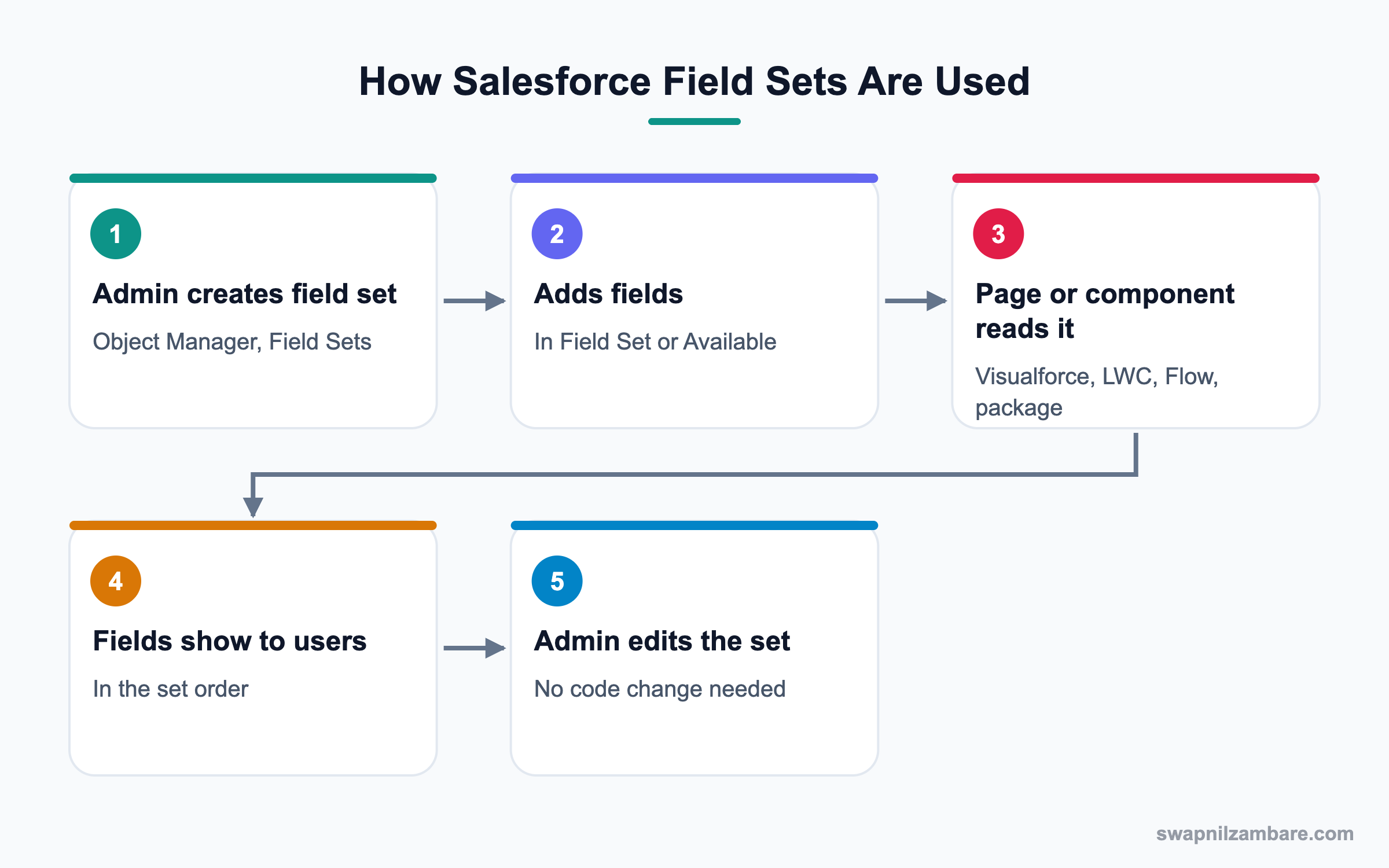
Field Set Parts
Each field set has a label, an API name and a description. The description is important, because it tells the next admin where the set is used.
Required Fields in a Set
You can mark a field as required inside the field set. The page that reads the set then treats it as required, even if the field is optional elsewhere.
Where Field Sets Are Used
Common places include a Visualforce page with a dynamic form, a Lightning Web Component that renders fields from Apex, and package screens. Some flow screens and Experience Cloud forms also read them.
Related List Customization Basics
Related lists show child records on a parent page, such as Contacts on an Account. Admins can choose the columns, the sort order and the buttons for each related list.
Related List Properties on a Page Layout
Open the page layout, click the wrench icon on a related list and pick columns. You can show up to ten fields and set a default sort.
Related List Components on Lightning Pages
On a Lightning record page, you can use the Related Lists component or the Related List Single component. The single version shows one list exactly where you want it.
Dynamic Related Lists
Dynamic Related Lists add filters and more fields right in App Builder. They are a good fit when a page needs a filtered list, like only open cases.
Salesforce Field Sets vs Page Layouts
New admins often confuse these two tools. This table shows the difference.
| Feature | Salesforce Field Sets | Page Layouts |
|---|---|---|
| Used by | Custom pages, components, packages | Standard record pages |
| Controls | Fields and their order | Fields, sections, related lists |
| Needs code to show | Yes, a page must read it | No |
| Admin can change | Yes, without code | Yes, in layout editor |
| Typical example | Course summary on a custom site page | Course record page |
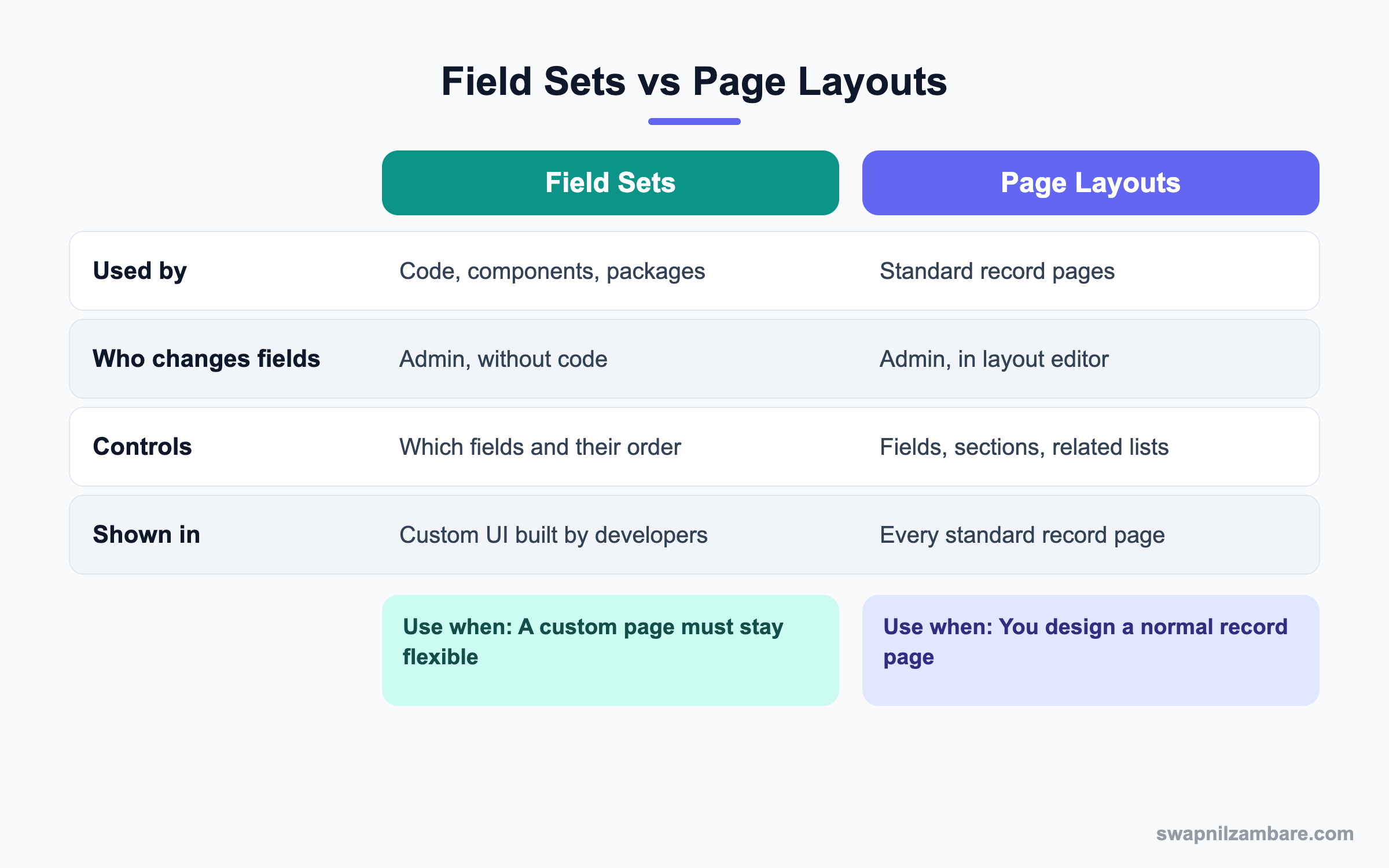
In short, page layouts shape normal record pages. Salesforce Field Sets shape custom pages built by developers or packages.
A Real Salesforce Field Sets Example
Bright Path Tutors shows a Course summary on its student portal. A developer built it with a Lightning Web Component that reads a field set. Let’s create that field set and then fix the Courses related list on Account.
Step 1: Create the Field Set
- Open Setup, then Object Manager, then Course.
- Click Field Sets, then New.
- Fill in the values from the table below and click Save.
- Drag Name, Fee, Duration in Weeks and Start Date into In the Field Set.
- Mark Fee as required and click Save.
| Property | Value |
|---|---|
| Field Set Label | Portal Course Summary |
| Field Set Name | Portal_Course_Summary |
| Where is this used? | Student portal course card LWC |
Now the developer reads the set in Apex. This short example shows the idea, so you know what to tell your developer.
List<Schema.FieldSetMember> members =
    SObjectType.Course__c.FieldSets.Portal_Course_Summary.getFields();
for (Schema.FieldSetMember m : members) {
    // Print each field API name in the set order
    System.debug(m.getFieldPath());
}
The debug log prints Name, Fee__c, Duration_in_Weeks__c and Start_Date__c in that order. If you add Level__c to the set later, the loop prints it too, with no code change.
Step 2: Customize the Courses Related List
- Open Object Manager, then Account, then Page Layouts.
- Open Account Layout and scroll to the Courses related list.
- Click the wrench icon on the list.
- Add Fee, Start Date and Level as columns.
- Set Sort By to Start Date, descending, then click OK and Save.
Common Mistakes with Salesforce Field Sets
- Leaving the description blank, so nobody knows where the set is used.
- Deleting a field set that a package or component still needs.
- Adding a field users cannot see, then wondering why it is blank.
- Putting too many columns in a related list, which makes it hard to read.
- Changing a related list on the wrong page layout.
Best Practices for Salesforce Field Sets
- Write the page or component name in the field set description.
- Check field-level security for every field you add.
- Keep related lists to five or six useful columns.
- Use Related List Single components to place key lists near the top.
- Test the custom page after every field set change.
Practice Task
Create a field set on Contact called Quick View with Name, Email and Phone. Then open the Contacts related list on Account and add the Email column. Hint: the wrench icon opens related list properties.
Most Asked Salesforce Field Sets Interview Questions
These Salesforce Field Sets and related list questions are common in admin and junior developer interviews.
Basic Salesforce Field Sets Interview Questions
Q1: What is a field set in Salesforce?
Salesforce Field Sets are named groups of fields on one object. Custom pages and components read it, so admins can change the fields without code.
Q2: Where do you create a field set?
In Object Manager, open the object and click Field Sets, then New. Drag fields into the In the Field Set box.
Q3: Who uses field sets?
Developers use them in Visualforce and Lightning components. Admins maintain them, and packages often ship with them.
Q4: What is the difference between In the Field Set and Available for the Field Set?
In the Field Set fields always show on the page. Available fields are optional, and the page can add them if it supports that.
Q5: What is a related list?
A related list shows child records on a parent record page. For example, Contacts and Opportunities appear on an Account.
Q6: How do you add columns to a related list?
Open the page layout, click the wrench icon on the related list and choose fields. Then save the layout.
Q7: How many columns can a related list show?
A related list on a page layout can show up to ten fields. Fewer columns are easier to read.
Intermediate Salesforce Field Sets Interview Questions
Q8: Why would you use a field set instead of hard-coding fields?
Salesforce Field Sets let admins change fields without code changes and deployments. That saves time and lowers risk.
Q9: Can you make a field required in a field set?
Yes. Mark it required inside the field set. The page reading the set then treats it as required.
Q10: What happens if a user lacks access to a field in the set?
The field does not show or shows as blank, depending on the code. Field-level security always applies.
Q11: What is the Related List Single component?
It is a Lightning App Builder component that shows one chosen related list. You can place it anywhere on a record page.
Q12: How do Dynamic Related Lists differ from normal related lists?
Dynamic Related Lists are set up in App Builder and support filters and more fields. Normal related lists come from the page layout.
Q13: Can you sort a related list?
Yes. In related list properties, choose Sort By and the direction. Users can also click column headers to sort.
Q14: Can you deploy field sets with change sets?
Yes. Field sets are metadata, so you can add them to a change set or a DevOps Center work item.
Advanced Salesforce Field Sets Interview Questions
Q15: How does Apex read a field set?
Apex uses the Schema methods, like SObjectType.Course__c.FieldSets.Name.getFields(). It returns field members with their API names and required flags.
Q16: Scenario: a package page stopped showing a field after an update. What do you check?
Check the package field set, field-level security and whether the field was removed from the set. Also read the package release notes.
Q17: How would you build a dynamic form for many objects with one component?
Pass the object and field set name to a Lightning Web Component. The component reads the set through Apex and renders each field.
Q18: Scenario: users complain the Cases related list is too long. What do you do?
Use a Dynamic Related List with a filter for open cases. Also cut columns to the few that users actually need.
Q19: Can field sets be used in SOQL queries?
Not directly, but code can build a dynamic SOQL query from field set members. This keeps the query in sync with the set.
Q20: What is a good way to document field sets in a large org?
Keep a short list of field sets, their objects and where they are used. Also fill the description field on each set.
Q21: Are Salesforce Field Sets the same as Dynamic Forms?
No. Dynamic Forms place fields on a standard Lightning record page. Salesforce Field Sets feed fields to custom pages and code instead.
Q22: Can two components share one field set?
Yes. Because the set lives on the object, many pages can read it. However, a change then affects all of them, so check the description first.
Q23: How do you find which code uses a field set?
Click Where is this used? if it is shown, or search the code in VS Code for the field set API name. Then update the description so the next admin knows.
Official Resources
- Salesforce Help: About Field Sets
- Salesforce Developers: FieldSet Class
- Trailhead: Lightning Experience Customization
Quick Recap
- Salesforce Field Sets are named groups of fields that pages and code read.
- Admins change the fields, and custom pages update with no code change.
- Field-level security still applies to every field in a set.
- Related lists are tuned with columns, sort order and buttons.
- Dynamic and Single related lists give more control on Lightning pages.
What’s Next?
Next, we save hours of clicking with Mass Update, Mass Delete and Mass Reassign tools.


