Salesforce Data Quality decides whether people trust your reports. If phone numbers are missing and the same lead appears three times, managers stop using dashboards. So a clear data quality strategy is one of the most valuable things an admin can build.
This post pulls together tools from earlier posts, like validation rules, duplicate rules and State and Country Picklists. Then we turn them into one plan for Bright Path Tutors.
What is Salesforce Data Quality?
Salesforce Data Quality means records are complete, accurate, consistent, unique and up to date. For example, every lead has an email, every phone uses one format and each student exists only once.
Think of a library. If books are on the wrong shelves and half the labels are missing, nobody finds anything. Good data quality is the librarian who keeps every book labelled and in its place.
Why Salesforce Data Quality Matters
Poor Salesforce Data Quality costs time and money. Sales reps call wrong numbers, emails bounce and reports show the wrong totals. Also, AI features like Einstein and Agentforce give poor answers when data is poor.
So Salesforce Data Quality is not a one-time clean-up. Instead, it is a cycle of standards, prevention, cleaning and monitoring.
How a Salesforce Data Quality Strategy Works
A Salesforce Data Quality strategy has five steps. First you agree on standards. Then you prevent bad data at entry. Next you find existing problems. After that, you clean them. Finally, you monitor quality every month.
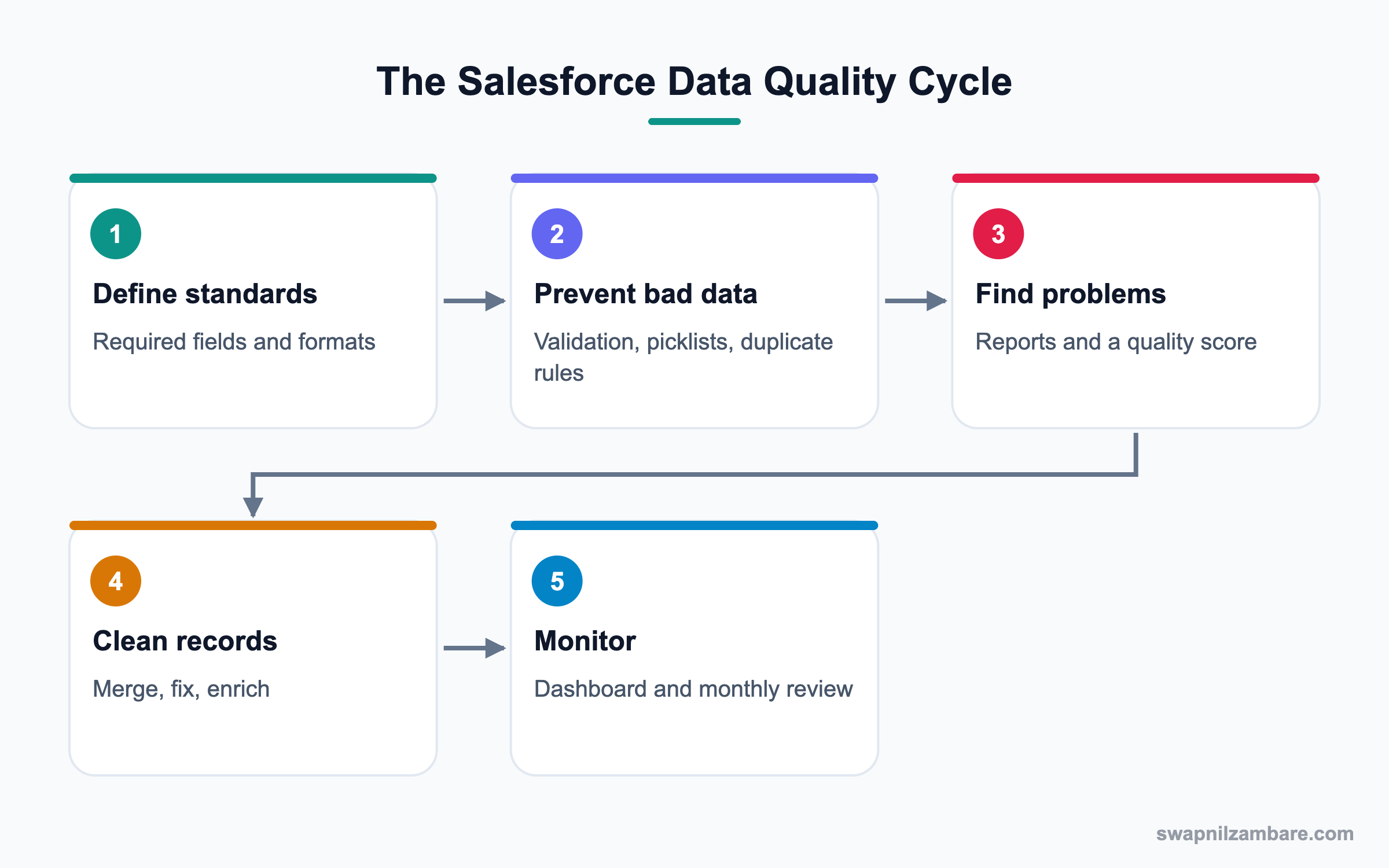
Step 1: Define Standards
Write down what “good” means for each key object. For example, a Lead needs First Name, Last Name, Email, Phone and Lead Source. Phones use the format +91 followed by ten digits.
Step 2: Prevent Bad Data
Use required fields, picklists, validation rules and duplicate rules. As a result, users cannot save records that break the standards.
Step 3: Find Problems
Build reports that list records with missing or wrong values. Also, a formula field can score each record for completeness.
Step 4: Clean Records
Merge duplicates, fix formats with Data Loader and fill gaps from trusted sources. Then record what you changed.
Step 5: Monitor
Put quality scores on a dashboard. Then review it each month with record owners.
The Six Dimensions of Salesforce Data Quality
Data teams often measure quality on six dimensions. This table explains each one with an example.
| Dimension | Meaning | Bright Path example |
|---|---|---|
| Completeness | Required data is present | Lead has Email and Phone |
| Accuracy | Data is correct | Phone number really works |
| Consistency | Same format everywhere | All phones start with +91 |
| Uniqueness | No duplicates | One record per student |
| Timeliness | Data is recent | Status updated this month |
| Validity | Data fits the rules | Course Code exists in master list |
Prevention vs Cleansing
Both are needed, but prevention is cheaper. This table compares them.
| Feature | Prevention | Cleansing |
|---|---|---|
| When | At data entry | After bad data exists |
| Tools | Validation, picklists, duplicate rules | Reports, Data Loader, merge |
| Cost | Low | High |
| Effort over time | Once, then small updates | Repeats if not prevented |
| Owner | Admin builds it | Admin or data steward |
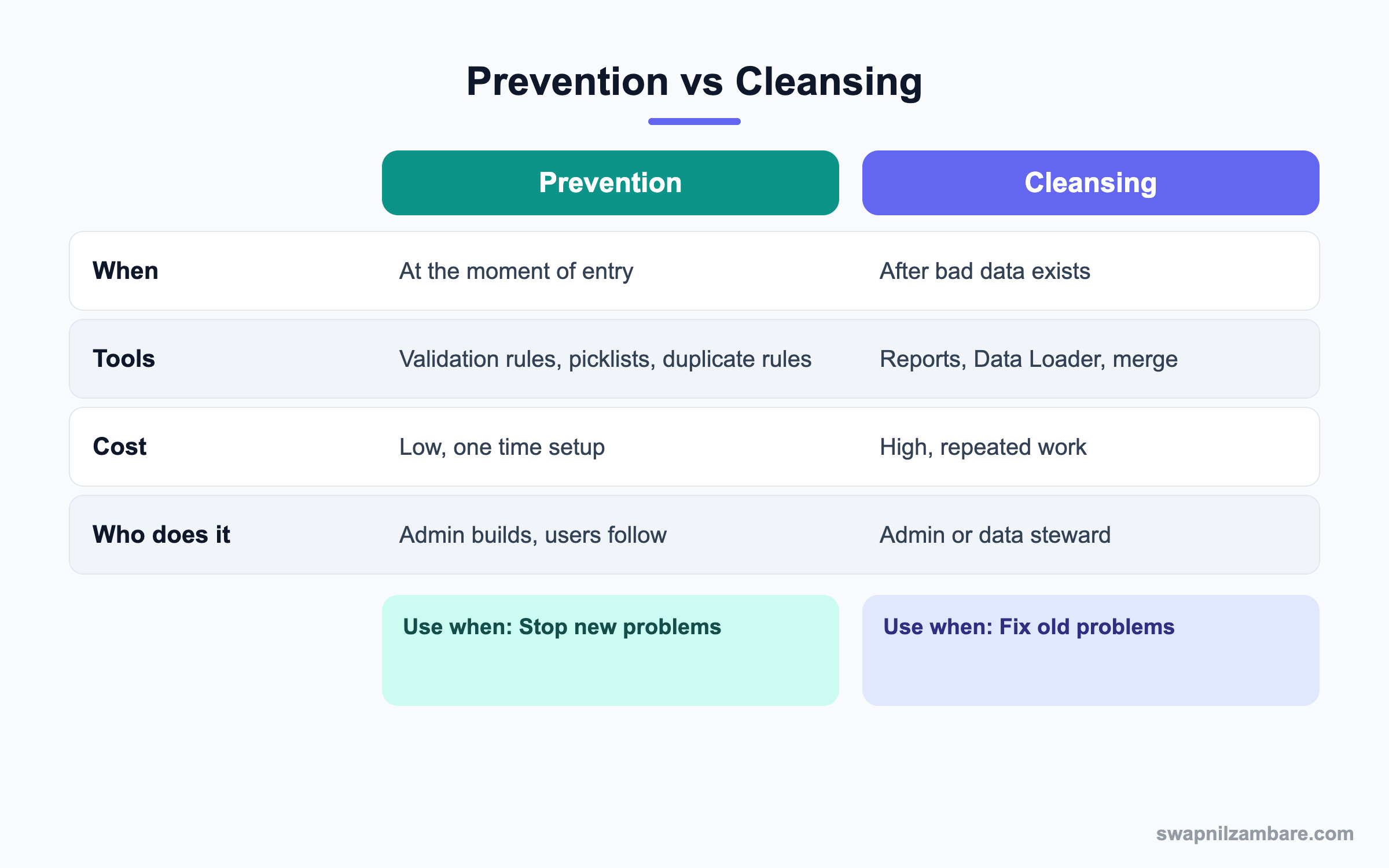
In short, fix the source first so bad data stops coming in. Then clean what already exists.
A Real Salesforce Data Quality Example
Bright Path Tutors has 8,000 leads. About 20% have no phone, many phones use mixed formats and some students appear twice. Let’s build the plan.
Step 1: Write the Lead Standard
These are the rules the sales head agreed to.
| Field | Rule |
|---|---|
| Required, valid format | |
| Phone | Required, format +91 and ten digits |
| Lead Source | Picklist, required |
| City | Picklist of served cities |
| Duplicates | Block same email, warn on same phone |
Step 2: Add a Validation Rule for Phone
Create a validation rule on Lead called Phone_Format. It allows only +91 followed by ten digits.
AND(
  NOT(ISBLANK(Phone)),
  NOT(REGEX(Phone, "\\+91[0-9]{10}"))
)
The rule fires only when Phone has a value in the wrong format. The error message says “Use +91 followed by ten digits, for example +919876543210.”
Step 3: Add a Completeness Score
Create a Number formula field on Lead called Data_Quality_Score. Each filled key field adds 20 points.
IF(ISBLANK(Email), 0, 20) +
IF(ISBLANK(Phone), 0, 20) +
IF(ISPICKVAL(LeadSource, ""), 0, 20) +
IF(ISBLANK(City), 0, 20) +
IF(ISBLANK(Company), 0, 20)
A score of 100 means the lead is complete. Then a report grouped by owner shows who needs to fix records.
Step 4: Turn On Duplicate Rules
- Open Setup and type “Duplicate Rules” in Quick Find.
- Edit the standard Lead rule, set Action On Create to Block for exact email matches.
- Create a second rule that only alerts when the phone matches.
- Activate both rules.
Step 5: Clean and Monitor
- Run a report of leads with Data_Quality_Score below 60.
- Export, fix formats in a spreadsheet and update with Data Loader.
- Use the Duplicate Record Sets list to merge duplicate leads.
- Add a dashboard chart of average score by owner and review it monthly.
Common Mistakes with Salesforce Data Quality
- Cleaning data once without adding prevention, so problems return.
- Making too many fields required, which pushes users to enter junk.
- Blocking duplicates too strictly, so users cannot save real records.
- Not naming a data owner for each object.
- Ignoring data that comes from integrations and imports.
Best Practices for Salesforce Data Quality
- Agree on standards with business owners, not just inside the admin team.
- Prefer picklists over free text for values that repeat.
- Start duplicate rules in Alert mode, then switch to Block when tuned.
- Score records and show the score to the owner on the page.
- Review a quality dashboard monthly and celebrate improvements.
Practice Task
Add the Data_Quality_Score formula to Lead in your practice org. Then create five leads with missing fields and build a report sorted by score. Hint: use a Number formula with zero decimal places.
Most Asked Salesforce Data Quality Interview Questions
These Salesforce Data Quality questions are asked in almost every admin interview, because clean data is a core admin duty.
Basic Salesforce Data Quality Interview Questions
Q1: What is Salesforce Data Quality?
It means records are complete, accurate, consistent, unique and current. Good quality makes reports and automation reliable.
Q2: Which tools prevent bad data at entry?
Required fields, picklists, validation rules, duplicate rules and State and Country Picklists. Dependent picklists also help.
Q3: What is a duplicate rule?
It decides what happens when a user creates a possible duplicate, such as allow with alert or block. It uses a matching rule to find matches.
Q4: What is a matching rule?
It defines how records are compared, such as exact email or fuzzy name. Duplicate rules call matching rules.
Q5: How do you find incomplete records?
Build a report with filters like Email equals blank. A completeness score formula also helps.
Q6: How do you merge duplicate leads?
Open a lead with duplicates and click View Duplicates, or use the Duplicate Record Sets tab. Then choose the master and merge.
Q7: Why are picklists better than text fields?
Picklists give one consistent value, so reports group correctly. Text fields allow spelling mistakes.
Intermediate Salesforce Data Quality Interview Questions
Q8: What are the dimensions of data quality?
The Salesforce Data Quality dimensions are completeness, accuracy, consistency, uniqueness, timeliness and validity. Each can be measured with reports or formulas.
Q9: How would you build a data quality score?
Create a formula field that adds points for each filled key field. Then report and dashboard the score by owner.
Q10: How do you clean phone formats in bulk?
Export the records, fix the format in a spreadsheet and update with Data Loader. Then add a validation rule to stop new mistakes.
Q11: How many records can you merge at once?
You can merge up to three records at a time in the standard merge screen. For larger jobs, use a tool or a developer script.
Q12: How do you handle duplicates from integrations?
Use an external ID and upsert, so the same record updates instead of creating a new one. Duplicate rules can also check API saves.
Q13: What is a data steward?
A data steward is a person who owns the quality of certain data. They review reports, fix records and agree on standards.
Q14: How do you stop users from entering junk to pass required fields?
Keep required fields to the true minimum and use validation rules that check real formats. Also explain why each field matters.
Advanced Salesforce Data Quality Interview Questions
Q15: Scenario: a migration brought in 50,000 duplicate contacts. What is your plan?
Back up the data, tune matching rules and find duplicate sets. Then merge in batches with a tool, starting with exact matches.
Q16: How does data quality affect AI and Agentforce?
AI answers depend on the data it reads. Missing or wrong data leads to poor predictions and wrong agent replies.
Q17: How do you measure the success of a data quality project?
Track the average quality score, duplicate count and bounce rate before and after. Report the trend every month.
Q18: Scenario: sales reps ignore duplicate alerts. What do you do?
Review the matching rule for false alarms first. Then switch to Block for exact matches and train the team.
Q19: How would you keep addresses accurate over time?
Use State and Country Picklists, an address validation app if needed and a yearly review. Also keep integration sources clean.
Q20: What role does a data quality dashboard play?
It makes quality visible to managers and owners. As a result, people fix their own records instead of waiting for the admin.
Q21: How do you decide which fields need validation rules?
Start with fields used in reports, automation and integrations. Then add rules only where errors cause real problems.
Q22: Who owns Salesforce Data Quality in a company?
Everyone who enters data shares it. However, each object should have a named owner, and the admin builds the tools.
Q23: How often should you review Salesforce Data Quality?
Monthly works for most orgs. Also review after every large import or new integration.
Q24: Can flows help with Salesforce Data Quality?
Yes. A before-save flow can clean values, such as trimming spaces or setting a default. So users do less manual fixing.
Q25: What is the risk of deleting old data to improve quality?
You may lose history that reports or audits need. So archive first, and agree on a data retention rule with the business.
Q26: How do you stop bad data from a web-to-lead form?
Add validation rules, duplicate rules and required fields on the form. Also, use a hidden Lead Source value to trace the form.
Official Resources
Quick Recap
- Salesforce Data Quality means complete, accurate, consistent and unique records.
- Prevention at entry is cheaper than cleaning later.
- Validation rules, picklists and duplicate rules stop bad data.
- A quality score formula and dashboard keep owners honest.
- Review quality every month, because it is a cycle, not a project.
What’s Next?
Next, we watch background work with Salesforce Scheduled Jobs monitoring.


