Nonprofit Cloud is Salesforce’s industry cloud for charities, foundations and social organisations. It brings fundraising, program management and volunteer work into one platform. So a charity can see who gave, what the money funded and what impact it made.
This post builds on Person Accounts and Campaigns. As an example, we use the Bright Path Foundation, a charity arm that funds scholarships for students who cannot pay fees.
What is Nonprofit Cloud?
Nonprofit Cloud is a set of native Salesforce features for nonprofits. It includes fundraising objects like gift transactions and gift commitments, program management for services, and volunteer management. It replaced the older Nonprofit Success Pack, or NPSP, for new customers, although many orgs still run NPSP.
Think of a charity as a bridge. Donors stand on one side, and the people helped stand on the other. Nonprofit Cloud tracks both sides and the money crossing the bridge.
Why Nonprofit Cloud Matters
Charities must show donors where money goes and what it achieved. Also, they often have small teams and tight budgets. So spreadsheets for donors, programs and volunteers quickly become messy.
Nonprofit Cloud gives one connected system. Then fundraisers, program staff and leaders work from the same data.
How Nonprofit Cloud Works
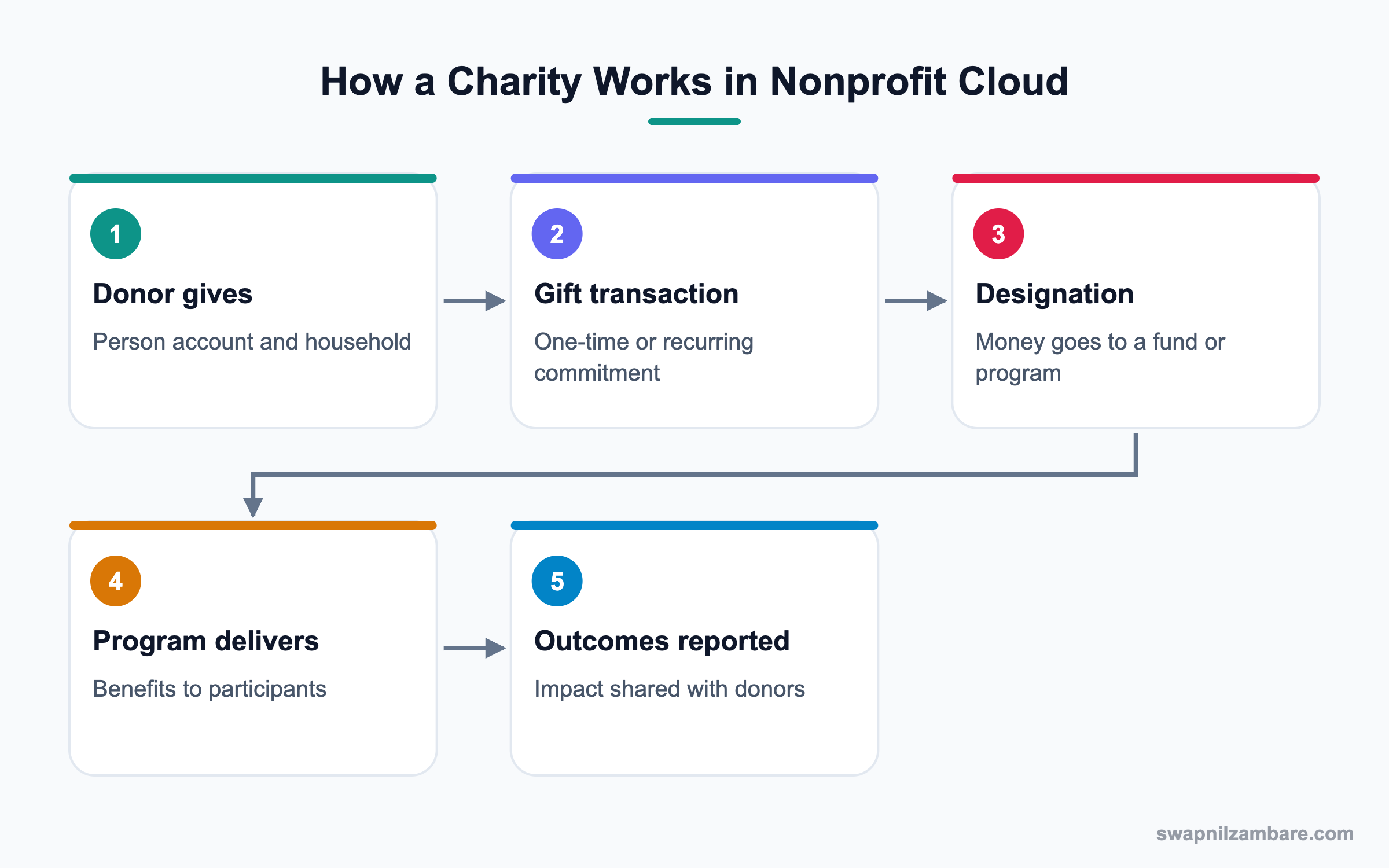
Donors are stored as person accounts and grouped into households. Each donation is a gift transaction, and recurring gifts are gift commitments. Designations link money to funds or programs. On the service side, programs hold benefits delivered to participants, and outcomes measure results.
Donors and Households
Individual donors are person accounts. Households group family members so giving can be seen together.
Gift Transactions
A gift transaction records one donation with amount, date and payment details.
Gift Commitments
A gift commitment records a promise to give, like a monthly donation. It creates scheduled transactions.
Gift Designations
Designations split a gift across funds or programs, such as 70% scholarships and 30% books.
Programs and Benefits
Programs describe services, like Scholarship Program. Benefits are what participants receive, and disbursements record each delivery.
Volunteers
Volunteer management tracks volunteer jobs, shifts and hours.
Outcomes
Outcome management defines indicators, like exam pass rate, to measure impact.
Key Nonprofit Cloud Terms
This table explains the main terms.
| Term | Meaning | Foundation example |
|---|---|---|
| Donor | Person or organisation giving | Mehta family |
| Gift transaction | One donation | 10,000 rupees on 5 June |
| Gift commitment | Promise of repeat gifts | 1,000 rupees monthly |
| Designation | Where money goes | Scholarship fund |
| Program | A service offered | Scholarship Program |
| Benefit | What a participant gets | Fee waiver for one term |
| Outcome indicator | Impact measure | Pass rate of scholars |
NPSP vs Nonprofit Cloud
Many admins meet both. This table compares them.
| Feature | NPSP | Nonprofit Cloud |
|---|---|---|
| Type | Managed package | Native platform |
| Donors | Contacts in household accounts | Person accounts |
| Gifts | Opportunities | Gift transactions |
| Recurring gifts | Recurring donations | Gift commitments |
| Programs | Separate package | Built in |
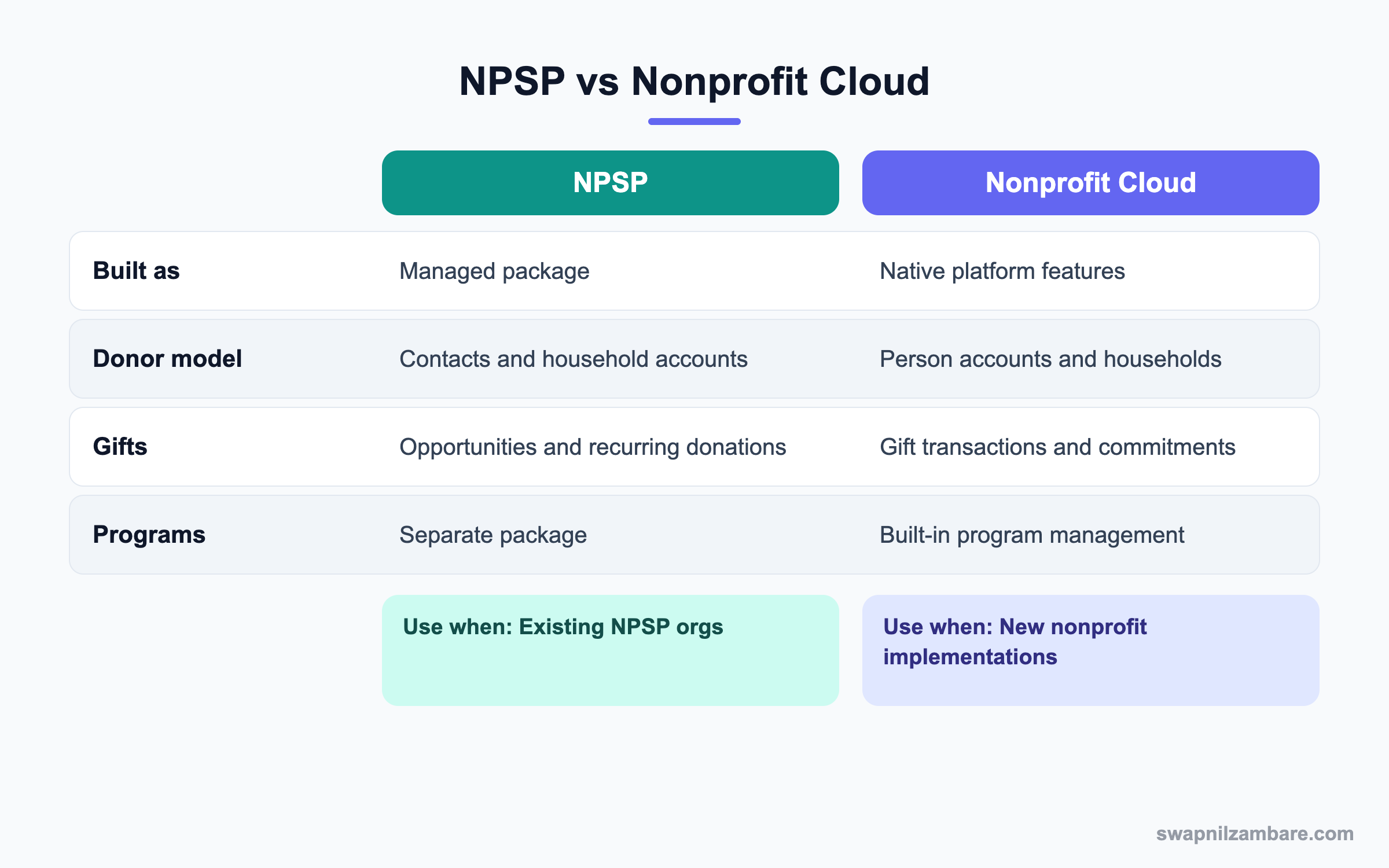
In short, new implementations usually start with Nonprofit Cloud. Existing NPSP orgs plan a careful move or stay until ready.
A Real Nonprofit Cloud Example
The Bright Path Foundation raises money for scholarships. It wants to track donors, monthly givers, scholars and exam results.
Step 1: Prepare the Org
- Confirm Nonprofit Cloud licenses and permission sets.
- Turn on person accounts.
- Assign fundraising and program permission sets to staff.
- Plan record types and page layouts for donors and participants.
Step 2: Record Donations
These records were created for one donor.
| Record | Value |
|---|---|
| Donor | Ritu Mehta, person account |
| Household | Mehta Household |
| Gift commitment | 1,000 rupees monthly for 12 months |
| Gift transaction | First payment received |
| Designation | 100% to Scholarship Fund |
Step 3: Set Up the Program
- Create the Scholarship Program record.
- Create a benefit called Term Fee Waiver.
- Enrol scholars as program participants.
- Record a benefit disbursement each term.
Step 4: Report Impact
- Create an outcome indicator called Exam Pass Rate.
- Record results for each scholar after exams.
- Build a dashboard with money raised, scholars helped and pass rate.
- Share a short impact report with donors.
Admins can total gifts by designation with a report or query. Object and field names follow your org’s data model.
SELECT GiftDesignation.Name, SUM(Amount)
FROM GiftTransactionDesignation
GROUP BY GiftDesignation.Name
Common Mistakes with Nonprofit Cloud
- Copying NPSP habits into Nonprofit Cloud without learning the new model.
- Skipping designations, so money cannot be traced to programs.
- Not separating donor data from participant data in sharing.
- Building custom objects for features that already exist.
- Forgetting consent and data protection for donors.
Best Practices for Nonprofit Cloud
- Map the donor and program processes before setup.
- Use designations from the first gift.
- Keep participant data private with strict sharing.
- Use outcome indicators to prove impact.
- Train volunteers and staff with simple guides.
Practice Task
Design three gift designations for a charity you know and one outcome indicator for each funded program. Hint: indicators should be measurable numbers.
Most Asked Nonprofit Cloud Interview Questions
These Nonprofit Cloud questions appear in interviews for nonprofit consultancies and charity admins.
Basic Nonprofit Cloud Interview Questions
Q1: What is Nonprofit Cloud?
It is Salesforce’s industry cloud for nonprofits, with native features for fundraising, programs, volunteers and outcomes. So charities manage donors and services in one place.
Q2: What is NPSP?
The Nonprofit Success Pack is an older managed package for nonprofits. Many orgs still use it, but new customers usually start with Nonprofit Cloud.
Q3: How are donors stored in Nonprofit Cloud?
Individuals are person accounts, grouped into households. However, organisations such as companies and trusts are business accounts.
Q4: What is a gift transaction?
It records one donation with amount, date and payment details. It is the core record for fundraising reports.
Q5: What is a gift commitment?
It records a promise to give over time, like a monthly gift. Scheduled transactions follow from it.
Q6: What is a gift designation?
It says where the money goes, such as a scholarship fund. One gift can be split across designations.
Q7: What is a benefit in program management?
It is what a participant receives, like a fee waiver. Disbursements record each time it is given.
Intermediate Nonprofit Cloud Interview Questions
Q8: How do programs and benefits relate?
A program is the service, and benefits are the items or support it gives. Participants are enrolled and receive benefits through disbursements.
Q9: How do you track volunteer hours?
Use volunteer management features for jobs, shifts and hours. Then report on hours by program.
Q10: How do you measure impact?
Define outcome indicators and record results. Then dashboards show impact next to money raised.
Q11: Why separate donor and participant sharing?
Because participants may be vulnerable and their data is private. So fundraisers should not see it by default.
Q12: How do campaigns fit in?
Campaigns track appeals and events. Gifts link to campaigns so you see which appeal raised the most.
Q13: What licenses are needed?
Nonprofit Cloud licenses and permission sets, often with special pricing for nonprofits. Check the current offer.
Q14: Can donors use a portal?
Yes. For example, Experience Cloud can give donors a page to see gifts and update details, if set up.
Advanced Nonprofit Cloud Interview Questions
Q15: Scenario: an NPSP org wants to move to Nonprofit Cloud. What is your approach?
Map NPSP objects to the new model, clean data, test migration in a sandbox and plan reports again. Then move in phases.
Q16: Scenario: leaders cannot see how much went to each program. What is missing?
Probably gift designations. Add them and backfill past gifts where possible.
Q17: How do you handle recurring gift failures?
Track failed payments on transactions, alert staff with a flow and contact the donor kindly.
Q18: How can Agentforce help a nonprofit?
AI can draft donor thank-you messages or answer volunteer questions, while staff review sensitive replies.
Q19: What data protection steps matter?
Consent tracking, limited access to participant data and secure payment handling.
Q20: How do you report impact to donors?
Combine gifts, designations, benefits delivered and outcome results in one dashboard or report.
Q21: Why avoid building custom donation objects?
Native objects work with fundraising features and updates. Custom copies add maintenance.
Q22: How do you onboard volunteers?
Use a form or site to collect details, approve them and assign shifts. Then track hours.
Q23: What should a new admin learn first in Nonprofit Cloud?
Learn donors, gift transactions and designations first, because fundraising drives most reports. Then learn programs and benefits for the service side.
Q24: How does Nonprofit Cloud help small teams?
It replaces many spreadsheets with one system and ready objects. As a result, a small team spends less time copying data and more time on its mission.
Q25: Can Nonprofit Cloud handle in-kind gifts?
Yes, gifts of goods or services can be recorded, often with their own fields or types. However, follow your finance team’s rules for valuing them.
Q26: How do you thank donors at scale in Nonprofit Cloud?
Use a flow on new gift transactions to send a thank-you email with merge fields. Then track replies and big gifts for a personal call.
Official Resources
Quick Recap
- Nonprofit Cloud covers fundraising, programs, volunteers and outcomes.
- Gift transactions, commitments and designations track money.
- Programs and benefits track services to participants.
- Outcome indicators prove impact.
- NPSP is the older package, still used by many orgs.
What’s Next?
Next, we look at schools and universities with Education Cloud.


