Financial Services Cloud is Salesforce’s industry cloud for banks, wealth managers and insurers. It helps advisors see each client’s household, accounts, goals and life events in one place. So conversations become more personal, and nothing important is missed.
This post builds on Person Accounts and Accounts and Contacts. Because Bright Path is a tutoring company, we use a small advisory firm called BrightWealth Advisors as the example.
What is Financial Services Cloud?
Financial Services Cloud, or FSC, adds a financial data model and tools to Salesforce. Clients are usually person accounts, and they group into households. Financial accounts store products like savings, loans and investments. Goals, life events and action plans guide advisors.
Think of a family doctor who knows the whole family’s history, not just one patient. FSC gives advisors that same full picture of a family’s money.
Why Financial Services Cloud Matters
Financial decisions are personal and linked to life events. A new baby, a house purchase or retirement all change what a client needs. However, data often sits in many banking systems.
So Financial Services Cloud brings it together for the advisor. Also, it supports compliance needs that are common in banking.
How Financial Services Cloud Works
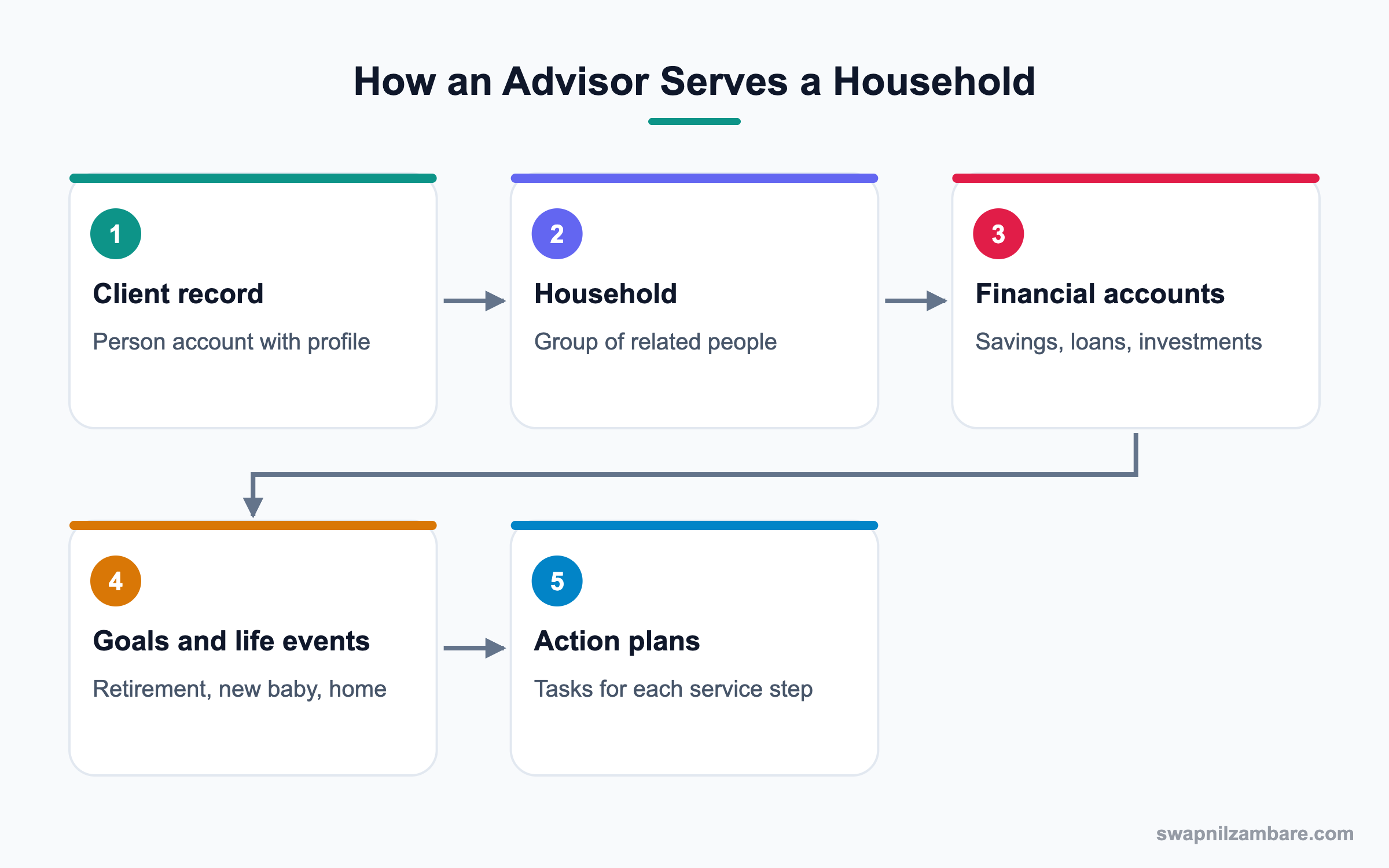
An advisor opens a client, sees their household and related people, and reviews financial accounts and goals. Then they record life events and start action plans for services like opening an account. Integrations keep balances updated from core banking systems.
Clients and Households
Clients are person accounts. A household groups related people, and its totals roll up from members’ accounts.
Relationship Centre
The Actionable Relationship Center shows households, businesses and connected people as a visual map. Advisors can act from the map.
Financial Accounts
Financial accounts store products like savings, credit cards and investment portfolios, with roles such as primary owner or joint owner.
Goals and Life Events
Financial goals track targets like retirement savings. Life events record moments like marriage or a new job.
Action Plans
Action plans are task templates for repeat processes, like onboarding a client. They keep steps consistent.
Compliant Data Sharing
Compliant data sharing helps control access in regulated teams, such as keeping advisors from seeing clients they should not.
Key Financial Services Cloud Terms
This table explains common terms simply.
| Term | Meaning | BrightWealth example |
|---|---|---|
| Client | A person served | Sunita Rao |
| Household | Group of related clients | Rao Household |
| Financial account | A product the client holds | Retirement portfolio |
| Financial goal | A money target | Retire at 60 |
| Life event | Important moment | First child born |
| Action plan | Steps for a process | New client onboarding |
Sales Cloud vs Financial Services Cloud
This table compares the focus of each cloud.
| Feature | Sales Cloud | Financial Services Cloud |
|---|---|---|
| Main record | Business account | Client and household |
| Money data | Opportunity amount | Financial accounts |
| Relationships | Contact roles | Households and maps |
| Processes | Sales stages | Onboarding, reviews, referrals |
| Compliance | Standard | Extra sharing options |
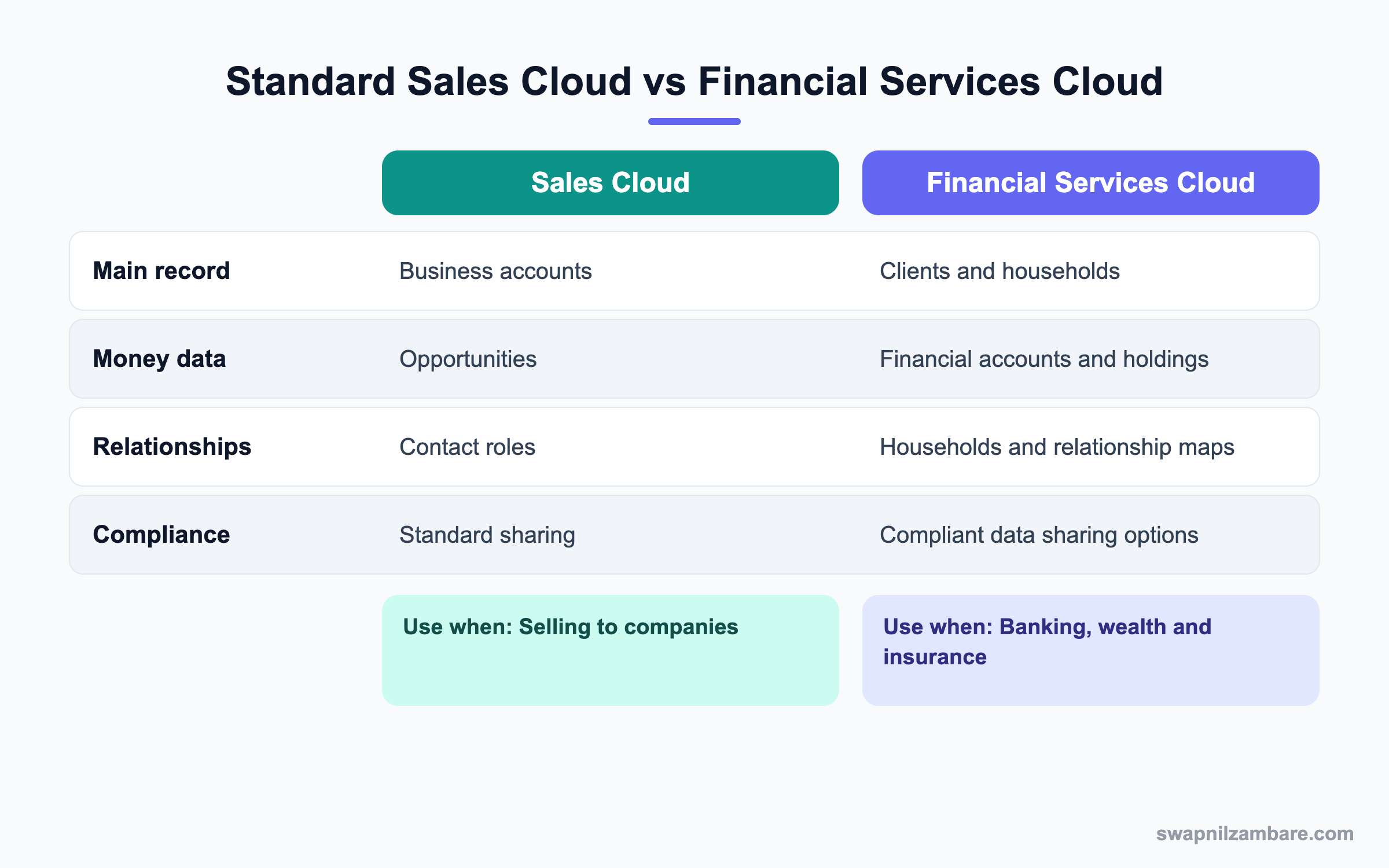
In short, FSC keeps the platform you know but models people, families and money instead of company deals.
A Real Financial Services Cloud Example
BrightWealth has 2,000 clients. Advisors want a household view, goal tracking and a standard onboarding checklist.
Step 1: Set Up the Basics
- Confirm FSC licenses and permission set licenses.
- Make sure person accounts are on.
- Assign FSC permission sets to advisors and assistants.
- Review sharing so advisors see only their book of clients.
Step 2: Create a Household
- Open the client Sunita Rao.
- Create the Rao Household and add Sunita and her husband.
- Set the primary member and relationship roles.
- Add the household to the relationship map view.
Step 3: Add Accounts and Goals
These are the records added.
| Record | Value |
|---|---|
| Financial account | Retirement Portfolio, joint owners |
| Financial account | Home Loan, primary owner Sunita |
| Goal | Retirement fund 1 crore by 2045 |
| Life event | Child starting college in 2030 |
Step 4: Start an Action Plan
- Create an action plan template called Client Onboarding.
- Add tasks like Collect KYC Documents, Risk Profile and First Review.
- Launch it on the Rao Household.
- Track progress from the household page.
Admins can list a household’s financial accounts with a query. Object names follow the FSC data model in your org.
SELECT Name, FinancialAccountType, Balance
FROM FinancialAccount
WHERE PrimaryOwner.Name = 'Sunita Rao'
Common Mistakes with Financial Services Cloud
- Modelling clients as business accounts instead of person accounts.
- Skipping households, so advisors miss family context.
- Opening access too widely in a regulated business.
- Building custom objects for data FSC already models.
- Not syncing balances regularly from core systems.
Best Practices for Financial Services Cloud
- Plan the household model before loading data.
- Use action plans for repeat regulated steps.
- Keep sharing strict and review it often.
- Integrate balances on a clear schedule.
- Train advisors to record life events and goals.
Practice Task
Draw a household for a family you know, with three members and four financial accounts. Mark the primary owner of each account. Hint: joint accounts have two owners.
Most Asked Financial Services Cloud Interview Questions
These Financial Services Cloud questions come up for admins on banking and insurance projects.
Basic Financial Services Cloud Interview Questions
Q1: What is Financial Services Cloud?
It is Salesforce’s industry cloud for banking, wealth and insurance. It adds clients, households, financial accounts, goals and tools for advisors.
Q2: How are clients stored?
Usually as person accounts. So each client is one record with personal details, and they can still join households and relationships.
Q3: What is a household?
A household groups related clients, like a family. It shows combined accounts and relationships, so the advisor sees total wealth and who decides.
Q4: What is a financial account?
It stores a product a client holds, like a savings account, loan or portfolio. Roles show who owns it.
Q5: What is a financial goal?
It is a target the client wants to reach, like saving for retirement. Advisors track progress against it and suggest changes when the gap grows.
Q6: What is a life event?
It is an important moment, like marriage or a new job, that may change financial needs. For example, a new job may mean a new salary account and higher savings.
Q7: What are action plans?
They are templates of tasks for repeat processes, like onboarding. They keep steps consistent and visible, which matters a lot in regulated work.
Intermediate Financial Services Cloud Interview Questions
Q8: What is the Actionable Relationship Center?
It is a visual map of households, businesses and connected people. Advisors can view and act on relationships from it.
Q9: What is compliant data sharing?
It is a set of sharing options for regulated teams that control who sees which clients and records. For example, it can stop one branch from seeing another branch’s clients.
Q10: How do balances get into FSC?
Through integrations with core banking systems, often scheduled or near real time. Because core systems own balances, Salesforce usually only reads them.
Q11: Can FSC support business clients too?
Yes. Business accounts can be modelled with relationships to people and households. So an advisor sees that a client also owns a small company.
Q12: How do referrals work in FSC?
Staff can refer clients to other teams, and referrals route to the right expert based on need. Then managers can report on referral volume and conversion.
Q13: What licenses are needed?
You need FSC licenses and permission set licenses. The exact set depends on your contract, so check it before setup.
Q14: Why use households instead of contact roles?
Households show the whole family and roll up totals. Contact roles alone do not give that view.
Advanced Financial Services Cloud Interview Questions
Q15: Scenario: advisors see clients from another branch. What do you check?
Check OWD, role hierarchy, sharing rules and compliant data sharing settings. Then restrict access by branch or team.
Q16: How would you migrate client data into FSC?
Load people, then households and relationships, then financial accounts and roles. Validate links at each stage.
Q17: How do you keep data private in sandboxes?
Use Data Mask or synthetic data so real financial details never sit in test orgs.
Q18: How can Agentforce help advisors?
AI can summarise client history and suggest next steps, while the Trust Layer protects data.
Q19: Scenario: household totals look wrong. Why?
Account roles or household membership may be wrong, or rollup settings may need a recalculation.
Q20: Why prefer standard FSC objects?
They work with FSC features and updates. Custom copies create extra work later.
Q21: How do you measure success?
Track onboarding time, client reviews completed, goal coverage and advisor adoption.
Q22: What compliance features might a bank need?
Strict sharing, Shield encryption, audit trails, consent tracking and record retention rules.
Q23: What should an admin learn first about Financial Services Cloud?
Start with person accounts, households and financial accounts. Then learn action plans and sharing, because most projects use them early.
Q24: How does Financial Services Cloud help client reviews?
Advisors see goals, accounts and recent events on one page before a meeting. As a result, reviews are faster and more personal.
Q25: Can insurers use Financial Services Cloud?
Yes. Insurance features cover policies and claims in many setups. However, check which features your license includes.
Q26: Why are life events valuable in Financial Services Cloud?
They signal new needs, like education savings after a child is born. So advisors can reach out at the right time.
Q27: How do you keep advisor pages simple in Financial Services Cloud?
Show only the key components, like household, accounts and goals, and move the rest to tabs. Then advisors find what they need quickly.
Official Resources
- Trailhead: Financial Services Cloud Basics
- Salesforce Help: Financial Services Cloud
- Salesforce Help: Action Plans
Quick Recap
- Financial Services Cloud models clients, households and money.
- Financial accounts, goals and life events give a full picture.
- The relationship centre shows connected people.
- Action plans standardise regulated steps.
- Strict sharing and data protection are essential.
What’s Next?
Next, we look at charities with Nonprofit Cloud.


