Education Cloud is Salesforce’s industry cloud for schools, colleges, universities and training providers. It tracks the full student lifecycle, from first enquiry to alumni giving. So staff in admissions, academics and student support share one view of each learner.
This post builds on Person Accounts and Lead Management. Bright Path Tutors is a training provider, so it is the perfect example for Education Cloud.
What is Education Cloud?
Education Cloud is a set of native Salesforce features and objects for education. It includes a learner model, academic terms, learning programs, courses and course offerings, plus enrolment records. It also adds tools for admissions, advising, student success and alumni relations, depending on your licenses.
Think of a school office with one shared file per student. Admissions, teachers and counsellors all write in the same file. Education Cloud is that shared file, kept safe and organised.
Why Education Cloud Matters
Education teams often use separate systems for enquiries, applications, classes and support. As a result, a counsellor may not know a student is failing a course, or alumni teams may lose contact details.
So Education Cloud connects the story of each learner in one place. Also, standard objects mean reports and features work across departments.
How Education Cloud Works
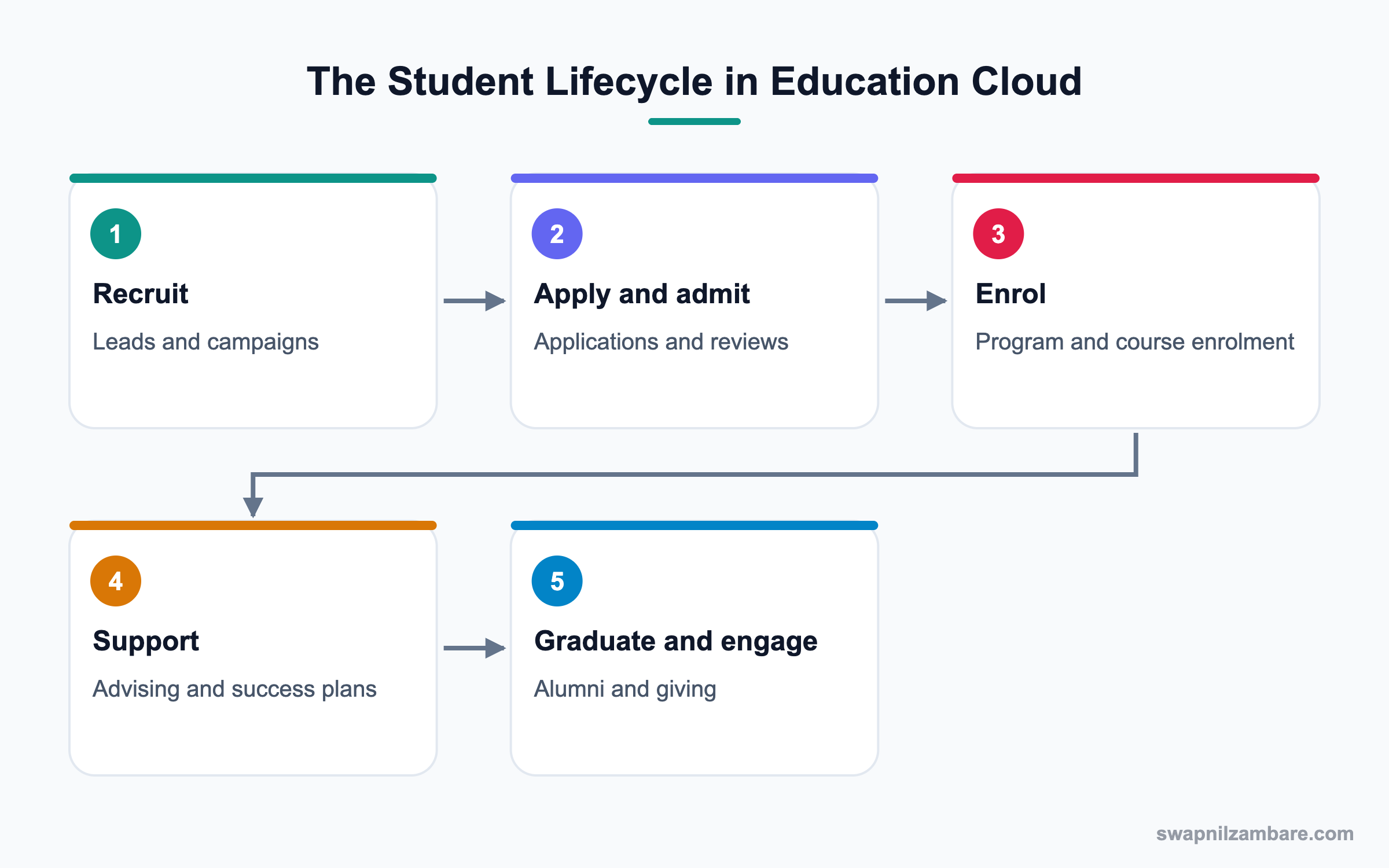
Prospects start as leads and campaign members. When they apply, application records track documents and decisions. Admitted learners enrol in programs and course offerings for each term. Then advisors track progress with success plans and alerts. After graduation, learners stay connected as alumni.
Learners
Learners are usually person accounts with education details like student ID and level.
Academic Terms
Terms define periods like Spring 2027. Course offerings belong to terms, so reports can compare one term with another.
Programs and Courses
A learning program is a qualification or track, like Full Stack Development. Courses are subjects, and course offerings are scheduled runs of a course in a term.
Enrolments
Program enrolment links a learner to a program. Course offering participation links a learner to a specific class.
Admissions
Application management tracks applications, documents, reviews and decisions.
Advising and Student Success
Advisors see caseloads, create success plans and respond to alerts, like low attendance.
Key Education Cloud Terms
This table explains common objects in plain words.
| Term | Meaning | Bright Path example |
|---|---|---|
| Learner | Person studying | Asha Mehta |
| Academic term | Study period | Term 1, 2027 |
| Learning program | Qualification or track | Data Analytics Program |
| Course | Subject | Python Basics |
| Course offering | A course in one term | Python Basics, Term 1, Batch A |
| Program enrolment | Learner joins a program | Asha in Data Analytics |
| Success plan | Support steps | Extra practice sessions |
EDA vs Education Cloud
Older orgs may use Education Data Architecture, or EDA. This table compares them.
| Feature | EDA | Education Cloud |
|---|---|---|
| Type | Managed package | Native industry cloud |
| Learners | Contacts | Person accounts |
| Academic model | Package objects | Standard objects |
| Admissions and advising | Add-ons | Built-in features |
| Best for | Existing EDA orgs | New implementations |
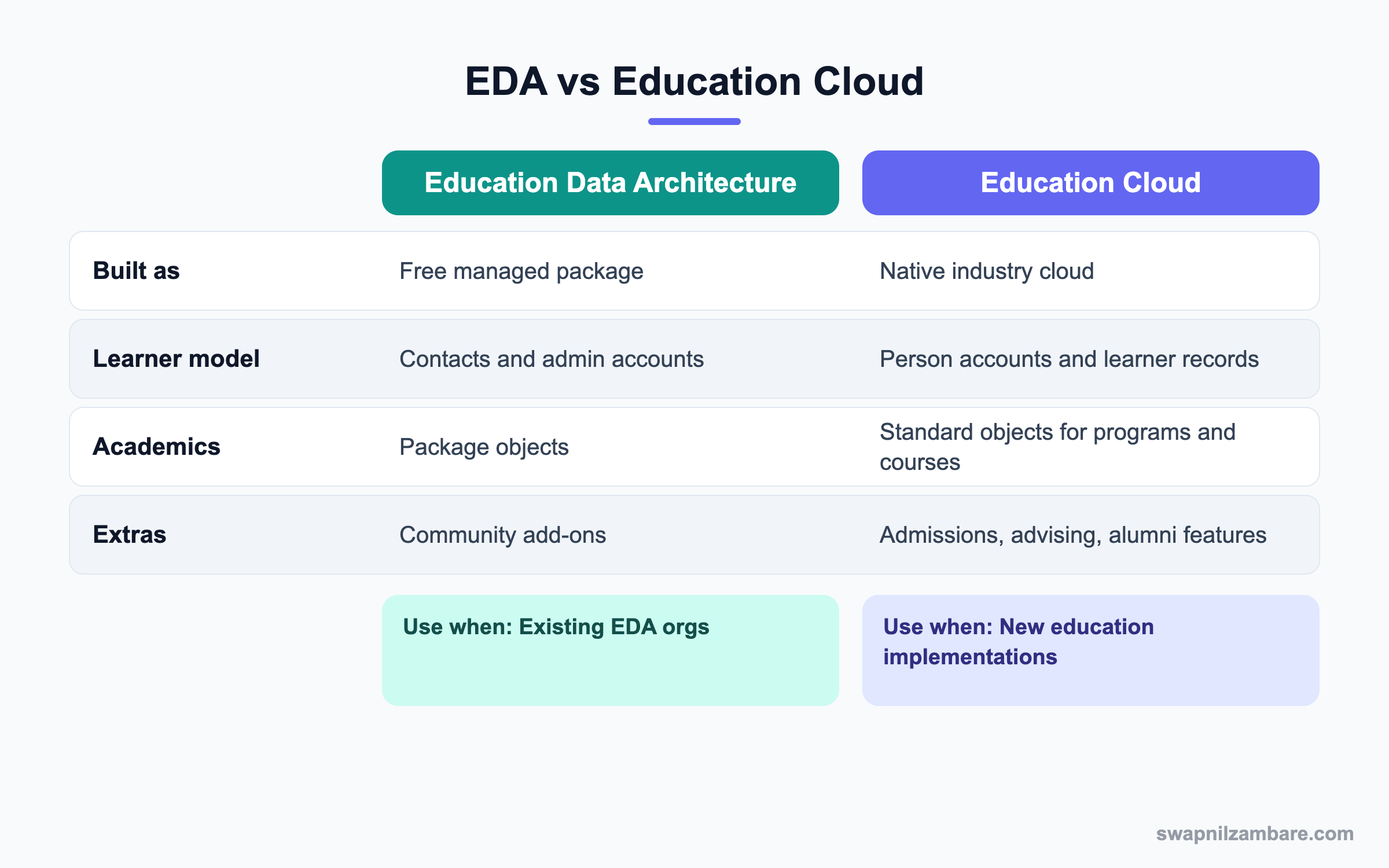
In short, new projects usually start with Education Cloud. EDA orgs plan a careful move when ready.
A Real Education Cloud Example
Bright Path wants to manage applications for its Data Analytics Program, enrol learners in course offerings and alert advisors when attendance drops.
Step 1: Set Up the Academic Model
These are the records created.
| Record | Value |
|---|---|
| Academic term | Term 1, 2027 |
| Learning program | Data Analytics Program |
| Courses | Python Basics, SQL Basics, Statistics |
| Course offering | Python Basics, Term 1, Batch A |
| Capacity | 30 learners |
Step 2: Handle Applications
- Publish an application form on the website or an Experience Cloud site.
- Each submission creates an application record linked to the learner.
- Reviewers check documents and record a decision.
- Admitted learners get a program enrolment automatically through a flow.
Step 3: Enrol in Classes
- Open the Python Basics, Term 1, Batch A offering.
- Add admitted learners as participants.
- Check capacity before adding more learners.
Step 4: Support with Advising
- Assign advisors to learners as their caseload.
- Create an alert rule when attendance drops below 75%.
- When an alert fires, the advisor creates a success plan with steps.
Admins can check program enrolments with a query. Names follow the Education Cloud data model in your org.
SELECT Account.Name, LearningProgram.Name, Status
FROM ProgramEnrollment
WHERE Status = 'Active'
Common Mistakes with Education Cloud
- Mixing courses and course offerings, so terms get confused.
- Using contacts for learners in a model that expects person accounts.
- Opening student records to too many staff.
- Building custom application objects when standard features fit.
- Ignoring data from the student information system.
Best Practices for Education Cloud
- Design the academic model with the registrar first.
- Integrate with the student information system clearly.
- Use flows to move learners from applicant to enrolled.
- Protect student data with strict sharing.
- Use success plans and alerts to help learners early.
Practice Task
Model one program you know with three courses and one term. Then list the course offerings you would create. Hint: each course run in a term is one offering.
Most Asked Education Cloud Interview Questions
These Education Cloud questions appear in interviews for education clients and training companies.
Basic Education Cloud Interview Questions
Q1: What is Education Cloud?
It is Salesforce’s industry cloud for education. It tracks learners from recruitment to alumni with standard objects for programs, courses, admissions and advising.
Q2: How are learners stored?
Usually as person accounts, so each learner is one record with personal and academic details. This also lets families and households link to the learner.
Q3: What is an academic term?
It is a study period, like a semester. Course offerings are linked to terms, so you can report results term by term.
Q4: What is the difference between a course and a course offering?
A course is the subject, like Python Basics. A course offering is one run of that course in a term, with dates and capacity.
Q5: What is a learning program?
It is a qualification or track, like a diploma, made of several courses. Learners enrol in the program and then in its course offerings.
Q6: What is program enrolment?
It links a learner to a program and shows status, like Active or Completed. So advisors see who is still studying.
Q7: What is a success plan?
It is a set of support steps an advisor creates to help a learner succeed. For example, extra practice and a weekly check-in.
Intermediate Education Cloud Interview Questions
Q8: How do applications work?
Application records track forms, documents, reviews and decisions. Then flows can enrol admitted learners automatically.
Q9: How do advisors find learners at risk?
Through alerts based on rules, like low attendance or grades, and through caseload views. So help reaches learners early.
Q10: How does Education Cloud connect to a student information system?
Through integrations, often MuleSoft or APIs, that sync courses, enrolments and grades. However, agree which system owns each field.
Q11: Why use person accounts for learners?
They fit individuals and work with Education Cloud features and households. Also, many standard pages expect them.
Q12: What is EDA?
Education Data Architecture is an older free package for education. Many orgs still use it, so admins should know both models.
Q13: How do you control access to student data?
Use private sharing, roles, permission sets and field-level security. Then advisors see only their caseload.
Q14: Can learners use a portal?
Yes. Experience Cloud sites can let learners apply, see classes and contact advisors.
Advanced Education Cloud Interview Questions
Q15: Scenario: advisors see students outside their caseload. What do you check?
Check sharing rules, OWD and caseload assignment. Then restrict access to assigned learners and test as an advisor.
Q16: How would you migrate from EDA?
Map EDA objects to Education Cloud objects, clean data, test in a sandbox and move in phases. Also rebuild reports for the new model.
Q17: How can Agentforce help in education?
An AI agent can answer admission questions or class timings, while staff handle personal cases. So the team saves time during admission season.
Q18: Scenario: course offerings overfill. How do you prevent it?
Add a validation rule or flow that checks capacity before adding participants. Then show a clear error message.
Q19: How do you measure student success?
Track retention, pass rates, alerts resolved and time to support after an alert.
Q20: What privacy rules matter?
Student data laws, consent and limited access matter most. Minors need extra care.
Q21: Why separate courses and offerings in reports?
Because one course runs many times. Offerings show results per batch and term.
Q22: How do alumni features help?
They keep graduates engaged for events, mentoring and giving.
Q23: What should an admin learn first in Education Cloud?
Start with learners, terms, programs, courses and offerings. Then learn enrolments, because most reports depend on them.
Q24: How does Education Cloud help training companies, not just universities?
The same model fits short courses and batches. For example, a coding institute can track each batch as a course offering.
Q25: Why should registrars help design Education Cloud?
Because they own academic rules like terms and credits. So their input prevents a model that does not match real timetables.
Official Resources
Quick Recap
- Education Cloud tracks learners from enquiry to alumni.
- Terms, programs, courses and offerings form the academic model.
- Applications and enrolments move learners forward.
- Advisors use alerts and success plans.
- EDA is the older package still found in many orgs.
What’s Next?
Next, we cover marketing tools with Marketing Cloud Engagement and Growth.

