Marketing Cloud Engagement is Salesforce’s platform for large-scale email, SMS and journey marketing. Marketing Cloud Growth is a newer edition built inside the core Salesforce platform on Data Cloud. Admins need to know both, because the choice changes how data, automation and setup work.
This post builds on Marketing Cloud Account Engagement basics and Campaigns. We will plan a welcome journey for new Bright Path Tutors learners.
What is Marketing Cloud Engagement?
Marketing Cloud Engagement, once known as ExactTarget, is a separate marketing platform. It has studios and builders, such as Email Studio, Mobile Studio, Contact Builder, Automation Studio and Journey Builder. Data lives in tables called data extensions, and Marketing Cloud Connect links it to Salesforce CRM.
Marketing Cloud Growth runs inside your Salesforce org. It uses Data Cloud for segments, a built-in email builder, forms and flow-based marketing automation. So admins who know Flow find it familiar.
Think of Engagement as a full TV studio with many rooms and crews. Growth is a smart studio kit you set up in your own office.
Why Marketing Cloud Engagement Matters
Many large B2C brands send millions of messages across email, SMS and apps. They need strong segmentation, journeys and high sending volume. Marketing Cloud Engagement handles that scale.
However, smaller teams may not need a separate platform. So Marketing Cloud Growth gives simpler marketing inside Salesforce. Knowing when each fits is a valuable admin skill.
How Marketing Cloud Engagement Works
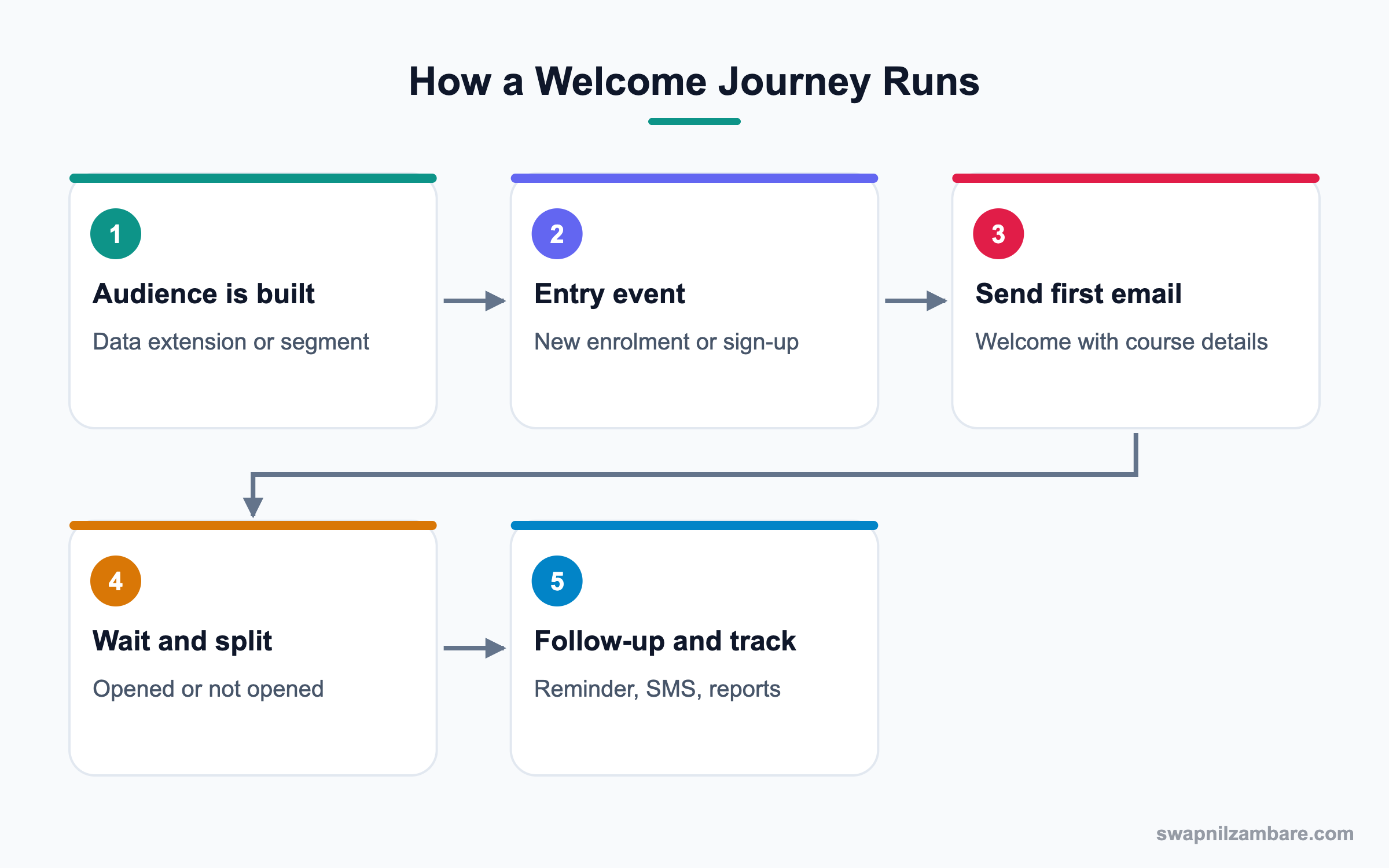
First, data arrives from CRM through Marketing Cloud Connect or from files and APIs into data extensions. Then marketers build audiences and journeys. Journeys start from entry events, send messages, wait, split by behaviour and track results. Finally, tracking data can flow back to Salesforce records.
Contact Builder and Data Extensions
Contact Builder defines how contacts and data relate. Data extensions are tables that hold audiences and attributes.
Email Studio and Content Builder
Marketers design emails with Content Builder and send them from Email Studio or journeys.
Journey Builder
Journey Builder creates multi-step journeys with waits, decision splits and channels like email and SMS.
Automation Studio
Automation Studio schedules imports, SQL queries and other data jobs.
Marketing Cloud Connect
Connect links Engagement with Salesforce CRM, so synced data and tracking results move between them.
Marketing Cloud Growth Features
Growth adds campaigns, email content, forms, Data Cloud segments and marketing flows inside the core org.
Key Marketing Cloud Engagement Terms
This table explains common terms simply.
| Term | Meaning | Bright Path example |
|---|---|---|
| Data extension | A table of marketing data | New Learners table |
| Journey | Multi-step customer path | Welcome Journey |
| Entry source | What starts a journey | New enrolment record |
| Decision split | A branch by data or behaviour | Opened first email |
| Automation | Scheduled data job | Nightly import |
| Business unit | Separate account area | Bright Path India |
Marketing Cloud Engagement vs Marketing Cloud Growth
This table compares the two editions.
| Feature | Engagement | Growth |
|---|---|---|
| Where it runs | Separate tenant | Inside Salesforce |
| Data | Data extensions | Data Cloud |
| Automation | Journey Builder | Marketing flows |
| Scale | Very large | Small to mid-size |
| Admin skills | Marketing Cloud setup | Flow and Data Cloud |
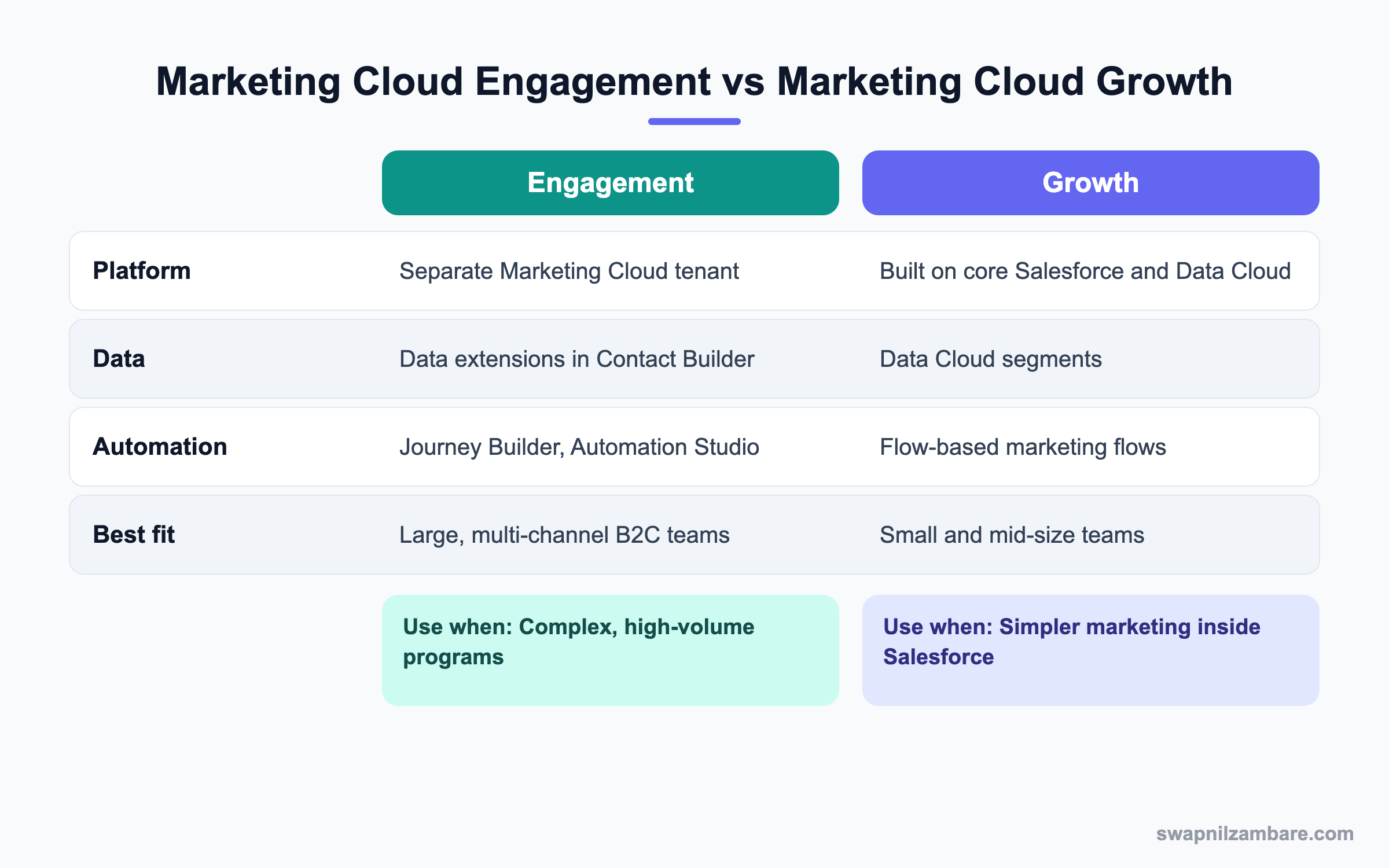
In short, choose Engagement for complex, high-volume programs. Choose Growth when a team wants simpler marketing inside Salesforce.
A Real Marketing Cloud Engagement Example
Bright Path wants every new learner to get a welcome email, a reminder before the first class and an SMS on the day.
Step 1: Prepare the Data
- Install and configure Marketing Cloud Connect with a dedicated integration user.
- Sync the Contact and Enrolment objects.
- Build a data extension called New Learners with email, phone, course and start date.
Step 2: Build the Journey
These are the journey steps.
| Step | Setting |
|---|---|
| Entry source | New Learners data extension, daily |
| Email 1 | Welcome with course details |
| Wait | Until 2 days before start date |
| Decision split | Opened Email 1 or not |
| Email 2 | Reminder with timetable |
| SMS | Morning of the first class |
Step 3: Test and Activate
- Test with seed contacts using your own email and phone.
- Check consent fields so only opted-in learners get SMS.
- Activate the journey and monitor the first sends.
Step 4: Track Results
- Review opens and clicks in Journey Builder analytics.
- Check that email tracking appears on Salesforce contacts through Connect.
- Share a short report with the sales team.
A typical SQL query in Automation Studio builds the audience. Names are examples for your account.
SELECT c.Id AS SubscriberKey, c.Email, e.Course_Name, e.Start_Date
FROM Contact_Salesforce c
JOIN Enrolment_Salesforce e ON e.Learner = c.Id
WHERE e.CreatedDate >= DATEADD(day, -1, GETDATE())
Common Mistakes with Marketing Cloud Engagement
- Using different subscriber keys, which creates duplicate contacts.
- Sending SMS without checking consent.
- Syncing every CRM field instead of only what marketing needs.
- Skipping seed tests before activating journeys.
- Choosing Engagement when the team only needs simple email.
Best Practices for Marketing Cloud Engagement
- Use the Salesforce contact or lead Id as the subscriber key.
- Sync only needed objects and fields.
- Respect consent and unsubscribe rules on every channel.
- Test journeys with seed lists every time.
- Review whether Growth or Account Engagement fits better before buying.
Practice Task
Draw a three-step journey for a course enquiry: welcome email, wait three days, then a call task or SMS. Hint: add one decision split based on email clicks.
Most Asked Marketing Cloud Engagement Interview Questions
These Marketing Cloud Engagement and Growth questions appear for admins who support marketing teams.
Basic Marketing Cloud Engagement Interview Questions
Q1: What is Marketing Cloud Engagement?
It is Salesforce’s large-scale marketing platform for email, SMS, mobile and journeys. It runs as a separate tenant linked to CRM.
Q2: What is Marketing Cloud Growth?
It is a newer marketing edition built inside core Salesforce on Data Cloud. It suits small and mid-size teams.
Q3: What is a data extension?
It is a table in Marketing Cloud Engagement that holds marketing data, like an audience list. For example, a New Learners table can hold email, phone, course and start date, so journeys can personalise messages.
Q4: What is Journey Builder?
It is the tool to build multi-step customer journeys with waits, splits and channels. So marketers can plan the whole welcome experience on one canvas instead of many separate sends.
Q5: What is Marketing Cloud Connect?
It connects Engagement with Salesforce CRM to sync data and send tracking back.
Q6: How is Account Engagement different?
Account Engagement, formerly Pardot, focuses on B2B lead nurturing and scoring. Engagement focuses on large B2C messaging.
Q7: What is a subscriber key?
It is the unique ID for a contact in Marketing Cloud. Using the CRM Id avoids duplicates.
Intermediate Marketing Cloud Engagement Interview Questions
Q8: What is Automation Studio used for?
It schedules data jobs like imports, SQL queries and exports. So audiences stay updated without manual work.
Q9: What is a business unit?
It is a separate area inside an account, often for a brand or region, with its own data and users.
Q10: How do you handle consent?
Store opt-in and opt-out per channel, check them before sends and honour unsubscribes quickly.
Q11: How does Growth build audiences?
It uses Data Cloud segments, built from unified data.
Q12: What is a decision split?
It is a journey step that sends contacts down different paths based on data or behaviour. For example, people who opened the first email get a timetable, while others get a shorter reminder.
Q13: What is a seed list?
It is a list of test recipients, often internal, who receive sends to check content and delivery. Then the team catches broken links and wrong names before customers see them.
Q14: Why sync only some CRM fields?
Fewer fields mean faster syncs, lower cost and less privacy risk.
Advanced Marketing Cloud Engagement Interview Questions
Q15: Scenario: contacts appear twice in Marketing Cloud. Why?
Different subscriber keys were used, like email in one place and CRM Id in another. Fix the key strategy and merge.
Q16: How do you choose between Engagement, Growth and Account Engagement?
Match the business: B2C scale points to Engagement, B2B nurturing to Account Engagement and simpler in-org marketing to Growth.
Q17: Scenario: tracking does not show on contacts. What do you check?
Check Marketing Cloud Connect setup, the integration user’s access and tracking settings.
Q18: How can Agentforce help marketing?
AI can draft content and build segments from plain language, with reviews before sending.
Q19: What role does Data Cloud play?
It unifies data from many sources so segments are accurate. Growth depends on it, and Engagement can use it too.
Q20: How do you protect deliverability?
Use authenticated sending domains, clean lists, consent and steady sending volumes.
Q21: What should an admin own in a marketing project?
User access, data sync, consent fields and integration health. Marketers own content and journeys.
Q22: How do you test journeys safely?
Use test mode with seed contacts, check every path and confirm exits before activation.
Q23: Who should own Marketing Cloud Engagement administration?
Usually a marketing operations admin owns the platform, while the Salesforce admin owns CRM sync and access. So both sides must agree on data and consent rules.
Q24: How long does a Marketing Cloud Engagement setup take?
A simple setup with Connect and one journey can take a few weeks. However, large brands with many business units and channels plan for months.
Q25: Can Marketing Cloud Growth send SMS?
Growth focuses first on email, forms and segments, and channel features grow by release. So check the current edition features before you promise SMS to a team.
Q26: Why is the subscriber key decision so important?
Because it is hard to change later and decides how contacts are matched. Using the CRM Id keeps one contact per person across email and SMS.
Official Resources
- Trailhead: Marketing Cloud Engagement Basics
- Salesforce Help: Journey Builder
- Trailhead: Marketing Cloud Growth Basics
Quick Recap
- Marketing Cloud Engagement is a large-scale marketing platform.
- Marketing Cloud Growth runs inside Salesforce on Data Cloud.
- Data extensions, Journey Builder and Connect are core Engagement tools.
- Consent and subscriber keys must be planned early.
- Pick the edition that matches the team’s scale and skills.
What’s Next?
Next, we sell online to businesses with Salesforce B2B Commerce.


