Salesforce B2B Commerce lets businesses sell to other businesses online, with logins, contract pricing and bulk orders. A school can sign in, see only the courses it may buy, and reorder last term’s materials in a few clicks. So the sales team spends less time on repeat orders and more time on new deals.
This post builds on Products and Price Books and Experience Cloud Sites. We will plan a store for Bright Path Tutors’ school customers.
What is Salesforce B2B Commerce?
Salesforce B2B Commerce is a commerce product built on the core platform, inside Experience Cloud. Admins create a store, link a catalog of products, set price books and give access through buyer accounts and entitlement policies. Buyers sign in, browse what they are entitled to see and place orders that become Salesforce order records.
Think of a wholesale counter with a members-only door. Every shop owner sees their own agreed price list, not the public one. Salesforce B2B Commerce is that counter, online.
Why Salesforce B2B Commerce Matters
Business buying is different from retail. Prices vary by contract, approvals matter and orders repeat every month. Email and phone orders are slow and easy to get wrong.
So Salesforce B2B Commerce moves repeat orders online, with the right price for each account. Also, because it sits in the same org, sales reps see orders next to accounts and opportunities.
How Salesforce B2B Commerce Works
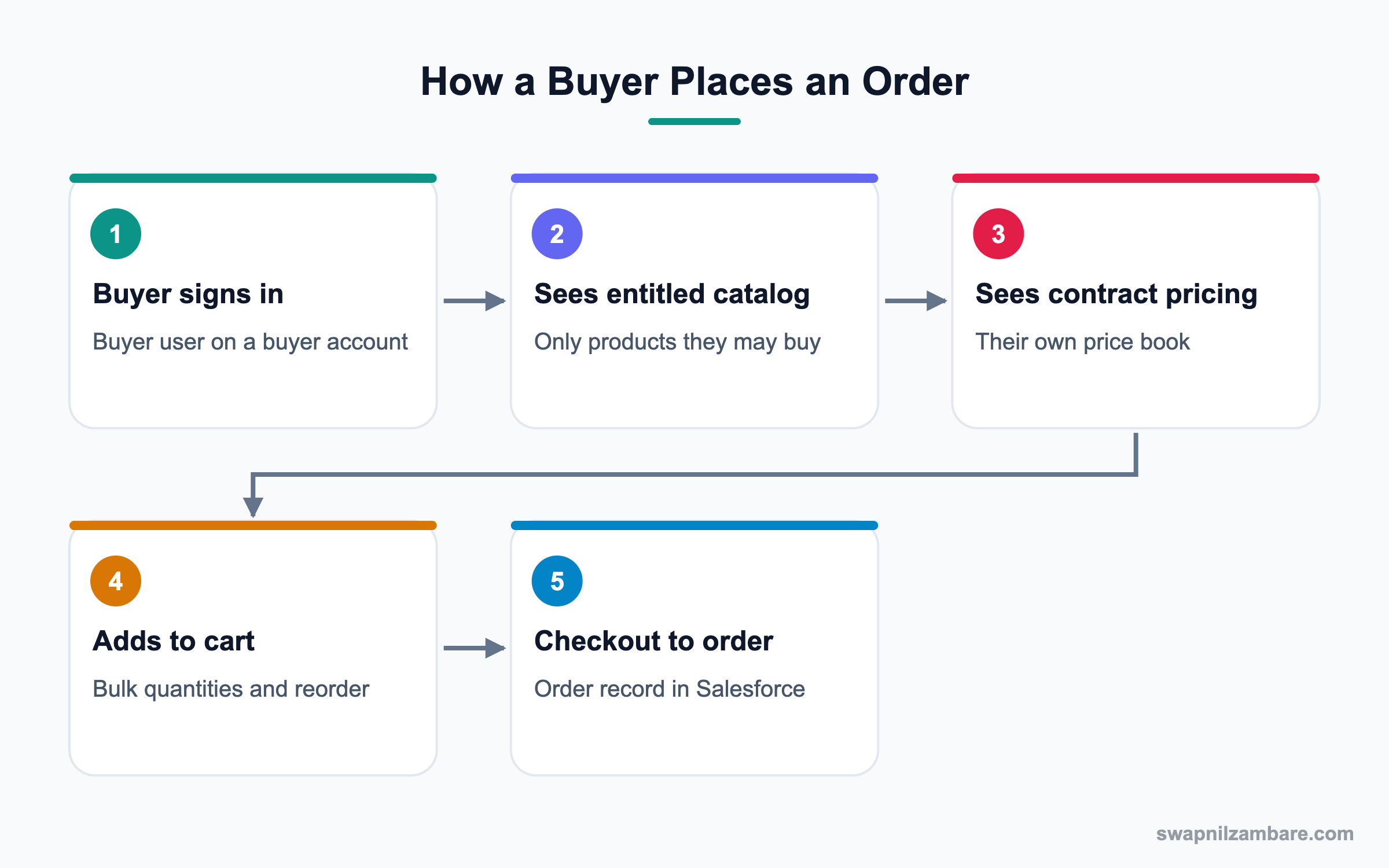
In Salesforce B2B Commerce, an admin first builds a store in Commerce setup and connects it to an Experience Cloud site. Then products, categories and price books are linked to that store. Buyer accounts and buyer groups decide who sees which catalog and price. Finally, buyers add to cart and check out, which creates an order.
Stores and Sites
A store holds commerce settings, while the Experience Cloud site holds the pages buyers see. One org can run several stores.
Catalogs and Categories
A catalog groups categories, and categories group products. Buyers browse the catalog assigned to their buyer group.
Price Books and Entitlements
Entitlement policies link buyer groups to catalogs and price books. So each account sees its own contract price.
Buyer Accounts and Buyer Users
A buyer account is a business account enabled to buy. Its contacts become buyer users with login access.
Carts and Orders
Carts hold items before checkout. At checkout, Salesforce creates an order record, which can flow to fulfilment or an ERP.
Payments and Approvals
Payment options include cards and purchase orders. Some orgs add approval flows for large orders.
Key Salesforce B2B Commerce Terms
This table explains the main terms.
| Term | Meaning | Bright Path example |
|---|---|---|
| Store | Commerce settings container | Bright Path School Store |
| Catalog | Group of categories | School Products |
| Category | Group of products | Workbooks, Course Seats |
| Buyer account | Account allowed to buy | City School |
| Buyer group | Group for entitlements | Premium Schools |
| Entitlement policy | Links catalog and price book | Premium pricing |
| Order | Checkout result | 30 seats, Term 1 |
B2B Commerce vs B2C Commerce
Both run on Commerce Cloud, but they serve different buyers. This table compares them.
| Feature | B2B Commerce | B2C Commerce |
|---|---|---|
| Buyers | Business users | Consumers |
| Login | Usually required | Usually optional |
| Pricing | Per account contract | Public price |
| Quantities | Bulk and reorder | Small baskets |
| Approvals | Common | Rare |
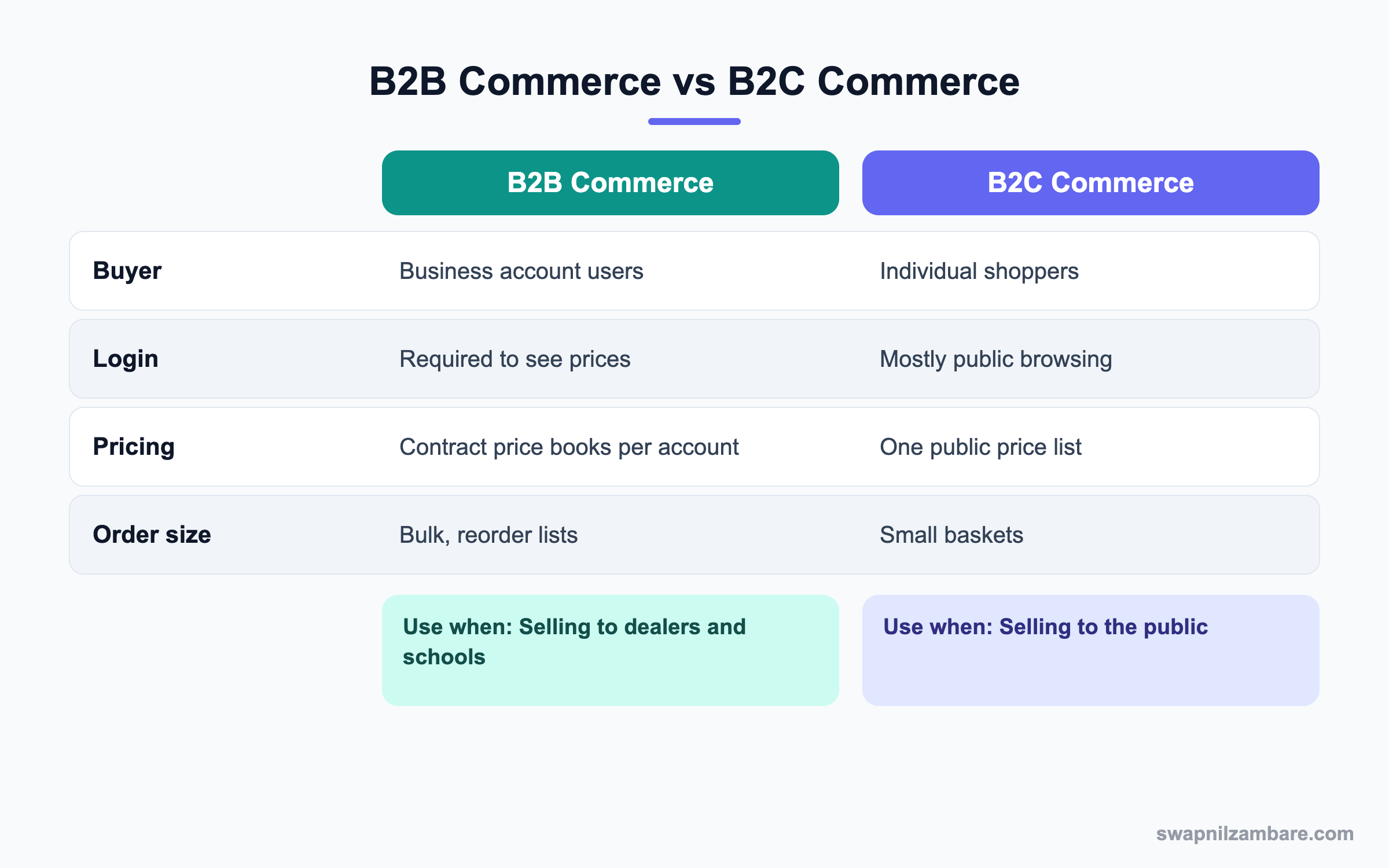
In short, use B2B Commerce when buyers are companies with agreed prices. Use B2C Commerce for public shopping.
A Real Salesforce B2B Commerce Example
Bright Path sells course seats and workbooks to 40 schools. Premium schools get a 15% lower price. Each school should log in and reorder easily.
Step 1: Set Up the Store
- Open Commerce setup and create a store called Bright Path School Store.
- Choose the B2B template and create the Experience Cloud site.
- Set the store’s currency, language and shipping options.
- Publish the site after basic branding.
Step 2: Build the Catalog and Price Books
These are the records used.
| Record | Value |
|---|---|
| Catalog | School Products |
| Categories | Course Seats, Workbooks |
| Price book 1 | Standard School Pricing |
| Price book 2 | Premium School Pricing |
| Buyer group 1 | Standard Schools |
| Buyer group 2 | Premium Schools |
Step 3: Enable Buyers
- Open the City School account and click Enable as Buyer.
- Add the account to the Premium Schools buyer group.
- Open the school’s contact and enable them as a buyer user.
- Create an entitlement policy linking Premium Schools to the catalog and premium price book.
Step 4: Test the Buying Flow
- Log in to the site as the buyer user.
- Check that only entitled products and prices appear.
- Add 30 course seats to the cart and check out.
- Open the order in Salesforce and confirm the account and amount.
Admins can review recent orders with a query.
SELECT OrderNumber, Account.Name, TotalAmount, Status
FROM Order
WHERE CreatedDate = LAST_N_DAYS:30
ORDER BY CreatedDate DESC
Common Mistakes with Salesforce B2B Commerce
- Forgetting entitlement policies, so buyers see nothing or see everything.
- Using one price book for accounts with different contracts.
- Enabling buyer users without checking site membership.
- Skipping tests as a real buyer user before go-live.
- Ignoring how orders reach fulfilment or the ERP.
Best Practices for Salesforce B2B Commerce
- Plan catalogs, price books and buyer groups before building.
- Keep buyer groups few and meaningful.
- Test every entitlement combination as a buyer user.
- Use reorder and quick order features for repeat buyers.
- Agree the order-to-fulfilment path with operations early.
Practice Task
Design buyer groups for three customer types you know, with the catalog and price book each should see. Hint: start with standard, premium and trial customers.
Most Asked Salesforce B2B Commerce Interview Questions
These Salesforce B2B Commerce questions appear in Commerce and Experience Cloud interviews.
Basic Salesforce B2B Commerce Interview Questions
Q1: What is Salesforce B2B Commerce?
It is a Salesforce product for selling online to business customers. Buyers sign in, see their own catalog and prices, and place orders that become Salesforce records.
Q2: What is a store?
It is the container for Salesforce B2B Commerce settings, linked to an Experience Cloud site that holds the pages buyers see.
Q3: What is a buyer account?
It is a business account enabled to buy in the store. So its users log in and see their own prices. Its contacts can become buyer users with login access.
Q4: What is a catalog?
A catalog groups categories, and categories group products. Buyers browse the catalog their buyer group is entitled to.
Q5: What is an entitlement policy?
It is the rule that links a buyer group to a catalog and a price book. So each group sees the right products and prices.
Q6: What happens at checkout?
Salesforce creates an order record from the cart. Then fulfilment or an ERP can take it forward.
Q7: How is it different from B2C Commerce?
B2B serves business buyers with logins, contract pricing and bulk orders. B2C serves consumers with public browsing and single baskets.
Intermediate Salesforce B2B Commerce Interview Questions
Q8: How do you give one account a special price?
Create a price book with those prices, put the account in a buyer group and link them with an entitlement policy.
Q9: Why might a buyer see no products?
The buyer group, entitlement policy or catalog link may be missing. Also check site membership and sharing.
Q10: What is a buyer group?
It is a group of buyer accounts that share entitlements, so you manage access for many accounts at once.
Q11: How do buyers reorder quickly?
Through reorder from past orders, saved lists and quick order forms with product codes.
Q12: How do orders reach the warehouse?
Through an integration to fulfilment or an ERP, often with MuleSoft or APIs. So agree the data flow early.
Q13: Can you run several stores in one org?
Yes. For example, one store per region or brand, each with its own catalog and pricing.
Q14: What payment options exist?
Cards through a payment gateway and purchase orders are common. The exact options depend on setup and region.
Advanced Salesforce B2B Commerce Interview Questions
Q15: Scenario: a school sees the wrong price. What do you check?
Check its buyer group, the entitlement policy, the price book entries and whether the product is active in that price book.
Q16: How would you handle approvals for large orders?
Add an approval flow on the order, or use account spending limits where supported. Then notify the rep and the buyer.
Q17: How do you keep the store fast?
Keep category sizes sensible, use search well and cache where possible. Also test pages with real catalog volume.
Q18: Scenario: buyers want quotes before ordering. What do you suggest?
Connect commerce with quoting, so a cart can become a quote for a rep to approve. Then the buyer orders from the agreed quote.
Q19: How does B2B Commerce relate to Revenue Cloud and CPQ?
Commerce handles self-service buying, while CPQ handles complex, rep-led quoting. Many orgs use both for different deals.
Q20: What security checks matter before go-live?
Check guest access, sharing for order and account data, buyer user permissions and payment handling.
Q21: How do you report on commerce performance?
Report on orders, average order value, reorder rate and products per account. Then compare online and rep-led sales.
Q22: Why plan catalogs with the sales team?
Because catalogs mirror how the business sells. So sales input prevents a structure buyers cannot understand.
Q23: Who should own a Salesforce B2B Commerce store day to day?
Usually a commerce or sales operations owner runs catalogs and pricing. Meanwhile, the Salesforce admin owns users, sharing and integrations.
Q24: How long does a first Salesforce B2B Commerce store take to launch?
A simple store with one catalog and two price books can launch in a few weeks. However, complex pricing and ERP integration take longer.
Q25: Can buyers see their past invoices in Salesforce B2B Commerce?
Order history is standard, while invoices depend on your billing system. So many orgs add a link or integration for invoices.
Q26: What is a good first use case for Salesforce B2B Commerce?
Start with repeat orders from existing customers, because the products and prices are already agreed. Then add new customer sign-up later.
Q27: How do you train buyers to use the store?
Send a short guide and a recorded walkthrough, then call your top accounts once. As a result, reorder habits form quickly.
Official Resources
- Trailhead: B2B Commerce Basics
- Salesforce Help: Salesforce Commerce
- Salesforce Help: Entitlement Policies
Quick Recap
- Salesforce B2B Commerce sells online to business buyers.
- Stores sit on Experience Cloud sites with catalogs and price books.
- Buyer accounts, buyer groups and entitlement policies control access.
- Checkout creates an order record in Salesforce.
- Plan catalogs, pricing and fulfilment before building.
What’s Next?
Next, we start the certification series with the Platform App Builder Certification Guide.


