LWC Navigation, toasts and modals are the three tools that make a component feel like part of Salesforce. First, navigation moves the user to a record, list or tab. Toasts show a short message, such as “Enrolment saved”. Modals open a focused dialog, such as a confirmation, on top of the page.
In this post, you will learn NavigationMixin and page references, the lightning/toast module, and the LightningModal base class. It builds on LWC lifecycle hooks, calling Apex from LWC and LWC custom events.
What is LWC Navigation?
LWC Navigation is the way a component sends users to another page in Lightning Experience, the Salesforce mobile app or an Experience Cloud site. You describe the destination as a page reference object, such as a record page with a recordId, and call NavigationMixin.Navigate. Salesforce then opens the right page in the right app.
Think of a taxi app. You do not give the driver a route, only the destination. Instead, the app knows the roads, traffic and city. A page reference is the destination, and NavigationMixin is the driver who knows the roads in every Salesforce app.
Why LWC Navigation, Toasts and Modals Matter
In practice, users need to move, get feedback and confirm actions. Here is why LWC Navigation, toasts and modals matter at Bright Path Tutors.
- First, after enrolling, the tutor should jump to the new enrolment record.
- Also, a success toast should confirm the save without blocking the screen.
- Next, cancelling a paid enrolment needs a confirmation dialog first.
- Also, hard-coded URLs break in the mobile app and Experience Cloud.
- Finally, standard toasts and modals look and behave like the rest of Salesforce.
So LWC Navigation, toasts and modals give components a native, polished feel.
How LWC Navigation Works
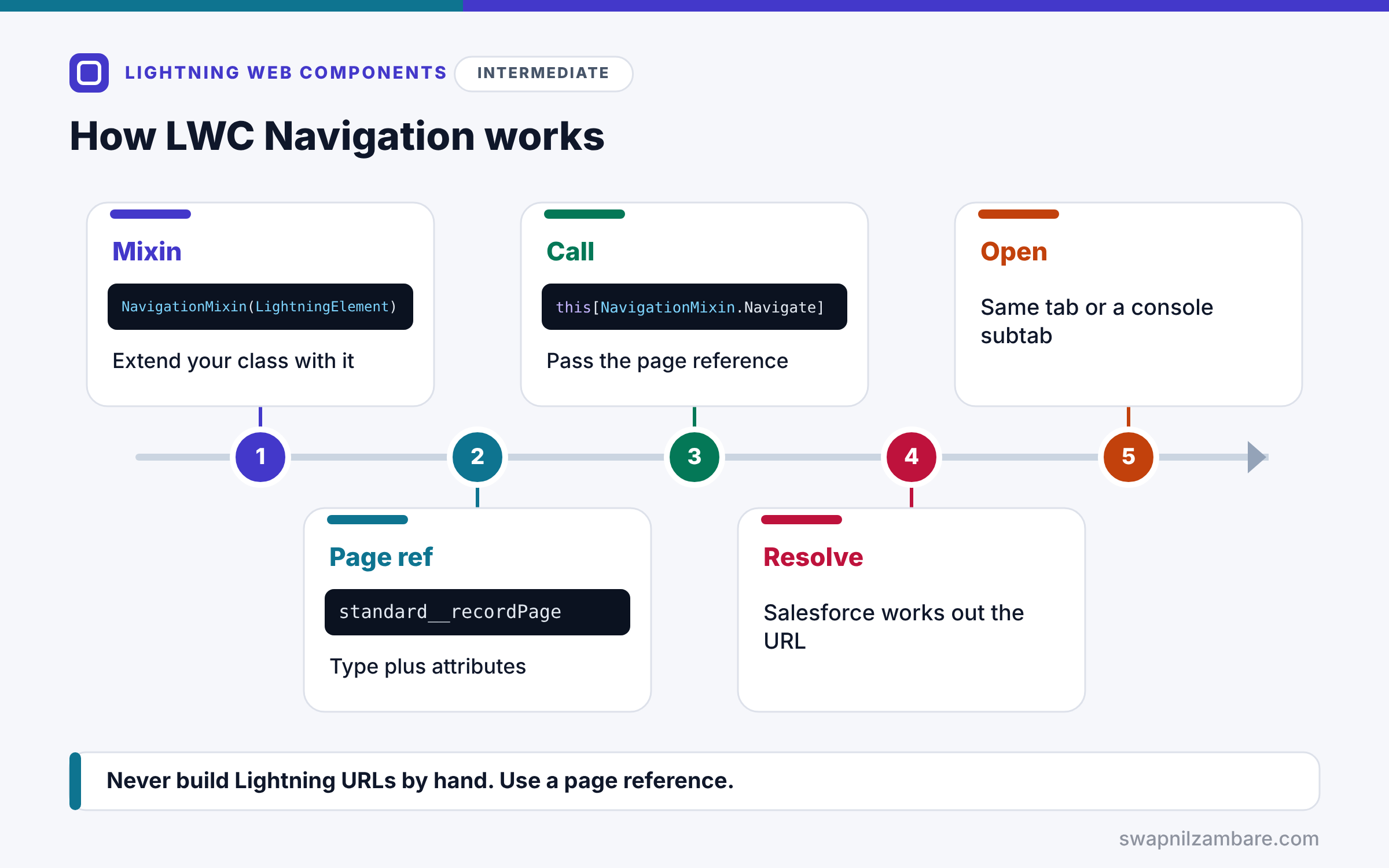
LWC Navigation follows a few steps. First, you extend your class with NavigationMixin(LightningElement). Next, you build a page reference with a type, such as standard__recordPage, and attributes, such as recordId and actionName. Then you call thisNavigationMixin.Navigate. After that, Salesforce works out the right URL for the current app. Finally, it opens the page, either in the same tab or a console subtab.
Page References
Every page reference has a type and attributes. For example, common types are standard__recordPage, standard__objectPage, standard__navItemPage and standard__webPage.
GenerateUrl
thisNavigationMixin.GenerateUrl returns a promise with a URL. Use it for links, such as an anchor tag or a link inside a toast.
Toasts with lightning/toast
LightningToast.show({ label, message, variant }, this) shows a toast. Also, the variant can be info, success, warning or error. Salesforce now prefers lightning/toast, because it also works where the older ShowToastEvent does not, such as LWR sites.
Modals with LightningModal
A modal is its own component that extends LightningModal. So its template uses lightning-modal-header, lightning-modal-body and lightning-modal-footer. Then the caller opens it with MyModal.open({…}), which returns a promise with the result.
Closing a Modal
Inside the modal, call this.close(result). As a result, the value you pass becomes what the caller receives.
Common Page Reference Types
The table below lists page references you will use most.
| Type | Key attributes | Opens |
|---|---|---|
| standard__recordPage | recordId, actionName | A record view or edit page |
| standard__objectPage | objectApiName, actionName | An object list or New page |
| standard__navItemPage | apiName | A custom tab |
| standard__webPage | url | An external web page |
Toast vs Modal
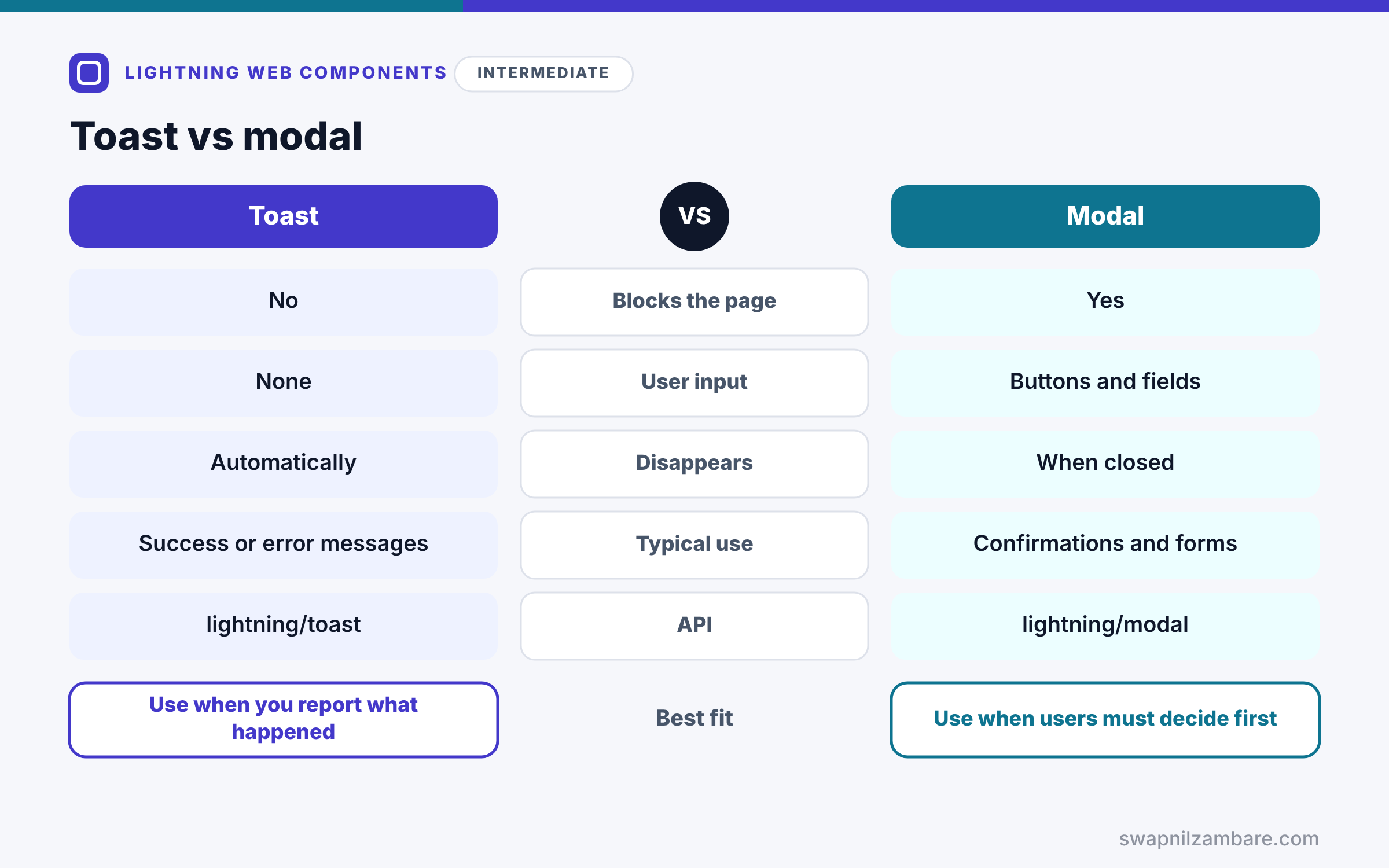
Next, the table below compares toasts and modals.
| Feature | Toast | Modal |
|---|---|---|
| Blocks the page | No | Yes |
| User input | None | Buttons and fields |
| Disappears | Automatically, by default | When closed |
| Typical use | Success or error messages | Confirmations and small forms |
| API | lightning/toast | lightning/modal |
When to use which is simple. So use a toast to tell users what happened. Use a modal when users must decide or enter something before you continue.
A Real LWC Navigation Example
Let’s combine LWC Navigation, a toast and a modal at Bright Path Tutors. A tutor clicks Cancel enrolment, confirms in a modal, sees a toast, and lands on the course record.
Step 1: The Modal Component
// confirmCancelModal.js
import { api } from 'lwc';
import LightningModal from 'lightning/modal';

export default class ConfirmCancelModal extends LightningModal {
    @api studentName;

    handleYes() { this.close('yes'); }
    handleNo() { this.close('no'); }
}
<!-- confirmCancelModal.html -->
<template>
<lightning-modal-header label="Cancel enrolment?"></lightning-modal-header>
<lightning-modal-body>
Cancel the enrolment for {studentName}? This cannot be undone.
</lightning-modal-body>
<lightning-modal-footer>
<lightning-button label="No" onclick={handleNo}></lightning-button>
<lightning-button label="Yes, cancel" variant="destructive"
onclick={handleYes} class="slds-m-left_x-small"></lightning-button>
</lightning-modal-footer>
</template>The modal extends LightningModal and receives studentName as an @api property. Then each button closes the modal and returns “yes” or “no”.
Step 2: The Calling Component
import { LightningElement, api } from 'lwc';
import { NavigationMixin } from 'lightning/navigation';
import LightningToast from 'lightning/toast';
import ConfirmCancelModal from 'c/confirmCancelModal';
import cancelEnrolment from '@salesforce/apex/EnrolmentController.cancelEnrolment';

export default class EnrolmentActions extends NavigationMixin(LightningElement) {
    @api recordId;        // the enrolment Id
    @api courseId;
    @api studentName;

    async handleCancel() {
        const answer = await ConfirmCancelModal.open({
            size: 'small',
            description: 'Confirm enrolment cancellation',
            studentName: this.studentName
        });
        if (answer !== 'yes') { return; }

        await cancelEnrolment({ enrolmentId: this.recordId });
        await LightningToast.show({ label: 'Enrolment cancelled', variant: 'success' }, this);

        this[NavigationMixin.Navigate]({
            type: 'standard__recordPage',
            attributes: { recordId: this.courseId, objectApiName: 'Course__c', actionName: 'view' }
        });
    }
}
The component opens the modal and waits for the answer. If the tutor confirms, it calls Apex, shows a success toast and then opens the course record.
Step 3: See the Flow
Here is what the tutor sees, step by step.
1. Modal: "Cancel enrolment?" [No] [Yes, cancel]
2. Toast: "Enrolment cancelled" (green, success)
3. Page: Course record "Apex Basics" opens
In short, each tool did one job, and the whole flow feels native to Salesforce.
LWC Navigation in Experience Cloud
In Experience Cloud sites, use comm__namedPage with a page name to reach site pages. The same NavigationMixin code then works in both Lightning Experience and the site, which hard-coded URLs cannot do.
Common Mistakes with LWC Navigation
- Hard-coding URLs such as /lightning/r/… in components.
- Forgetting to wrap the class with NavigationMixin.
- Using a modal for simple messages that a toast would handle.
- Not awaiting Modal.open, so code runs before the user answers.
- Using ShowToastEvent in LWR sites, where it is not supported.
Best Practices for LWC Navigation
- Always move users with page references, never with raw URLs.
- Use GenerateUrl when you need a real link.
- Prefer lightning/toast for new toasts.
- Keep modals small, with one clear decision.
- Return clear values from modals, such as “yes” or a saved Id.
Practice Task
Add a “New course” button that opens the standard New Course page. Hint: use type standard__objectPage with objectApiName Course__c and actionName new.
Most Asked Interview Questions on LWC Navigation
Also, navigation, toasts and modals come up in most practical LWC interviews. Here are the 21 questions asked most about LWC Navigation, toasts and modals.
Basic Questions on LWC Navigation
Q1: Which module handles navigation in LWC?
It is lightning/navigation, used through NavigationMixin.
Q2: How do you open a record page from LWC?
Call NavigationMixin.Navigate with type standard__recordPage, the recordId and actionName view.
Q3: What is a page reference?
It is an object, so it describes the destination with a type and attributes.
Q4: How do you get a URL for a link?
Use NavigationMixin.GenerateUrl, which returns a promise with the URL.
Q5: Which module shows toasts now?
Today it is lightning/toast, because Salesforce prefers it over ShowToastEvent.
Q6: Which toast variants exist?
There are four: info, success, warning and error.
Q7: How do you build a modal?
First create a component that extends LightningModal, then open it with open().
Code and Scenario Questions on LWC Navigation
Q8: How do you pass data into a modal?
Pass it in the open() options, because each option maps to the modal’s @api properties.
Q9: How do you get a result back from a modal?
Await open(), then read the value the modal passed to this.close().
Q10: Which sizes can a LightningModal use?
It can use small, medium, large and full.
Q11: How do you open a New record page?
First use standard__objectPage, then set actionName to new.
Q12: How do you open a custom tab?
For a tab, use standard__navItemPage with the tab’s apiName.
Q13: Why avoid hard-coded URLs?
Because they break in the mobile app, consoles and Experience Cloud.
Q14: How do you make a toast stay until closed?
Simply set mode to sticky in the toast options.
Advanced Questions on LWC Navigation
Q15: Where does ShowToastEvent not work?
It is not supported in LWR Experience Cloud sites, so use lightning/toast there.
Q16: How do you move between pages in an Experience Cloud site?
In sites, use comm__namedPage with the site page’s name.
Q17: Can a modal contain other components?
Yes, so a modal can hold forms or lists like any template.
Q18: How do you handle a user closing a modal with the X button?
The promise resolves with undefined, so treat that as a cancel.
Q19: How do you add a link inside a toast?
For links, use labelLinks or messageLinks in lightning/toast.
Q20: Why does navigation need the mixin?
Because the mixin gives the component access to the platform’s navigation service.
Q21: How do you test navigation in Jest?
First use the navigation mock from sfdx-lwc-jest, then assert the page reference that was passed.
Official Resources
Quick Recap
- LWC Navigation uses NavigationMixin and page references.
- GenerateUrl builds real links for anchors and toasts.
- lightning/toast is the preferred way to show toasts.
- LightningModal builds dialogs that return a result.
- Never hard-code Salesforce URLs in components.
What’s Next?
Components should also look right. Next, read our guide to SLDS styling hooks for LWC.


