Salesforce Big Objects store very large volumes of data, even billions of records, inside Salesforce. They are perfect for archives, event logs and long history that normal objects would struggle with. However, they trade features for scale, so you must design them carefully.
This post builds on storage limits and large data volumes. We will archive old attendance logs for Bright Path Tutors.
What are Salesforce Big Objects?
Salesforce Big Objects are a special kind of object built for massive data. Custom big objects end with __b. Salesforce also has standard big objects, such as the one that stores archived field history for Field Audit Trail.
Think of a regular object as an office filing cabinet, quick to open and full of tools. A big object is a warehouse. It holds far more boxes, but you find things only by their shelf label, which is the index.
Why Salesforce Big Objects Matter
Some data grows endlessly, like attendance logs, web events or old cases. If you keep it in normal objects, storage fills up and queries slow down. Deleting it may break audit rules.
So Salesforce Big Objects let you keep history without hurting performance. Also, they keep data inside Salesforce, close to the records it relates to.
How Salesforce Big Objects Work
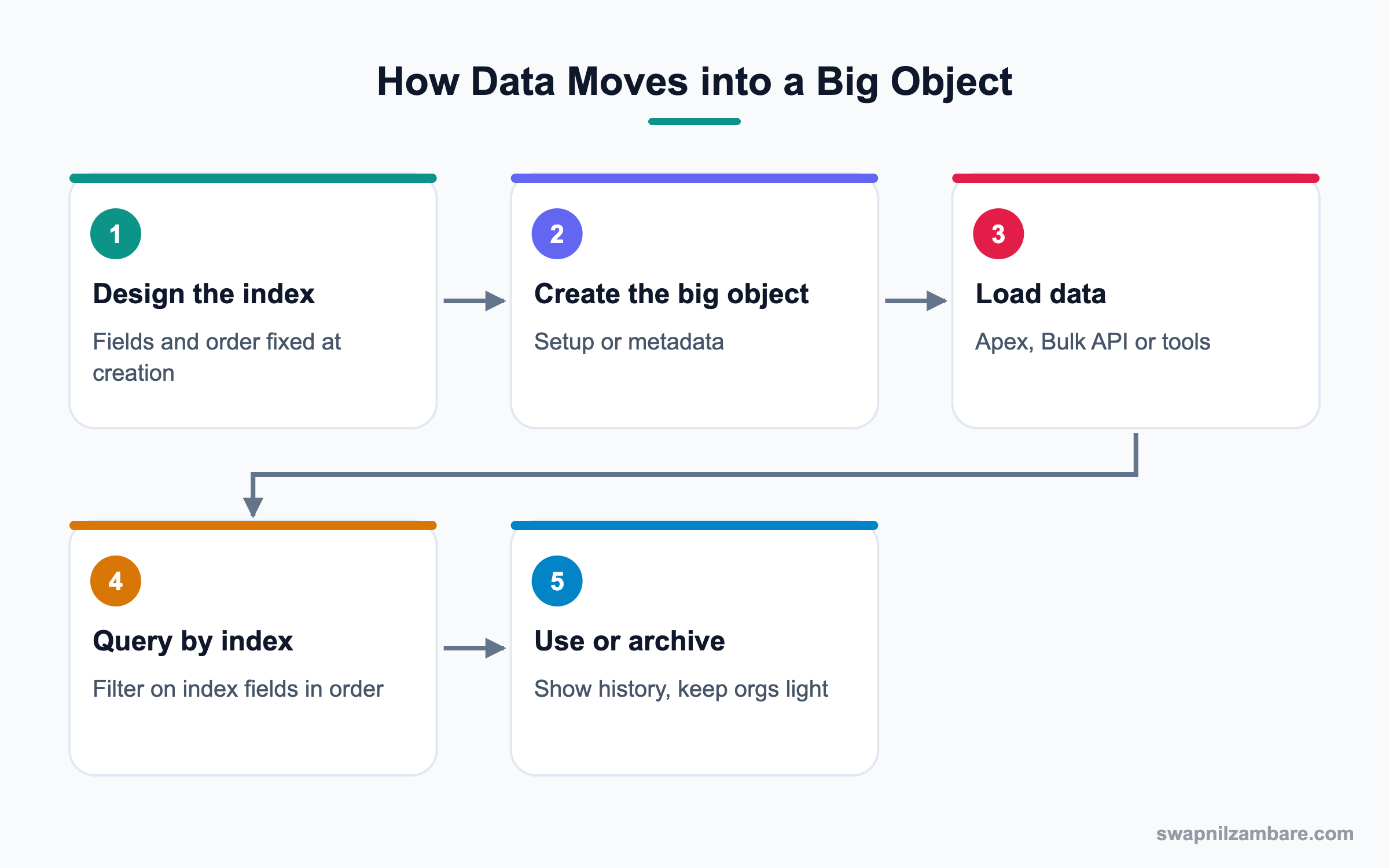
You design an index first, because queries can only filter on index fields. Then you create the object with fields and the index. Next, you load data with Apex, the Bulk API or tools. Finally, you query by the index to show or use the data.
The Index
The index is one or more fields, in a fixed order, that identify each record. It cannot be changed after creation, so plan it carefully.
Field Types
Big objects support a limited set of types, such as Text, Number, Date/Time, Lookup, Email, Phone, URL and Long Text Area.
Loading Data
Use Apex with Database.insertImmediate(), the Bulk API or data tools. Inserting a record with the same index values updates it.
Querying
SOQL on big objects must filter on index fields, starting from the first field in order. Range filters are allowed only on the last field used.
Security
Big objects support object and field permissions but not record-level sharing.
What is Missing
Triggers, flows, validation rules and standard reports do not work on big objects. That is the trade-off for scale.
Salesforce Big Objects Rules at a Glance
This table summarises key rules.
| Topic | Rule | Example |
|---|---|---|
| Name | Ends with __b | Attendance_Log__b |
| Index | Set once, fields in order | Student, Course, Date |
| Query | Filter on index from first field | Student then Course |
| Sharing | No record-level sharing | Use permissions |
| Automation | No triggers or flows on big objects | Process in Apex instead |
| Update | Insert with same index replaces | Re-load a log row |
Custom Objects vs Big Objects
This table compares the two object kinds.
| Feature | Custom objects | Big objects |
|---|---|---|
| Volume | Millions | Billions |
| Automation | Flows, triggers, rules | None |
| Reports | Standard reports | Not standard |
| Query flexibility | High | Index only |
| Best use | Daily records | Archives and logs |
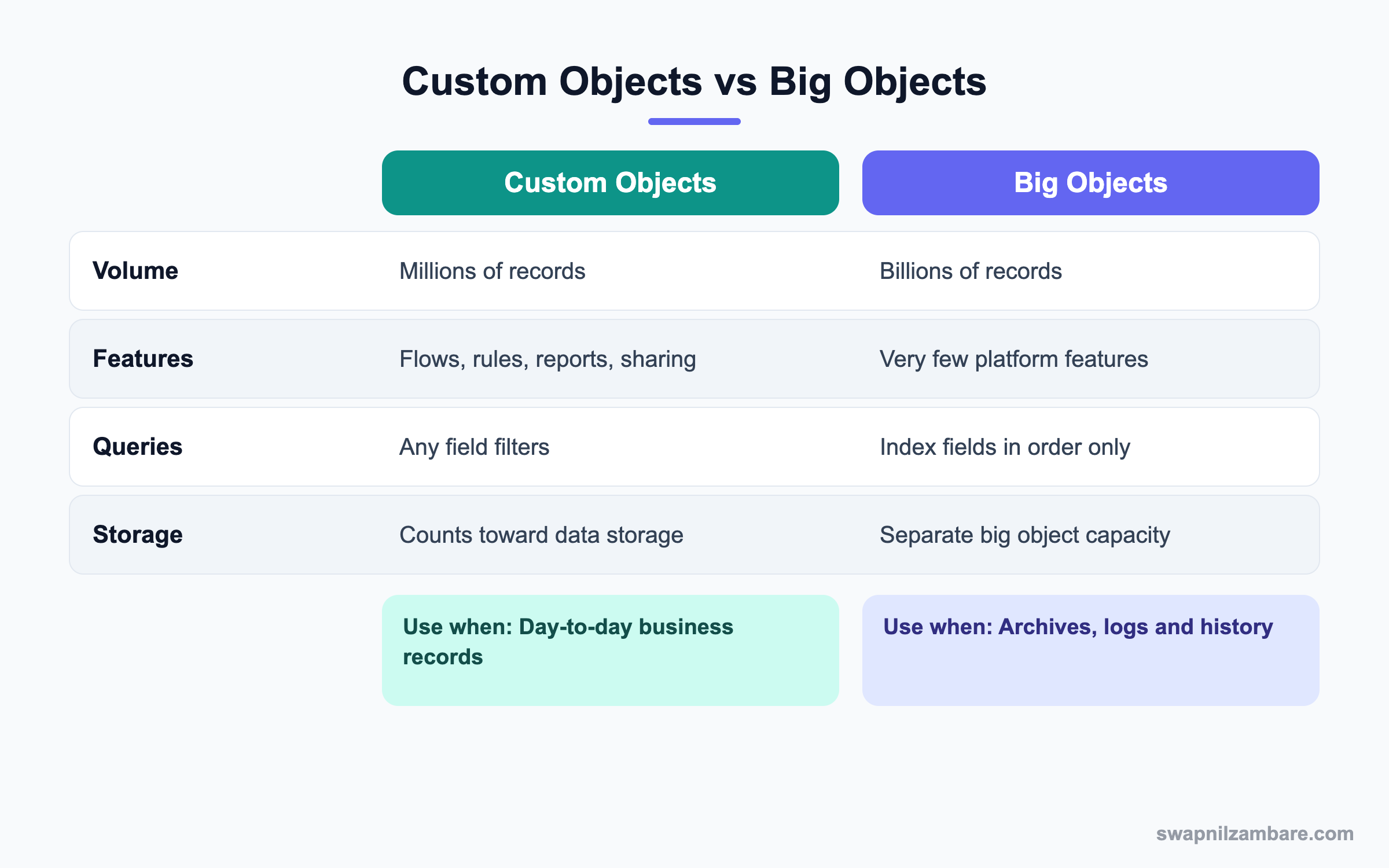
In short, keep active business data in custom objects. Move high-volume history into Salesforce Big Objects.
A Real Salesforce Big Objects Example
Bright Path stores class attendance in a custom object. After three years it holds 20 million rows and storage is almost full. Finance must keep the logs for seven years.
Step 1: Design the Index
Attendance is always looked up by student, then course, then date. So the index follows that order.
| Field | Type | Index position |
|---|---|---|
| Student__c | Lookup(Contact) | 1 |
| Course__c | Lookup(Course) | 2 |
| Class_Date__c | Date/Time | 3 |
| Status__c | Text | Not indexed |
| Tutor_Name__c | Text | Not indexed |
Step 2: Create the Big Object
- Open Setup and type “Big Objects” in Quick Find.
- Click New and enter Attendance Log as the label.
- Add the fields from the table.
- Define the index with Student, Course and Class Date in that order.
- Save, then deploy if you built it in a sandbox.
Step 3: Load Old Data
A developer writes a batch job to copy old rows. This small example shows the insert call.
List<Attendance_Log__b> logs = new List<Attendance_Log__b>();
for (Attendance__c a : oldRows) {
    logs.add(new Attendance_Log__b(
        Student__c = a.Student__c,
        Course__c = a.Course__c,
        Class_Date__c = a.Class_Date__c,
        Status__c = a.Status__c));
}
Database.insertImmediate(logs);
After the batch, the old custom records are deleted to free storage.
Step 4: Query by Index
To show a student’s history, query in index order.
SELECT Class_Date__c, Status__c
FROM Attendance_Log__b
WHERE Student__c = '003XXXXXXXXXXXXXXX'
AND Course__c = 'a01XXXXXXXXXXXXXXX'
A developer can show this in a Lightning Web Component on the student page.
Common Mistakes with Salesforce Big Objects
- Designing the index without knowing how data will be queried.
- Expecting flows, triggers or standard reports to work.
- Filtering on non-index fields in SOQL.
- Forgetting permissions, so users cannot see the data.
- Moving active data that users still edit daily.
Best Practices for Salesforce Big Objects
- Start with the questions users will ask, then design the index.
- Keep the index short and in query order.
- Archive in batches and verify counts before deleting.
- Document the big object and its index clearly.
- Consider Salesforce Backup, Data Cloud or external storage for other needs.
Practice Task
Design an index for a big object that stores website login events. Users will search by user, then by date. Hint: the field you filter by range must be last.
Most Asked Salesforce Big Objects Interview Questions
These Salesforce Big Objects questions appear in senior admin and data architecture interviews.
Basic Salesforce Big Objects Interview Questions
Q1: What are big objects?
They are objects built to store very large data volumes, up to billions of records, inside Salesforce. So they suit archives, logs and long history that rarely changes.
Q2: What suffix do custom big objects use?
Custom big objects end with __b.
Q3: What is a big object index?
It is one or more fields in a fixed order that identify records and control how you query them. Because of this, the index works like a shelf label in a warehouse.
Q4: Can you change the index later?
No. The index is fixed at creation, so plan it carefully. If you get it wrong, you must create a new big object and reload the data.
Q5: Do big objects support triggers or flows?
No. They do not support triggers, flows or validation rules. Therefore, any checks must happen before data is loaded, usually in Apex.
Q6: Name a standard big object.
FieldHistoryArchive is a common example. It stores archived field history for Field Audit Trail.
Q7: Do big objects use normal data storage?
They use separate big object capacity, not the regular data storage allocation.
Intermediate Salesforce Big Objects Interview Questions
Q8: How do you insert records?
With Apex Database.insertImmediate(), the Bulk API or tools that support big objects. For large archives, a batch job copies rows in chunks.
Q9: How do you update a big object record?
Insert a record with the same index values, and it replaces the existing one.
Q10: What are SOQL rules for big objects?
You must filter on index fields starting with the first one, without skipping. Ranges apply only to the last field used.
Q11: Do big objects support sharing?
They support object and field permissions, but not record-level sharing.
Q12: Can you report on big objects?
Not with standard reports. Instead, use custom components, Data Cloud or external tools to view and analyse the data.
Q13: Which field types are allowed?
Text, Number, Date/Time, Lookup, Email, Phone, URL and Long Text Area.
Q14: How do you delete big object records?
With Apex Database.deleteImmediate() using the index values. So deletion also depends on knowing the full index of each record.
Advanced Salesforce Big Objects Interview Questions
Q15: Scenario: storage is full of old logs. What is your plan?
Design a big object with a query-friendly index, archive logs in batches, verify counts and delete the originals.
Q16: How do you choose index order?
Put the fields users always filter by first and any range field last.
Q17: When should you not use big objects?
When data needs automation, reports or frequent edits. Use custom objects then.
Q18: How do you show big object data to users?
Build a Lightning Web Component that queries by index and shows results on a record page.
Q19: How do big objects compare with Data Cloud?
Big objects keep simple history inside the core platform. Data Cloud handles unified, analytical data at scale with more tools.
Q20: Scenario: a query fails with an index error. Why?
The query skipped an index field or used a range on a non-final field. Fix the filter order.
Q21: How do you test an archive job?
Run it in a sandbox, compare record counts and sample values, then run in production.
Q22: How do you explain Salesforce Big Objects to a manager?
Say they are a cheap, huge archive inside Salesforce for data you must keep but rarely change. So the main org stays fast and storage costs drop.
Q23: Can Salesforce Big Objects hold lookups to normal records?
Yes. Lookup fields can point to standard or custom records, like Contact. So history stays linked to the right student.
Q24: What should you document for each big object?
The purpose, index fields and order, load jobs, retention rules and who can access it. Then future admins will not break the design.
Q25: How do Salesforce Big Objects help compliance?
They let you keep long history, such as seven years of logs, without deleting it. Also, Field Audit Trail uses a big object to keep field changes for years.
Official Resources
- Salesforce Developers: Big Objects Guide
- Trailhead: Big Object Basics
- Salesforce Help: Field Audit Trail
Quick Recap
- Salesforce Big Objects store billions of records for archives and logs.
- The index is fixed and controls every query.
- Automation, sharing rules and standard reports are not supported.
- Load with Apex insertImmediate or the Bulk API.
- Keep daily data in custom objects and history in big objects.
What’s Next?
Next, we connect apps without code using MuleSoft Composer.


