Apex Interfaces let you write code that works with many different classes without knowing which one it will get. You name the methods, and each class fills in its own version. So you can add a new payment type or a new discount rule without touching the code that calls it.
This post builds on Apex classes and objects and access modifiers. We will keep using Bright Path Tutors and its Course object.
What are Apex Interfaces?
Apex Interfaces are lists of method names with no code inside them. A class that says implements that interface must write a body for every method. The interface itself never does any work.
Think of a job description. It says the person must be able to teach, mark papers and meet parents. It does not say how. Each teacher does those three things in their own style.
Why Apex Interfaces Matter
Business rules change often, and Apex Interfaces absorb that change. Today fees are paid by card, tomorrow by bank transfer and next year by a wallet. Without interfaces, every new type means editing the same long if-else block.
With Apex Interfaces, you add one new class and the old code keeps working. So your code is easier to test, easier to extend and far less risky to change.
How Apex Interfaces Work
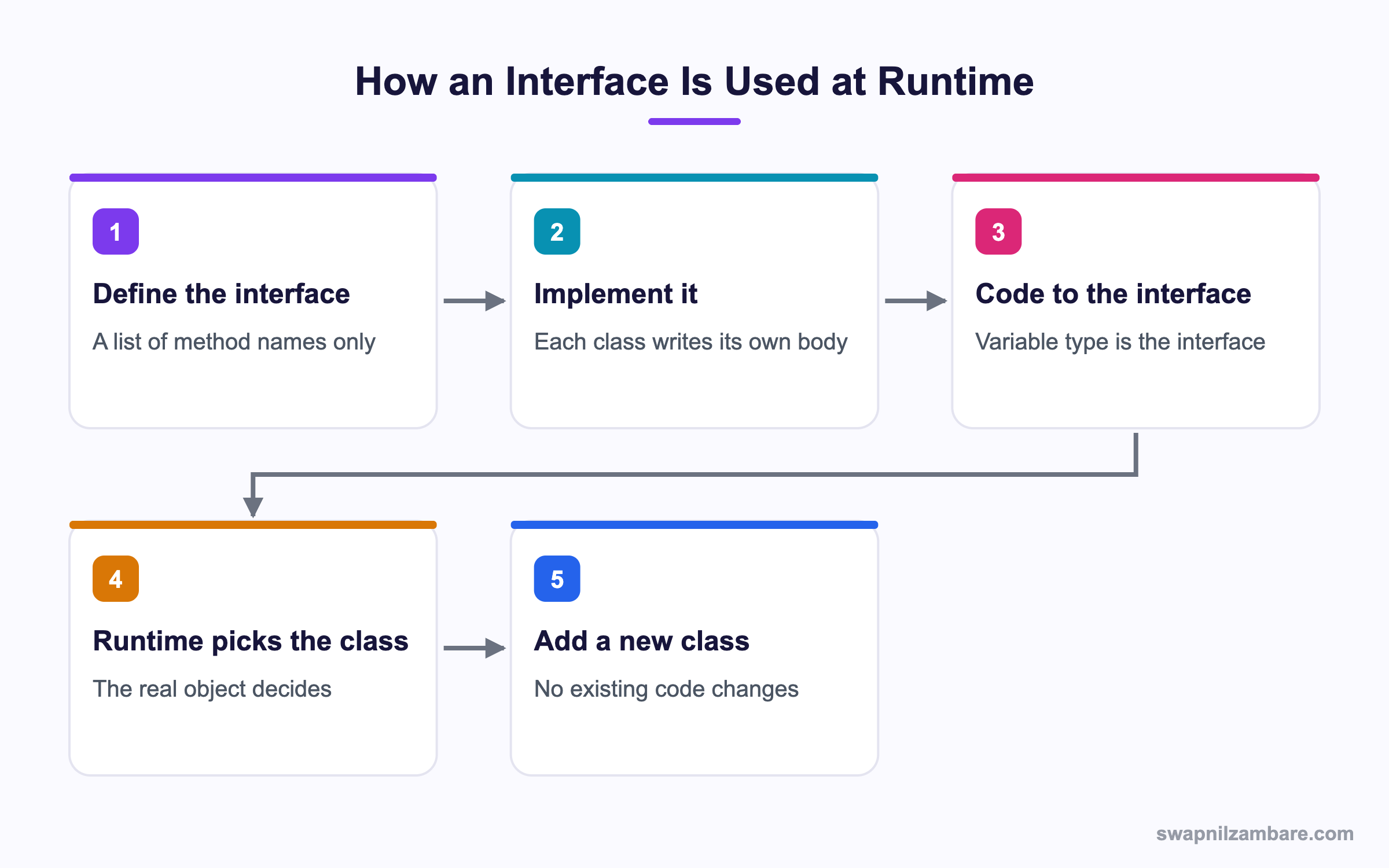
You define the Apex Interfaces you need once. Then one or more classes implement it. Finally, your calling code uses the interface as the variable type, not the concrete class.
Defining an Interface
An interface holds method signatures only. There are no bodies, no variables and no constructors.
public interface Payable {
    // Every payment type must return an amount
    Decimal getAmount();
    String getLabel();
}
Methods in an interface are public by default, so you do not write the public keyword on them.
Implementing an Interface
A class promises to follow the contract with implements. If it misses a method, the code will not save.
public class CardPayment implements Payable {
    private Decimal amount;
    public CardPayment(Decimal amount) { this.amount = amount; }
    public Decimal getAmount() { return amount; }
    public String getLabel() { return 'Card payment'; }
}

public class BankTransfer implements Payable {
    private Decimal amount;
    public BankTransfer(Decimal amount) { this.amount = amount; }
    public Decimal getAmount() { return amount * 0.99; }
    public String getLabel() { return 'Bank transfer, 1% fee'; }
}
Both classes keep their own logic. The bank transfer takes a fee, while the card payment does not.
Coding to the Interface
Now the caller works with Payable, not with either class name.
List<Payable> items = new List<Payable>{
    new CardPayment(5000),
    new BankTransfer(5000)
};
Decimal total = 0;
for (Payable p : items) {
    System.debug(p.getLabel() + ' = ' + p.getAmount());
    total += p.getAmount();
}
System.debug('Total: ' + total);
The debug log shows each label with its amount, then the total.
Card payment = 5000
Bank transfer, 1% fee = 4950
Total: 9950
To add a wallet payment, you write one new class. The loop above never changes.
Abstract Classes
An abstract class sits between a normal class and an interface. It can hold real code and variables, but it cannot be created with new. Child classes extend it.
public abstract class Discount {
    protected String name;
    public Discount(String name) { this.name = name; }
    // Shared code every child gets for free
    public String describe() { return 'Discount: ' + name; }
    // Each child must write this one
    public abstract Decimal apply(Decimal fee);
}
The describe method is written once and shared. The apply method is abstract, so each child must provide it.
Extending an Abstract Class
A child class uses extends and must implement every abstract method.
public class EarlyBirdDiscount extends Discount {
    public EarlyBirdDiscount() { super('Early bird'); }
    public override Decimal apply(Decimal fee) { return fee * 0.9; }
}
The super call runs the parent constructor. The override keyword is required in Apex, unlike some other languages.
Virtual Classes
A virtual class is a normal class that allows children to change some of its methods. Unlike an abstract class, you can create it directly.
public virtual class Notifier {
    public virtual String message(String student) {
        return 'Hello ' + student + ', your class starts soon.';
    }
}

public class SmsNotifier extends Notifier {
    public override String message(String student) {
        return 'Hi ' + student + ', class in 30 mins.';
    }
}
Only methods marked virtual or abstract can be overridden. A plain method cannot.
Apex Interfaces Keyword Summary
This table shows the keywords you need for each case.
| What you want | Parent keyword | Method keyword | Child keyword |
|---|---|---|---|
| A contract with no code | interface | none needed | implements |
| Shared code plus required methods | abstract | abstract | extends with override |
| Shared code that may be changed | virtual | virtual | extends with override |
| Shared code that cannot change | normal class | none | extends, no override |
Interface vs Abstract Class
Both let different classes share a shape. This table shows when each fits.
| Feature | Interface | Abstract class |
|---|---|---|
| Method bodies | Not allowed | Allowed |
| Member variables | Not allowed | Allowed |
| Constructors | Not allowed | Allowed |
| How many per class | Many | One only |
| Keyword used | implements | extends |
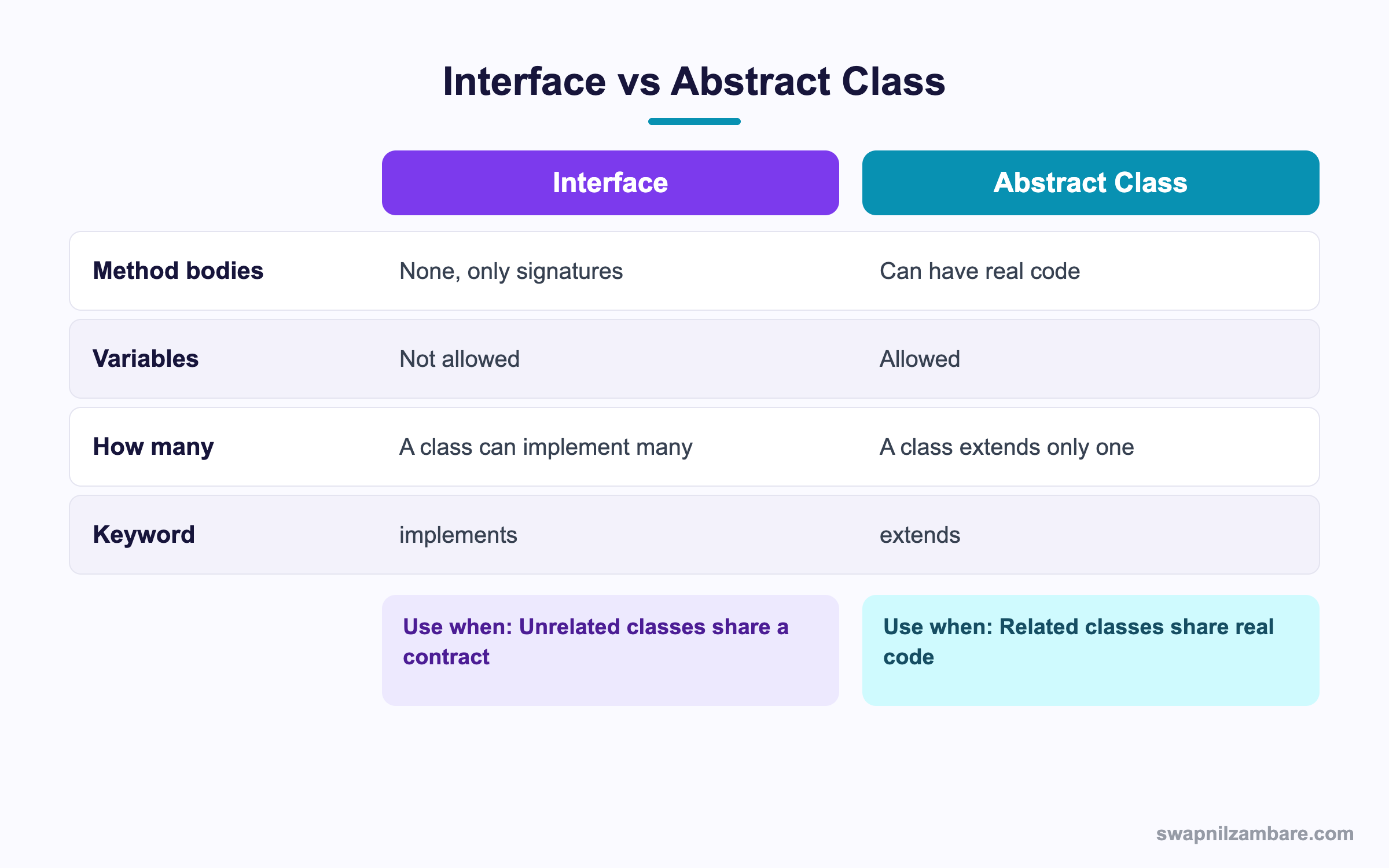
In short, pick an interface when unrelated classes must share a contract. Pick an abstract class when related classes also share real code.
A Real Apex Interfaces Example
Bright Path Tutors applies different discounts to a course fee. Admins must be able to add a new discount without a developer rewriting the calculator.
Step 1: Define the Contract
public interface FeeRule {
    Decimal calculate(Decimal fee);
    String ruleName();
}
Step 2: Write Two Rules
public class SiblingRule implements FeeRule {
    public Decimal calculate(Decimal fee) { return fee - 500; }
    public String ruleName() { return 'Sibling discount'; }
}

public class ScholarshipRule implements FeeRule {
    public Decimal calculate(Decimal fee) { return fee * 0.5; }
    public String ruleName() { return 'Scholarship'; }
}
Step 3: Apply Every Rule in Order
public class FeeCalculator {
    public static Decimal run(Decimal fee, List<FeeRule> rules) {
        for (FeeRule r : rules) {
            fee = r.calculate(fee);
            System.debug(r.ruleName() + ' applied, fee now ' + fee);
        }
        return fee;
    }
}
Running it with a 10,000 rupee fee and both rules gives this log.
Sibling discount applied, fee now 9500
Scholarship applied, fee now 4750
These are the pieces we built and what each one does.
| Piece | Type | Job |
|---|---|---|
| FeeRule | Interface | The contract |
| SiblingRule | Class | Flat 500 off |
| ScholarshipRule | Class | Half price |
| FeeCalculator | Class | Runs the rules in order |
Common Mistakes with Apex Interfaces
- Forgetting a method, which stops the class from saving.
- Marking interface methods public, which Apex does not allow.
- Trying to add a variable to an interface.
- Forgetting the override keyword, which Apex requires.
- Extending more than one class, which Apex does not support.
Best Practices for Apex Interfaces
- Keep interfaces small, with two or three methods.
- Name them by behaviour, like Payable or FeeRule.
- Code against the interface type in your variables and lists.
- Use an abstract class when children also need shared code.
- Write one test class per implementation, so each rule is covered.
Practice Task
Write an interface called Reminder with one method send(String studentName). Then create EmailReminder and SmsReminder classes. Hint: loop over a List of Reminder and call send on each.
Most Asked Apex Interfaces Interview Questions
These Apex Interfaces questions come up in almost every Salesforce developer interview.
Basic Apex Interfaces Interview Questions
Q1: What is an interface in Apex?
Apex Interfaces are lists of method signatures with no bodies. A class that implements it must write every method.
Q2: Which keyword implements an interface?
You use the implements keyword for Apex Interfaces. For a class parent you use extends instead.
Q3: Can an interface have variables?
No. Apex Interfaces hold method signatures only, with no variables and no constructors.
Q4: Can a class implement more than one interface?
Yes. You separate them with commas, which is how Apex works around single inheritance.
Q5: Can a class extend more than one class?
No. Apex allows one parent class only, so multiple inheritance is not supported.
Q6: What is an abstract class?
A class that cannot be created with new. It can hold real code and abstract methods that children must write.
Q7: What is a virtual class?
A normal class that allows children to override methods marked virtual. You can still create it directly.
Q8: Do interface methods need the public keyword?
No. They are public by default, and adding the keyword causes an error.
Intermediate Apex Interfaces Interview Questions
Q9: What is the difference between an interface and an abstract class?
An interface has no code and no variables, and a class can implement many. An abstract class can hold code and variables, but a class extends only one.
Q10: When would you choose an interface over an abstract class?
When the classes are unrelated and only share a contract, such as different payment types.
Q11: What does the override keyword do?
It tells Apex that this method replaces a parent method. Apex requires it, unlike Java.
Q12: Can you override any method?
No. Only methods marked virtual or abstract can be overridden.
Q13: What happens if a class misses an interface method?
The class fails to compile, so the error appears when you save it.
Q14: Can an interface extend another interface?
Yes. An interface can extend one other interface, so the child gets both sets of methods.
Q15: What does super do?
It calls the parent constructor or a parent method from the child class.
Q16: Can an abstract class have a constructor?
Yes. Children call it with super, even though you cannot create the abstract class directly.
Q17: Name a standard Salesforce interface you have used.
Common ones are Database.Batchable, Queueable, Schedulable, Comparable and Database.AllowsCallouts.
Advanced Apex Interfaces Interview Questions
Q18: How do interfaces help with unit testing?
Apex Interfaces let you pass a fake implementation into your code, so tests run without callouts or real data.
Q19: How do interfaces support the open closed principle?
Existing code stays closed to edits, while new behaviour arrives as a new class. So you extend without editing.
Q20: Scenario: a long if-else decides tax by country. How would you refactor it?
Create a TaxRule interface, one class per country and a map from country code to rule. Then the if-else disappears.
Q21: Can you use an interface type in a map or set?
Yes. A Map of String to FeeRule is a common pattern for picking a rule by key.
Q22: What is the Stub API used for with interfaces?
Test.createStub builds a mock object for an interface or virtual class, so tests control what it returns.
Q23: How would you let admins add rules without code?
Store the class name in Custom Metadata, then use Type.forName and newInstance to build the rule at runtime.
Q24: Scenario: two interfaces declare the same method name. What happens?
One implementation satisfies both, because the signature matches. So there is no conflict in Apex.
Q25: What is the cost of overusing interfaces?
Too many small classes make the code harder to follow. So use them where change is likely, not everywhere.
Q26: How do interfaces relate to dependency injection?
You pass the implementation in from outside, usually through the constructor. Then the class does not choose its own dependency.
Q27: Can an inner class implement an interface?
Yes. Inner classes often implement Comparable for sorting a wrapper list.
Official Resources
- Apex Developer Guide: Interfaces
- Apex Developer Guide: Extending a Class
- Trailhead: Apex Basics for Admins
Quick Recap
- Apex Interfaces define method names with no code inside.
- A class uses implements and must write every method.
- Abstract classes mix shared code with required methods.
- Virtual classes allow children to override chosen methods.
- Code against the interface type so new classes drop in cleanly.
What’s Next?
Next, we look at Inheritance and Polymorphism in Apex and how parent and child classes behave at runtime.


