Agentforce Agent Analytics shows how your AI agents perform after launch. It answers questions like how many conversations the agent handled, which topics were used and how often it escalated to a human. Without these numbers, you cannot tell if the agent helps or hurts customers.
This post builds on Agentforce Service Agent and the Agentforce Testing Center. We will monitor the Bright Path Helper agent for its first month.
What is Agentforce Agent Analytics?
Agentforce Agent Analytics is the set of dashboards, reports and data that measure AI agent activity in Salesforce. It covers sessions, topics, actions, escalations and quality signals. Depending on your setup, the data lives in Data Cloud, CRM Analytics dashboards or standard reports, and names can change by release.
Think of it like a fitness tracker for your agent. It counts steps, measures heart rate and shows trends. Then you change the plan based on what you see.
Why Agentforce Agent Analytics Matters
AI agents can drift. A new product or policy can make answers wrong overnight. Also, customers may ask things you never planned for.
So Agentforce Agent Analytics helps you catch problems early. It also proves value to leaders with real numbers, like chats handled without a human.
How Agentforce Agent Analytics Works
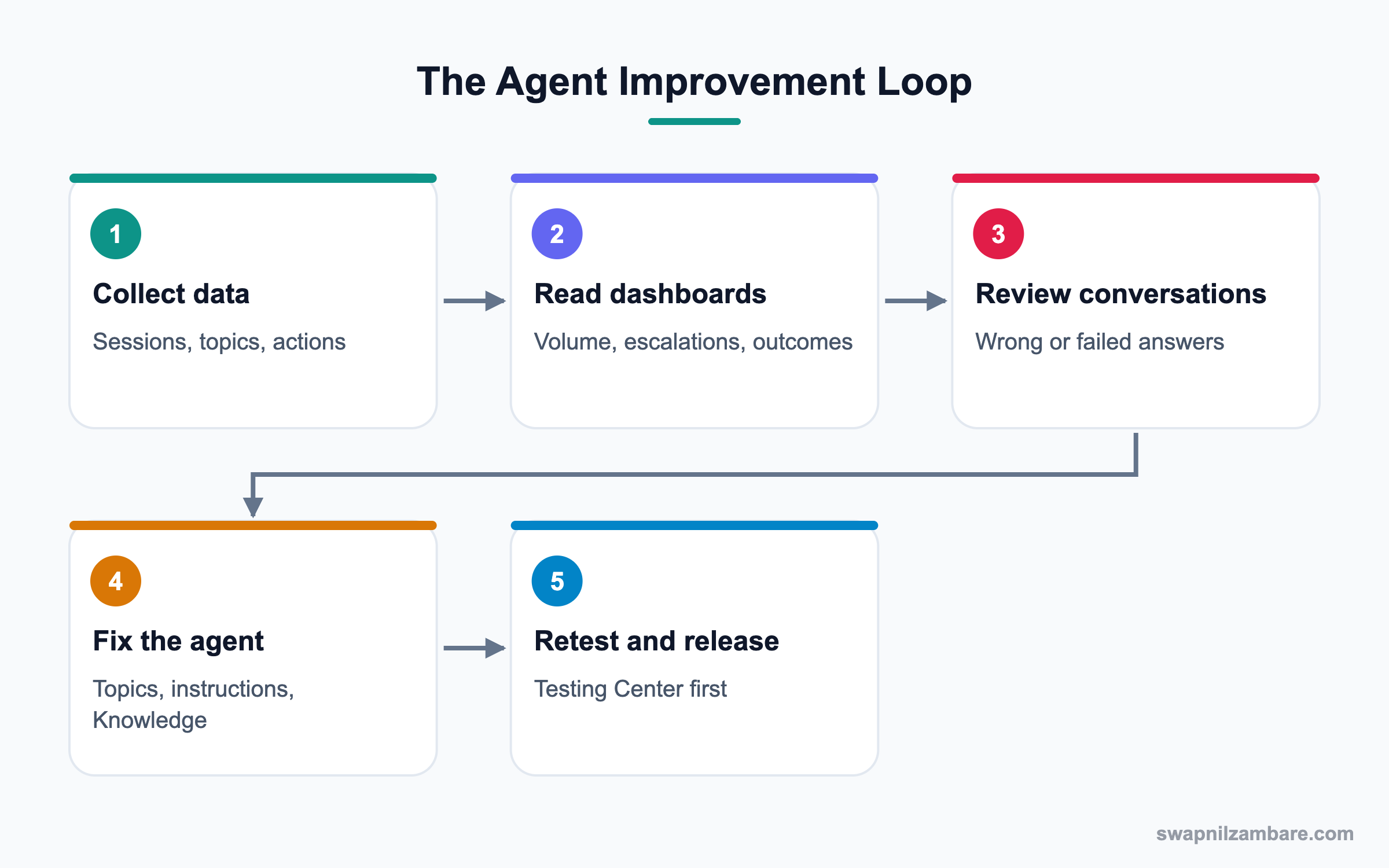
Each conversation creates session data, including the topic chosen, actions run and the final outcome. This data feeds dashboards. Admins then read trends, open sample conversations and improve the agent.
Sessions and Volume
Session counts show how busy the agent is by day and channel. Sudden drops may mean a broken channel.
Topics and Actions
Topic usage shows what customers ask most. Action success and failure rates show which tools break.
Escalations
Escalation rate shows how often the agent hands off to humans. A rising rate can mean missing topics.
Quality and Feedback
Customer ratings, thumbs up or down, and audit data on generated responses show answer quality.
Audit and Trust Data
Einstein audit data can store prompts, responses and safety scores for review, based on your settings. This helps with compliance.
Testing Center
The Testing Center runs batches of test questions before you release a change. So analytics and testing work together.
Key Agentforce Agent Analytics Metrics
This table lists core metrics and what they tell you.
| Metric | What it tells you | Healthy sign |
|---|---|---|
| Sessions | How much the agent is used | Steady or growing |
| Containment rate | Share solved without a human | Rising over time |
| Escalation rate | Share handed to humans | Stable or falling |
| Topic distribution | What customers ask | Matches your plan |
| Action failure rate | Broken tools | Close to zero |
| Satisfaction | Customer feeling | Similar to humans |
Agent Analytics vs Testing Center
These tools are often confused. This table compares them.
| Feature | Agent Analytics | Testing Center |
|---|---|---|
| Timing | After launch | Before launch or change |
| Data | Real conversations | Test cases |
| Result | Trends | Pass or fail |
| Main user | Admin and service lead | Admin and QA |
| Purpose | Find gaps | Prevent regressions |
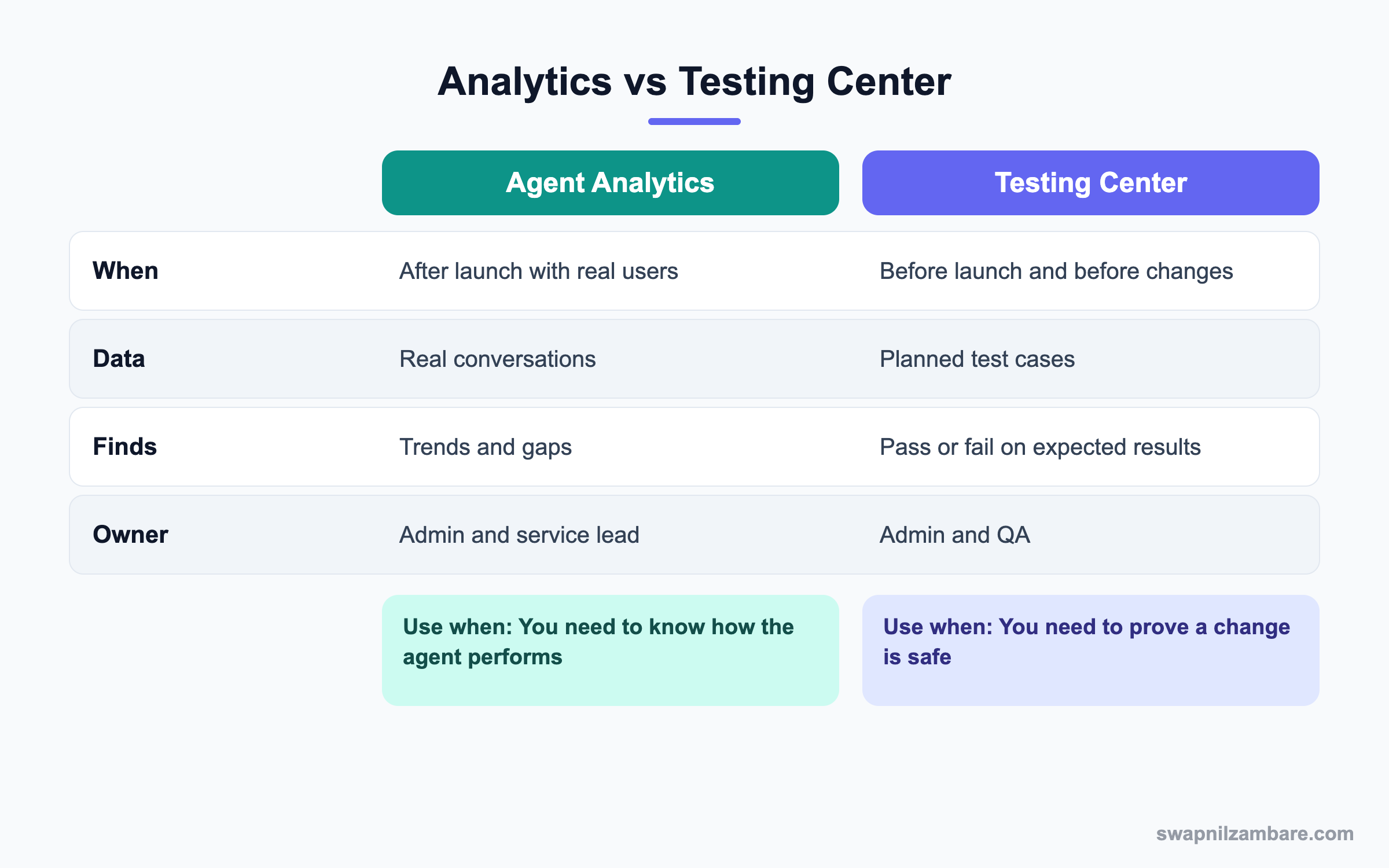
In short, analytics tells you what to fix. Testing proves your fix works.
A Real Agentforce Agent Analytics Example
Bright Path Helper went live two weeks ago. The service lead wants a weekly review to improve it.
Step 1: Open the Dashboards
- Open the Agentforce analytics or Command Center pages your org has.
- Filter to the Bright Path Helper agent and the last 7 days.
- Note sessions, containment and escalation rate.
Step 2: Find the Gap
The dashboard shows 30% of fee chats escalate. The top reason is “refund timeline”, which has no topic.
| Finding | Cause | Fix |
|---|---|---|
| High fee escalations | No refund timeline answer | Add Knowledge article |
| Action failures | Flow fails without enrolment number | Add an instruction to ask first |
| Low ratings on timings | Old timetable article | Update article |
Step 3: Fix and Retest
- Publish the new refund timeline article.
- Add the instruction “Ask for the enrolment number before checking fees.”
- Add five new test cases in the Testing Center and run them.
- Release the change once all tests pass.
Step 4: Track with Reports
For chat channels, admins can also count sessions by status. This shows how many ended with a transfer.
SELECT Status, COUNT(Id)
FROM MessagingSession
WHERE CreatedDate = LAST_N_DAYS:7
GROUP BY Status
Common Mistakes with Agentforce Agent Analytics
- Launching an agent and never looking at the data.
- Chasing containment rate while satisfaction drops.
- Ignoring action failures, which make answers wrong.
- Changing the agent without testing first.
- Not sharing results with the service team.
Best Practices for Agentforce Agent Analytics
- Review the dashboard weekly during the first months.
- Read real conversations, not just numbers.
- Pair every fix with new test cases.
- Track satisfaction next to containment.
- Share a monthly summary with leaders.
Practice Task
Write five metrics you would show to a service manager for an AI agent. For each one, write the action you would take if it got worse. Hint: start with escalation rate.
Most Asked Agentforce Agent Analytics Interview Questions
These Agentforce Agent Analytics questions test whether you can run AI agents responsibly after launch.
Basic Agentforce Agent Analytics Interview Questions
Q1: What is Agentforce Agent Analytics?
It is the data and dashboards that measure AI agent activity, such as sessions, topics, actions and escalations.
Q2: What is containment rate?
It is the share of conversations the agent resolves without a human. For example, if 70 of 100 chats end without a handoff, containment is 70%. However, check that those customers were actually helped.
Q3: What is escalation rate?
It is the share of conversations handed off to a human agent. Some escalation is healthy, because sensitive cases should reach people.
Q4: Why look at topic usage?
It shows what customers really ask, so you can add or improve topics. In Agentforce Agent Analytics, a surprise topic often points to a gap in your plan.
Q5: What is an action failure?
It happens when a tool the agent calls, like a flow, errors or returns nothing useful. Then the agent may give a vague answer or escalate.
Q6: What is the Testing Center?
A tool to run batches of test questions against an agent and check expected results.
Q7: Why read real conversations?
Numbers show trends, but conversations show why problems happen. So read a sample of good and bad chats every week.
Intermediate Agentforce Agent Analytics Interview Questions
Q8: How do analytics and testing work together?
Analytics finds gaps in real use, and testing proves fixes before release.
Q9: What does a rising escalation rate suggest?
Missing topics, poor Knowledge or failing actions. So review recent escalated chats.
Q10: Where is agent data stored?
Often in Data Cloud and related analytics apps, plus standard objects like messaging sessions. It depends on your setup.
Q11: What is audit data for generative AI?
Stored records of prompts, responses and safety checks, used for review and compliance when turned on.
Q12: How do you measure quality, not just volume?
Combine satisfaction, thumbs feedback, wrong-answer reviews and repeat contacts.
Q13: How often should you review analytics?
Weekly at launch, then monthly once the agent is stable. Also review right after any big product or policy change.
Q14: Who should see the dashboards?
Admins, service leads and AI owners. Leaders get a monthly summary.
Advanced Agentforce Agent Analytics Interview Questions
Q15: Scenario: containment is high but complaints rise. What does it mean?
The agent may be ending chats without solving them. Check transcripts and satisfaction, then fix topics.
Q16: Scenario: sessions drop to zero on one day. What do you check?
Check the channel deployment, agent activation and recent changes.
Q17: How do you prove business value?
Show chats handled, time saved for humans, faster replies and satisfaction compared with before.
Q18: How do you handle sensitive data in audit logs?
Limit access, follow retention rules and rely on masking in the Trust Layer.
Q19: How would you set alerts for agent health?
Use available monitoring alerts or report subscriptions on escalation and failure rates.
Q20: What is a regression in agent behaviour?
When a change makes previously correct answers wrong. Testing Center batches catch it.
Q21: Scenario: one action fails often. What next?
Debug the flow or Apex, add input checks and an instruction to collect required data.
Q22: Why compare AI and human satisfaction?
It shows if customers accept the agent. Big gaps mean the agent needs work.
Q23: How do you decide to add a new topic?
When many escalations or failed chats share one theme. Then write and test the new topic.
Q24: How does Agentforce Agent Analytics support governance?
It gives evidence of how agents behave, which helps audits and risk reviews.
Q25: Can you build your own reports on agent data?
Yes, in many setups you can report on messaging sessions and related objects, or use Data Cloud data. So you can add agent metrics to existing service dashboards.
Q26: What is the danger of optimising only for containment?
The agent may avoid handoffs even when a person is needed. As a result, customers leave unhappy, so always pair containment with satisfaction.
Q27: How do you report agent results to non-technical leaders?
Use three numbers, like chats handled, time saved and satisfaction, plus one example conversation. Then add the next improvement planned.
Q28: What should a weekly agent review include?
Check the main Agentforce Agent Analytics numbers, read ten sample conversations and list the top three gaps. Then assign each gap an owner and a test case, so fixes do not get lost.
Q29: How do seasons affect agent metrics?
Busy periods, like exam season, bring new questions and higher volume. So compare metrics with the same period last year, and prepare topics before the rush.
Official Resources
- Salesforce Help: Agentforce Analytics
- Salesforce Help: Agentforce Testing Center
- Trailhead: Agentforce Basics
Quick Recap
- Agentforce Agent Analytics measures sessions, topics, actions and escalations.
- Containment and satisfaction must be read together.
- Real conversations explain the numbers.
- Every fix needs new tests in the Testing Center.
- Review weekly at launch and share results with leaders.
What’s Next?
Next, we analyse sales calls with Einstein Conversation Insights.


